Skip to content
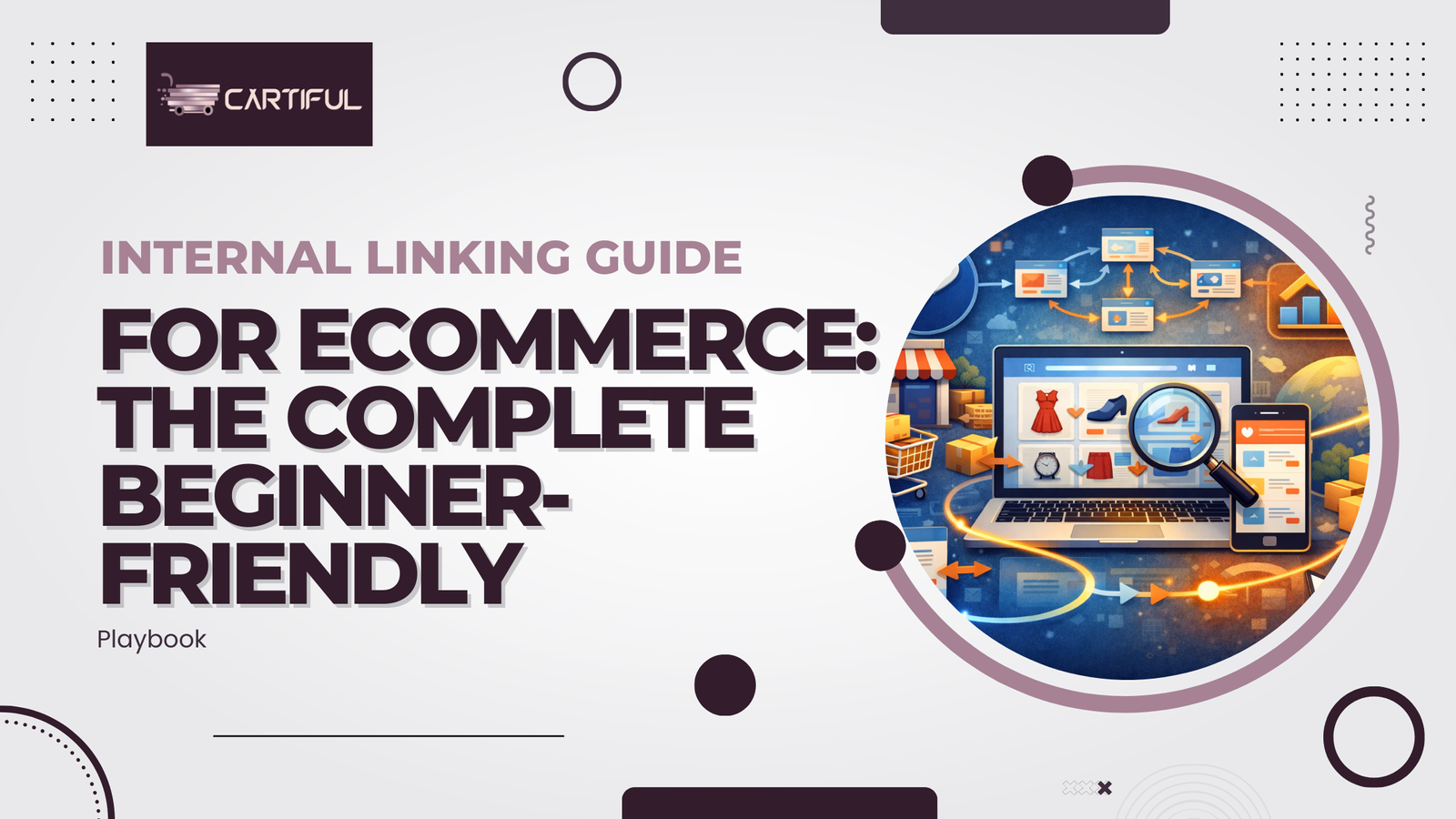
Most ecommerce sites don’t struggle because their products are bad or their prices are wrong.
They struggle because search engines can’t clearly understand how the site fits together.
Category pages don’t pass authority to products.
Blogs attract traffic but don’t support revenue pages.
New products go live and quietly become orphan pages.
Internal linking is the system that connects all of this.
When done correctly, internal linking helps search engines crawl your store efficiently, understand relationships between pages, and prioritize the pages that actually drive sales. At the same time, it guides users naturally from discovery to purchase without forcing clicks.
This guide breaks down internal linking for ecommerce step by step, including:
- site structure and hierarchy
- category, product, and blog linking strategies
- anchor text best practices
- common ecommerce mistakes
- internal link audits
- and schema markup, explained simply and practically for beginners
What internal linking means for ecommerce (and why it’s different)?
Internal linking for ecommerce is the practice of connecting pages within your online store, such as categories, subcategories, products, and blog posts, so search engines and users can easily navigate, understand relationships, and reach important pages.
Unlike blogs, ecommerce sites deal with large catalogs, filters, pagination, and seasonal pages, which makes internal linking more complex and more important.
Internal links vs external links
- External links point from other websites to yours.
- Internal links connect pages within your own site.
- External links help build authority.
- Internal links decide where that authority flows.
- Without internal links, even well-linked pages can fail to rank properly.
Why ecommerce sites struggle more
Ecommerce sites often face:
- thousands of URLs created by filters and variations
- multiple paths leading to the same product
- thin product descriptions with no contextual links
- blog content that never connects to collections or products
- discontinued or seasonal products becoming orphan pages
Internal linking is what keeps this complexity under control.
How search engines use internal links
Search engines rely on internal links to:
- discover new pages
- understand page importance
- map topical relationships
- distribute ranking signals across your site
If a page has no internal links pointing to it, search engines treat it as low priority—even if it’s valuable.
Ecommerce site architecture: the foundation of internal linking
Before you add a single internal link, your ecommerce site needs a clear structure. Internal linking works best when it follows an intentional hierarchy. If the structure itself is messy, internal links simply spread confusion faster.
Think of site architecture as the map of your online store. Internal links are the roads.
If the map doesn’t make sense, adding more roads won’t fix the problem.
Why site architecture matters for internal linking?
Search engines don’t understand your store the way humans do. They don’t “see” menus, layouts, or design intent. They rely on URLs and links to understand:
- which pages are more important
- how products relate to categories
- where authority should flow
- how deep pages are within your site
When architecture is clear, internal linking becomes logical and scalable. When it isn’t, you end up with orphan products, weak category pages, and inconsistent crawling.
The ideal ecommerce hierarchy (simple but scalable)
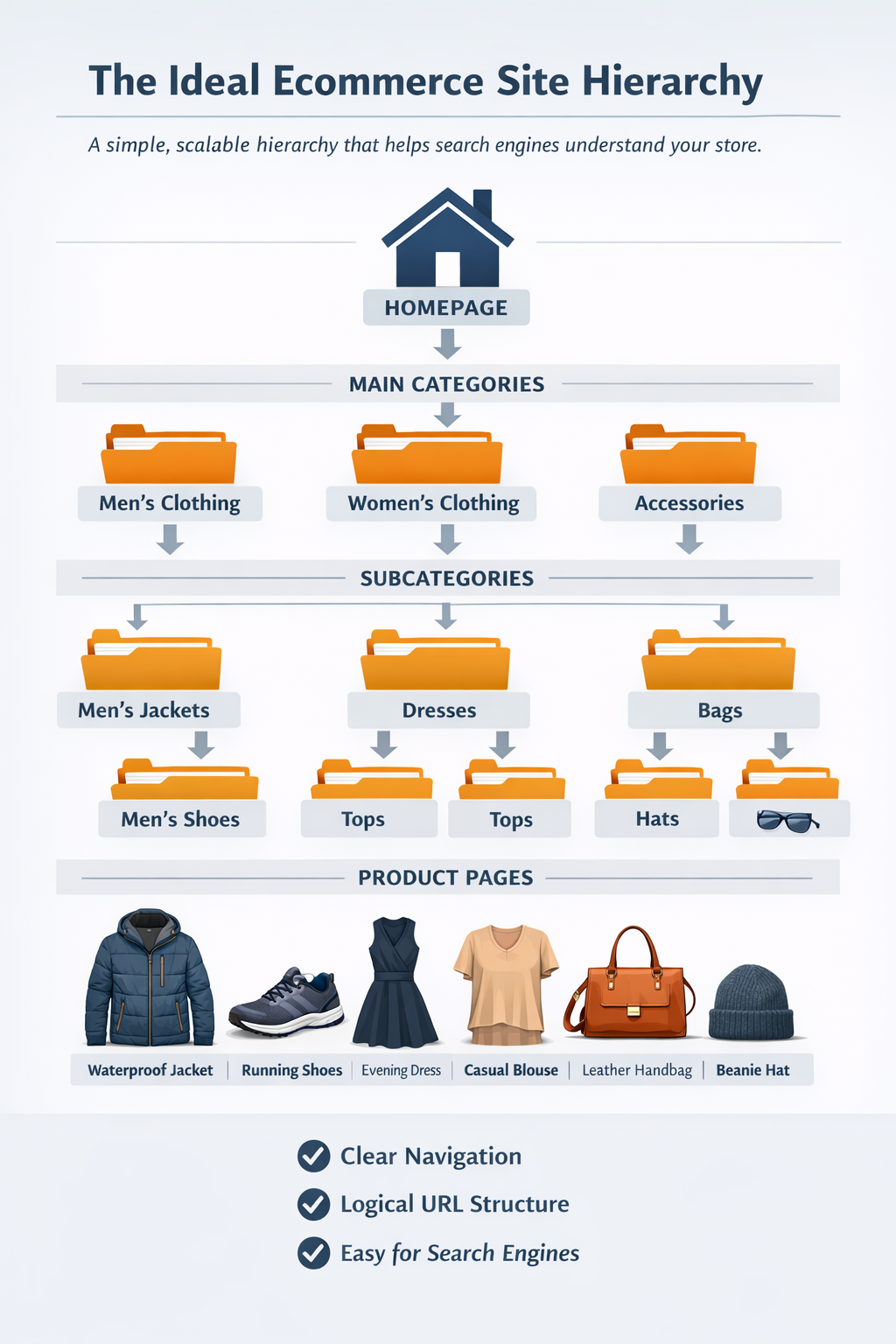
Most ecommerce stores perform best with a clear, predictable hierarchy:
Homepage → Category → Subcategory → Product
For example:
- Homepage
- Men’s Clothing
- Men’s Jackets
- Waterproof Winter Jacket
This structure helps search engines immediately understand:
- what type of product is being sold
- how specific the page is
- which broader category it belongs to
It also makes internal linking intuitive. Categories link downward to subcategories and products. Products link upward through breadcrumbs and occasionally sideways through related items.
Where ecommerce sites usually go wrong?
Many ecommerce sites technically follow this structure, but break it in practice. Common problems include:
- products accessible only through filters
- categories with no descriptive content or internal links
- multiple URLs leading to the same product
- blog posts completely disconnected from collections
- seasonal pages that disappear without redirects
When this happens, internal links lose their meaning. Search engines can’t tell which pages represent the core of your store and which are secondary.
Page depth: How many clicks is too many?
Page depth refers to how many clicks it takes to reach a page from the homepage.
As a general guideline:
- important category pages should be reachable within one or two clicks
- key product pages within three to four clicks
When products sit deeper than that, they’re crawled less frequently and often struggle to rank. This is especially common in large stores where products are buried behind multiple layers of filters or pagination.
Internal linking should always aim to reduce unnecessary depth, especially for high-value products and collections.
Identifying your priority pages (“money pages”)
Not every page on your ecommerce site deserves the same internal linking weight. Before placing links, you should identify:
- main category or collection pages that target broad search intent
- high-margin or best-selling products
- evergreen collections that remain relevant year-round
- informational pages that support purchasing decisions
These pages should receive more internal links from navigation, blogs, and supporting pages. This tells search engines, very clearly, “these pages matter.”
How do architecture and internal linking work together?
Once your structure is clear, internal linking becomes a system instead of a guessing game. Links reinforce hierarchy rather than fight it. Categories support products. Blogs support categories. Supporting pages reduce friction.
This is why architecture always comes first.
Internal linking doesn’t fix structural issues; it amplifies whatever structure already exists.
Types of internal links ecommerce stores should use
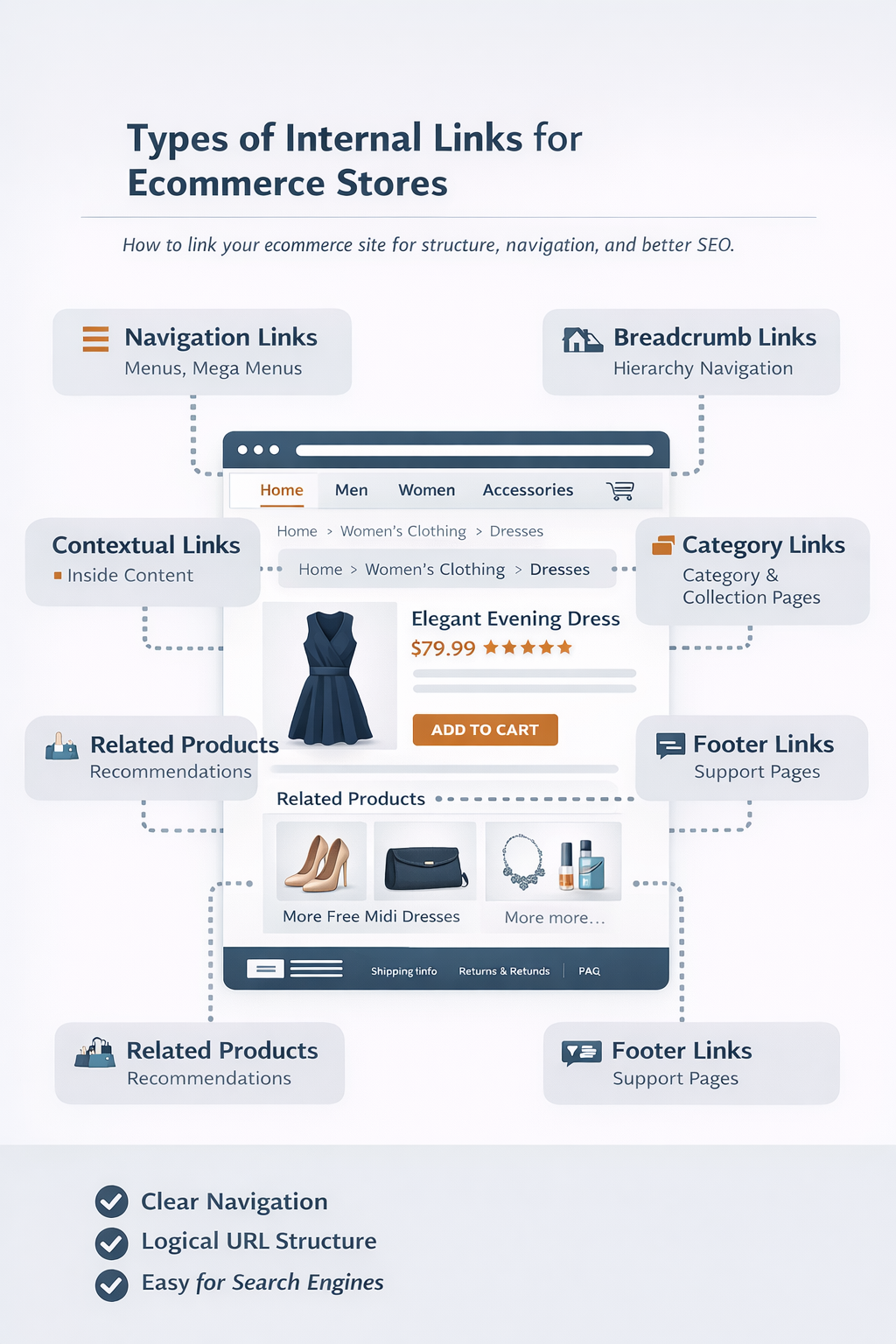
Once your site architecture is clear, the next step is understanding which types of internal links you should use and what role each one plays. Not all internal links are equal, and ecommerce sites rely on several different link types working together.
A common mistake is treating internal linking as just “adding more links.” In reality, every internal link should have a purpose, either helping search engines understand the structure or helping users move closer to a purchase.
Navigation links (menus and mega menus)
Navigation links are the strongest structural signals on your site. They tell search engines which pages you consider most important.
In ecommerce, navigation should:
- highlight primary categories
- reflect your actual product hierarchy
- stay stable over time
What to avoid is turning your navigation into a keyword dump. Linking to every subcategory, filter, or seasonal page from the main menu dilutes link value and makes the structure harder to interpret.
A good rule of thumb is this:
Navigation links define the backbone of your store, not every possible branch.
Breadcrumb links (one of the most important internal links)
Breadcrumbs show users where they are in the site hierarchy, such as:
Home → Category → Subcategory → Product
From an internal linking perspective, breadcrumbs:
- create consistent upward links from products to categories
- reinforce hierarchy across thousands of product pages
- reduce orphaning when products are added or removed
Breadcrumbs are especially valuable on ecommerce sites because they scale automatically. Every new product inherits internal links to its parent categories without manual effort.
Later in this guide, breadcrumbs will also become critical when we discuss schema markup, because breadcrumb schema directly mirrors your internal linking structure.
Contextual links inside content (high relevance, high impact)
Contextual links are links placed naturally within content, such as:
- category descriptions
- product descriptions
- blog posts
- buying guides
These links are powerful because they appear within relevant text. For example, a blog explaining how to choose running shoes, linking to a running shoes collectio,n gives search engines strong contextual signals.
On ecommerce sites, contextual links should:
- connect blogs to categories or collections
- connect products to relevant guides (size, care, usage)
- support key pages without overwhelming the reader
Quality matters more than quantity here. A few well-placed contextual links often outperform dozens of random ones.
Internal links on category and collection pages
Category pages are internal linking hubs. They naturally link downward to:
- subcategories
- featured or best-selling products
- related collections
They can also link sideways to:
- buying guides
- seasonal hubs
- complementary categories
These links help search engines understand which products belong where and which collections are closely related.
Related products and recommendation sections
Sections like “related products,” “you may also like,” or “complete the look” serve both SEO and conversion goals.
From an internal linking standpoint, they:
- distribute link equity across product pages
- improve crawl paths between related items
- prevent products from becoming isolated
However, relevance is critical. Random recommendations weaken topical signals and confuse both users and search engines. These sections should be rule-based, not purely random.
Footer links (supporting, not leading)
Footer links are best used for:
- shipping information
- returns and refunds
- FAQs
- size guides
- core categories (limited)
Footers should not be used to push aggressive keyword-focused links. Search engines expect footer links to support usability, not act as a ranking shortcut.
How these link types work together
A healthy ecommerce internal linking system uses all of these link types together:
- navigation defines importance
- breadcrumbs reinforce hierarchy
- contextual links build relevance
- category links distribute authority
- related products improve discovery
- footers support trust and usability
When one of these is missing or misused, the entire system becomes weaker.
Anchor text for ecommerce internal links
Anchor text is the clickable text users see when they click a link. For ecommerce sites, anchor text plays a quiet but powerful role in helping search engines understand what a linked page is about and how it fits into your product structure.
Many ecommerce sites either ignore anchor text completely or over-optimize it. Both approaches cause problems. The goal is not to stuff keywords into every link, but to use language that feels natural while still being descriptive.
Why anchor text matters more on ecommerce sites
Ecommerce sites often have:
- hundreds of product pages with similar names
- multiple categories targeting related search terms
- thin product descriptions with limited context
Anchor text helps add clarity. When multiple pages link to a category using varied but relevant anchor text, search engines get stronger signals about that category’s focus and intent.
At the same time, anchor text directly affects user experience. Clear anchors set expectations and reduce friction, especially on category and product pages.
What good ecommerce anchor text looks like
Good anchor text:
- clearly describes the destination page
- matches the user’s intent
- fits naturally within the surrounding sentence
- avoids unnecessary repetition
For example:
- “browse our full men’s running shoes collection”
- “view the complete skincare routine for dry skin”
- “see the size guide before ordering”
These anchors communicate context without sounding forced.
Anchor text patterns that work well for ecommerce
Ecommerce anchor text usually falls into a few safe, effective patterns:
Category-focused anchors
These reference collections or groups of products naturally.
- “explore our winter jackets collection”
- “shop women’s formal footwear”
Use-case anchors
These match how customers search and think.
- “shoes for long-distance running”
- “women gifts for corporate events”
Supporting anchors
These reduce friction during buying.
- “check delivery timelines”
- “read our return policy”
- “view fabric care instructions”
Using a mix of these patterns keeps your internal links natural and helpful.
Anchor text mistakes that hurt ecommerce SEO
Some of the most common anchor text mistakes include:
- using the exact same keyword phrase every time
- forcing keywords into anchors that don’t fit the sentence
- linking product grids with identical anchor text
- relying too heavily on generic anchors like “learn more”
These patterns make internal linking look mechanical rather than user-focused.
How to diversify anchor text naturally?
Anchor text variation doesn’t mean randomness. It means describing the same destination in slightly different ways based on context.
For example, a running shoes category could be linked as:
- “running shoes”
- “men’s running footwear”
- “shoes designed for long runs”
- “our full running shoes range”
All of these reinforce the same topic without repeating the exact phrase.
Anchor text on category vs product pages
On category pages, anchor text should:
- help users explore subcategories or products
- focus on clarity rather than keywords
On product pages, anchor text should:
- guide users to related items or support pages
- avoid linking aggressively to unrelated products
Anchor text should always feel like part of the shopping journey, not an SEO trick.
Anchor text and internal linking scale
As your store grows, anchor text consistency becomes harder to manage. This is why patterns matter more than perfection. If your anchors consistently describe pages accurately and naturally, search engines will understand your site even as hundreds of new pages are added.
Anchor text is not about gaming rankings. It’s about clear communication—with both users and search engines.
The best internal linking strategy for ecommerce (step by step)
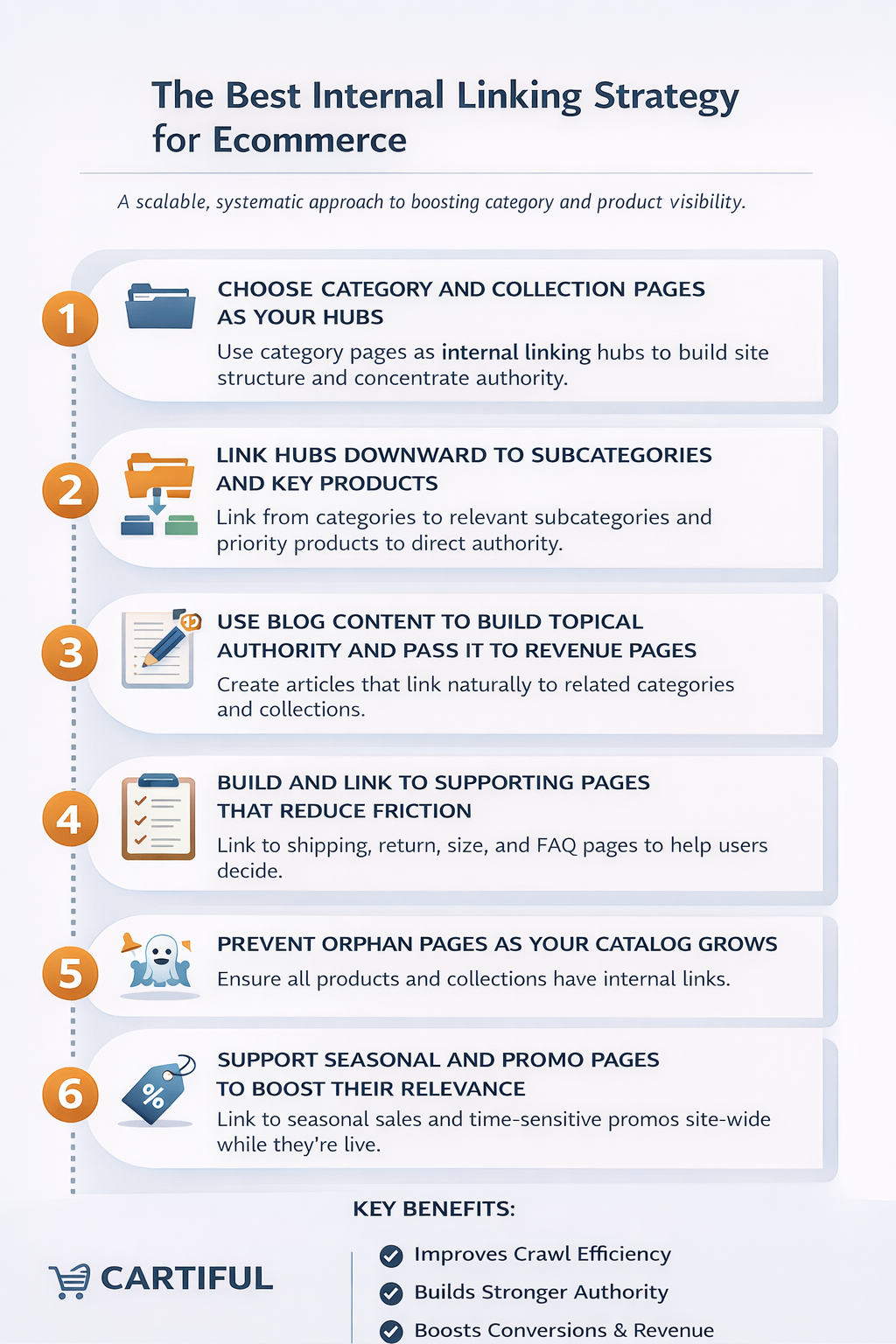
A strong ecommerce internal linking strategy follows a hub-and-spoke model.
Step 1: Choose category pages as hubs
In most ecommerce sites, category or collection pages should act as internal linking hubs. These pages typically:
- target broader search intent
- attract higher search volume
- support multiple products
- remain relevant longer than individual SKUs
Because of this, they should receive the highest concentration of internal links, from navigation, blogs, and supporting pages.
When categories are treated as hubs, authority flows naturally from broader pages to more specific ones.
Step 2: Link categories to subcategories and top products
From each category page:
- link to relevant subcategories
- highlight best-selling or featured products
- avoid linking to every SKU
This keeps link equity focused.
Step 3: Use blog content to support revenue pages
Blog posts should not exist just for traffic.
Each blog should:
- target a specific user question or intent
- link naturally to one primary category or collection
- support products without being salesy
For example, a “how to choose running shoes” guide should link to the running shoes collection, not random products.
Step 4: Build supporting pages that deserve links
Supporting pages include:
- shipping information
- return policies
- size guides
- material or care guides
- FAQs
These pages reduce friction and improve conversions while strengthening internal linking.
Step 5: Fix orphan and seasonal pages
Products often become orphaned when:
- collections change
- items go out of stock
- seasonal pages are removed
Always:
- redirect discontinued products
- link seasonal collections from evergreen hubs
- connect new products to categories immediately
Internal linking for category pages, product pages, and blogs
Once you have a system in place, the next step is execution. Internal linking works differently on category pages, product pages, and blog content, and each page type has its own role in your ecommerce site.
Instead of guessing where to place links, it helps to follow simple, repeatable recipes for each page type.
Internal linking for category and collection pages
Category pages are the backbone of ecommerce internal linking. They sit between broad site authority and individual products, which makes them ideal hubs.
A well-linked category page should do three things at once:
- help users explore products easily
- signal topical relevance to search engines
- distribute authority to key products
What to link from category pages?
Category pages should link to:
- subcategories (if applicable)
- priority or best-selling products
- closely related collections
- relevant guides or FAQs that support buying decisions
These links should feel intentional, not auto-generated clutter.
Where to place internal links on category pages?
Internal links on category pages work best when they appear:
- in breadcrumb navigation at the top
- within short descriptive copy near the top or middle of the page
- in featured product or curated sections
- near FAQs or informational blocks at the bottom
Avoid hiding all links inside product grids. While grids are crawlable, they don’t always provide strong contextual signals.
How many internal links are enough
There’s no fixed number, but category pages should:
- link to a manageable set of priority products
- avoid linking to every SKU if the catalog is large
- prioritize relevance over volume
Search engines learn more from which pages you link to than how many links you add.
Internal linking for product pages
Product pages are where conversions happen, but they’re also often the weakest internally linked pages on ecommerce sites.
A strong product page should never exist on its own.
Essential internal links for product pages
Every product page should include:
- breadcrumb links to category and subcategory
- links to related or complementary products
- links to supporting pages like size guides, care instructions, or delivery information
These links serve both SEO and conversion goals.
Linking from product descriptions (use carefully)
Product descriptions can include internal links, but they should be:
- helpful and relevant
- limited in number
- placed naturally within the content
For example, linking back to the main collection or to a care guide makes sense. Linking to multiple unrelated products does not.
Avoiding over-linking on product pages
Too many links on a product page can:
- distract users from purchasing
- dilute internal link value
- create noise rather than clarity
Product pages should guide, not overwhelm.
internal linking for blog pages (turning traffic into revenue)
Blogs often attract the most organic traffic on ecommerce sites, but they frequently fail to support sales because they aren’t internally linked correctly.
The role of blog content in ecommerce
Blog content should:
- answer questions users have before purchasing
- build topical authority around categories
- guide readers toward relevant collections
A blog post is not meant to replace a category page. It’s meant to support it.
How to link blogs to categories and products
Each blog post should:
- link to one primary category or collection
- include 2–3 supporting internal links to related guides or products
- avoid linking to too many products unless it’s a comparison or list-style post
Internal links in blogs work best when:
- placed where a reader would logically want to explore products
- included after explaining a problem or solution
- written in natural, conversational language
Forced links break trust. Natural links build it.
How do these recipes work together?
Category pages push authority downward.
Product pages connect users and search engines upward and sideways.
Blogs feed relevance and intent into collections.
When each page type follows its recipe, internal linking stops being guesswork and starts working as a system.
Internal linking pitfalls that hurt ecommerce SEO
Many ecommerce sites technically have internal links, but they still struggle to rank because those links work against them instead of supporting their structure. These issues are often subtle, easy to overlook, and very common in growing stores.
Understanding these pitfalls helps you avoid wasting crawl budget and prevents important pages from being undervalued.
Faceted navigation creating crawl traps
Filters for size, color, price, brand, or material are useful for users, but they can create thousands of additional URLs.
When these filtered URLs are internally linked and crawlable:
- search engines waste time crawling low-value pages
- link equity gets diluted across near-duplicate URLs
- important category pages lose authority
How to fix it:
Only allow internal links to filtered URLs that represent meaningful, search-demand-driven categories. Everything else should be controlled using noindex tags, parameter handling, or blocked from internal linking.
Pagination splitting authority across pages
Pagination is necessary for large catalogs, but it can weaken internal linking if handled poorly.
Problems occur when:
- page one links weakly to deeper pages
- product links are spread thin across many paginated URLs
- internal links don’t prioritize important products
How to fix it:
Ensure page one of a category links prominently to priority products and subcategories. Pagination should support discovery, not replace strategic internal linking.
Multiple internal paths to the same product
A single product often appears in:
- multiple categories
- filtered views
- search results
- promotional pages
If these paths create different URLs or inconsistent linking, search engines struggle to identify the main version of the product.
How to fix it:
Use a consistent canonical URL for each product and ensure internal links point to that preferred version.
Orphan products and collections
Orphan pages are pages with no internal links pointing to them. In ecommerce, they often appear when:
- new products are added but not linked
- old collections are removed
- seasonal pages expire
- manual linking is forgotten
Orphan pages are difficult for search engines to discover and evaluate.
How to fix it:
Every product and collection should be linked from at least one category, supporting page, or curated section.
Broken internal links after catalog changes
Discontinued products, renamed categories, and restructured URLs often leave broken internal links behind.
Broken links:
- waste crawl budget
- create poor user experiences
- weaken internal link signals
How to fix it:
Regularly audit internal links and redirect outdated URLs to the most relevant alternatives.
Irrelevant “related product” widgets
Automatically generated related product sections can damage topical relevance when they show unrelated items.
This confuses users and weakens internal linking signals.
How to fix it:
Use rule-based or curated logic for recommendations, based on category, use case, or compatibility.
Internal links hidden behind heavy JavaScript
If internal links are loaded late or require user interaction to appear, search engines may not always process them reliably.
How to fix it:
Ensure important internal links are present in the HTML or rendered early and consistently.
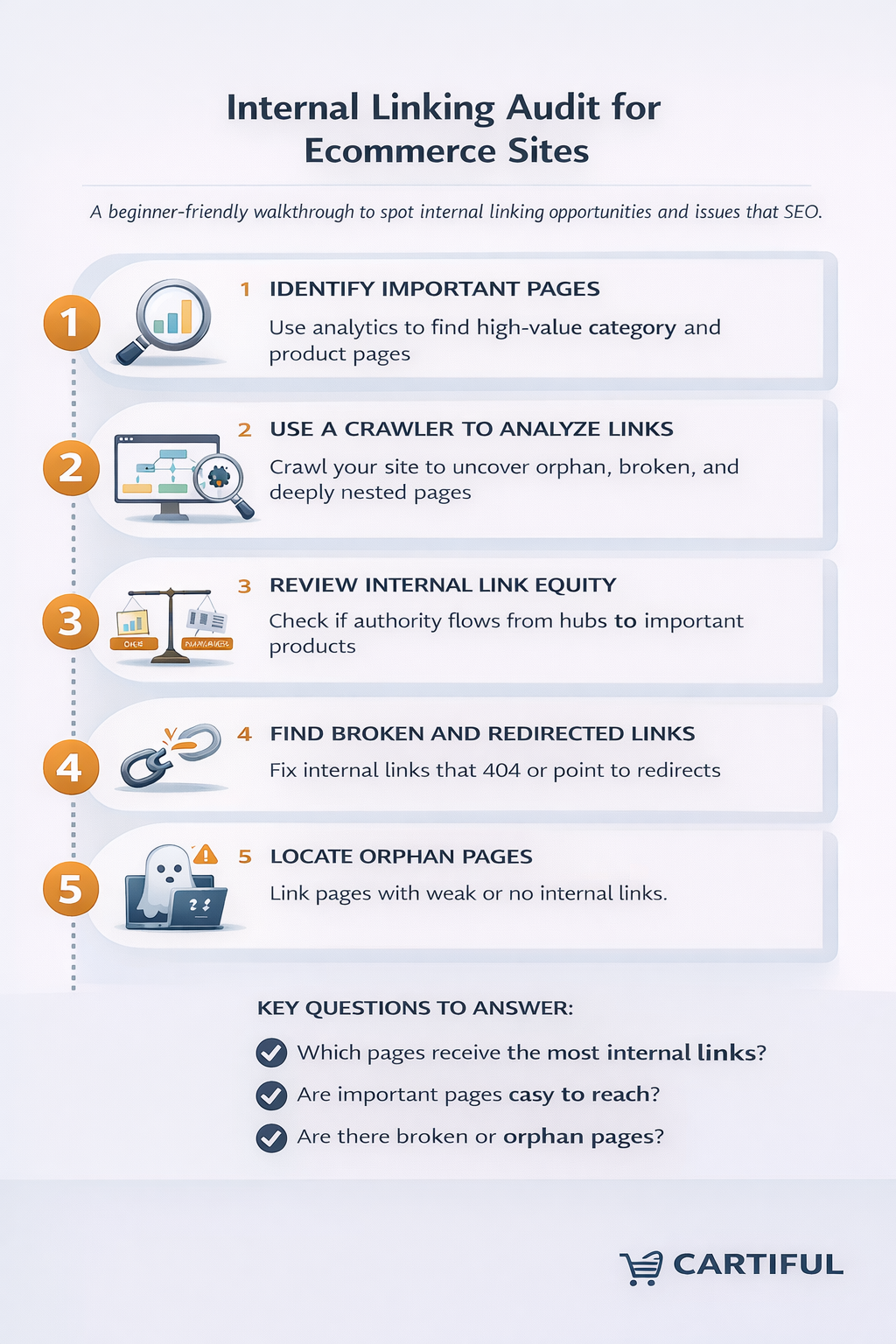
How to audit internal links on an ecommerce site
An internal linking audit shows how search engines actually experience your store.
Auditing with google search console
Use Search Console to:
- identify indexed vs non-indexed pages
- spot coverage errors
- find pages receiving few internal links
Crawler-based audits
Using a crawler helps you:
- find orphan pages
- measure click depth
- identify broken or redirected internal links
Metrics that matter
Focus on:
- internal link distribution
- depth of key pages
- consistency of anchor text
- crawl paths to important categories
Schema markup for ecommerce (beginner-friendly and practical)
Schema markup is structured data that helps search engines understand your pages more clearly.
While internal links show relationships, schema confirms them.
How schema supports internal linking
Schema:
- reinforces page hierarchy
- clarifies product details
- improves search appearance
- supports breadcrumb visibility
Ecommerce schemas to prioritize
Start with:
- Organization schema
- Website schema
- BreadcrumbList schema
- Product schema
- Offer schema
- Review/AggregateRating schema (only if genuine)
- FAQ schema (for support content)
Breadcrumb schema (most important)
Breadcrumb schema:
- mirrors your internal linking hierarchy
- helps search engines display breadcrumb trails
- improves clarity for category and product pages
Breadcrumb structure should always match your actual site structure.
Product schema essentials
Product schema should include:
- product name
- images
- description
- brand
- price and availability
- SKU or GTIN if available
Avoid adding fake reviews or unsupported data.
Category pages and schema
There’s no official “category schema,” but:
- breadcrumb schema supports hierarchy
- clean internal links clarify category intent
- optional item lists should be used carefully
Adding schema on Shopify and WooCommerce
- Shopify: themes, apps, or custom JSON-LD
- WooCommerce: SEO plugins + theme support
Always test the schema before deployment.
Internal linking and schema examples (practical flows)
Example: product breadcrumb trail
Home → Category → Subcategory → Product
This reinforces both navigation and schema hierarchy.
Example: blog to collection flow
Guide → Collection → Featured Products → Shipping Info
This connects informational intent to revenue naturally.
Example: seasonal hub flow
Seasonal Hub → Collections → Products → Evergreen Guides
This prevents seasonal pages from becoming isolated.
Ecommerce internal linking checklist
Site structure
- clear hierarchy
- shallow depth
- no duplicate paths
Category pages
- contextual links
- featured products
- breadcrumb links
Product pages
- related products
- supporting guides
- clean breadcrumbs
Blogs
- one main collection link
- supporting internal links
Schema
- breadcrumb schema active
- product schema valid
- organization schema present
FAQs: Internal linking for ecommerce
-
How many internal links should an ecommerce page have?
There is no fixed number. What matters is relevance. Category pages usually have more internal links than product pages, while product pages should focus on breadcrumbs, related products, and a few supporting links. Too many links can dilute value and distract users.
-
Do internal links really help ecommerce SEO?
Yes. Internal links help search engines discover pages, understand relationships between categories and products, and decide which pages are most important. Many ecommerce ranking issues come from poor internal linking rather than a lack of content or backlinks.
-
Should product pages link back to category pages?
Yes, but naturally. Breadcrumbs are the best way to do this. Product descriptions can also link back to collections when it helps users explore, but avoid forcing category links into every paragraph.
-
What are orphan pages in ecommerce?
Orphan pages are pages with no internal links pointing to them. In ecommerce, this often happens to new products, discontinued items, seasonal collections, or forgotten blog posts. Orphan pages are harder for search engines to crawl and rarely perform well.
-
Should out-of-stock products still be internally linked?
If a product will return, it can stay linked with a clear out-of-stock message. If it’s permanently discontinued, it’s better to redirect it to the most relevant category or alternative product to preserve internal link value.
-
Are breadcrumbs important for internal linking?
Yes. Breadcrumbs are one of the most effective internal links for ecommerce sites. They reinforce hierarchy, improve navigation, and help both users and search engines understand where a product sits within your store.
-
Can blogs really help product and category rankings?
Yes, when used correctly. Blogs build topical authority and can pass relevance to category pages through internal links. Blogs that don’t link to collections or products usually fail to contribute to ecommerce SEO.
-
What is the most important schema markup for ecommerce?
Breadcrumb schema and product schema provide the most immediate value. Breadcrumb schema reinforces internal structure, while product schema helps search engines understand pricing, availability, and product details.
-
Do internal links help with crawl budget?
Yes. Clean internal linking helps search engines crawl important pages more efficiently and avoid wasting time on low-value or duplicate URLs, which is especially important for large ecommerce sites.
-
How often should internal linking be reviewed?
Internal linking should be reviewed regularly. For small stores, quarterly reviews are usually enough. For larger or fast-changing catalogs, monthly checks and reviews after major updates are recommended.
Conclusion
Internal linking is not something you “set and forget.” It’s the system that quietly determines how search engines understand your store and how easily customers move from browsing to buying.
When ecommerce sites struggle with visibility, the root cause is often structural. Categories don’t support products, blog content doesn’t feed into collections, and new pages go live without clear internal paths. Fixing internal linking brings order to that chaos. It improves crawlability, strengthens category authority, prevents orphan pages, and makes your site easier to navigate as it grows.
The most effective ecommerce internal linking strategies start with a clear architecture, use categories as hubs, connect blogs to revenue pages intentionally, and reinforce everything with breadcrumbs and supporting links. When this system is in place, SEO improvements tend to compound over time instead of resetting with every catalog change.
At Cartiful, internal linking is treated as a foundational part of ecommerce SEO, not a checklist item added after content is published. Every store structure, category layout, and content plan is built with internal link flow in mind so that growth doesn’t create complexity or crawl issues later on.
Whether you manage a small store or a large, fast-growing catalog, investing in a deliberate internal linking system pays off in better rankings, stronger conversions, and a site that scales without breaking.