Skip to content

Running an ecommerce store isn’t just about adding products and running ads. If search engines can’t properly crawl, index, and understand your store, even your best products struggle to show up when buyers are actively searching. That’s where a technical SEO audit for ecommerce comes in.
A technical SEO audit looks at how your online store works behind the scenes. It checks whether search engines can access the right pages, whether unnecessary URLs are wasting crawl budget, how product and category pages are structured, how fast your store loads, and how clearly your data is communicated through schema markup. For ecommerce websites, this matters more than usual because stores generate thousands of URLs through filters, variants, pagination, and internal search pages.
In this guide, we’ll walk through a complete, step-by-step technical SEO audit specifically for ecommerce stores. You’ll learn what to check, why it matters, how to audit each area, and what practical fixes actually move the needle. The goal is not just to “find issues,” but to help you turn technical SEO into stable rankings, cleaner indexation, and stronger visibility for your products and categories.
This guide is written for store owners, ecommerce managers, and marketing teams using platforms such as Shopify and WooCommerce. It’s beginner-friendly, but detailed enough to be used as a real audit framework, not a surface-level checklist. We’ll also go deep into structured data and schema markup, explaining what it is, which types matter most for ecommerce, and how to validate them correctly.
By the end, you’ll have a clear technical SEO roadmap you can follow yourself or hand to a developer or agency with confidence.
What Technical SEO Means for Ecommerce Websites
Technical SEO for ecommerce is about making sure search engines can easily crawl, understand, and prioritize the pages that actually drive revenue. Unlike content-heavy blogs or service sites, ecommerce stores rely on large page inventories, reusable templates, and dynamic URLs, which makes technical accuracy far more important.
For an online store, technical SEO focuses on three core outcomes:
search engines can access your store without friction, index the right pages instead of low-value duplicates, and understand product, category, and brand relationships clearly enough to rank them correctly.
Why Ecommerce Technical SEO Is Different
Ecommerce websites behave very differently from most other sites. A single store can generate thousands of URLs from product variations, filters, sorting options, pagination, internal search results, and tracking parameters. If these URLs are not controlled properly, search engines waste time crawling pages that should never rank, while important product and category pages get crawled less often or indexed inconsistently.
Another key difference is scale. Most ecommerce sites rely on templates. A small technical issue in a category template or product page layout does not affect one URL; it affects hundreds or thousands of pages at once. That’s why ecommerce technical SEO audits focus heavily on patterns, not individual pages.
What A Technical SEO Audit Is Really Trying To Fix
A proper technical SEO audit for ecommerce is not just about spotting errors. It’s about improving the quality of your indexed pages and reducing friction across your entire store.
At a high level, the audit should answer four questions:
- can search engines crawl your store efficiently without wasting resources
- are the right pages being indexed, and are low-value pages kept out of the index
- is your site structure helping important categories and products get discovered
- is your store technically clear, fast, and understandable at scale
When these fundamentals are handled correctly, content, links, and product optimization become far more effective. When they’re ignored, even well-written category content and strong backlinks struggle to perform.
Before You Start: Setup And Tools
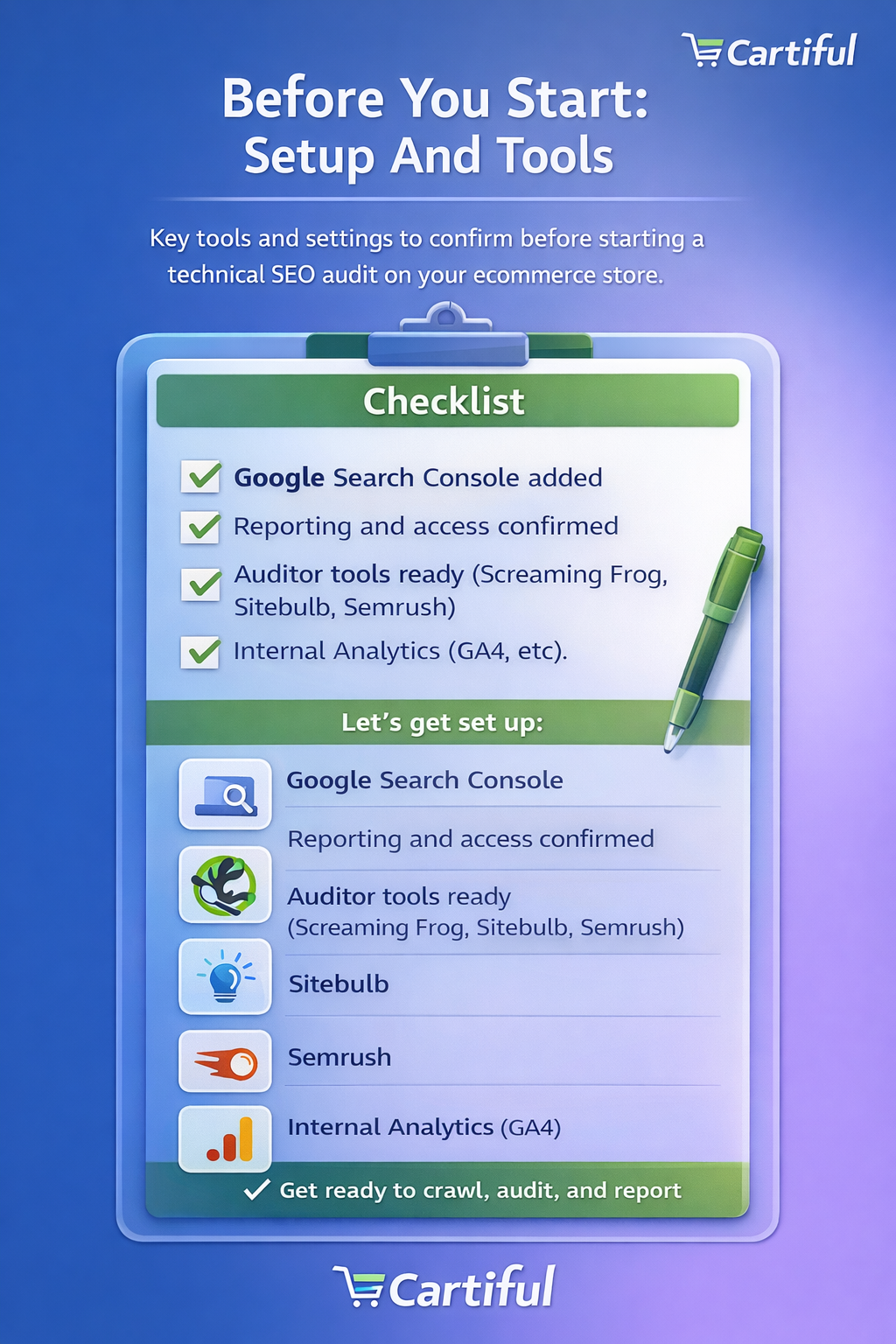
Before running a technical SEO audit for an ecommerce store, it’s important to get the right access and tools in place. Skipping this step often leads to incomplete audits, wrong conclusions, or fixes that don’t actually address the root problem. A good audit is based on real crawl data, real index data, and real performance signals, not assumptions.
This section helps you prepare properly so the rest of the audit is accurate and actionable.
Access You Should Have Before Auditing
At minimum, you should have access to the following:
- Google Search Console
This is non-negotiable. It shows how Google crawls, indexes, and reports issues on your store. You’ll rely on it heavily for indexation checks, sitemap validation, mobile usability, and structured data errors. - Analytics Platform (GA4 or equivalent)
Analytics data helps you connect technical issues with real outcomes such as traffic drops, poor engagement on category pages, or underperforming product templates. - CMS Or Platform Access
You don’t need full developer permissions, but you should be able to review theme settings, SEO options, URL structures, and installed apps or plugins. On Shopify and WooCommerce, many technical issues originate from themes or extensions. - Optional But Helpful: CDN Or Hosting Access
If the store uses a CDN or server-level caching, having visibility here helps when diagnosing speed issues, redirects, or blocked resources.
Core Tools You’ll Use During The Audit
You don’t need dozens of tools to run a solid ecommerce technical SEO audit. A small, focused stack is enough if you know what each tool is for.
-
Crawling Tool
Used to simulate how search engines crawl your site. This helps you identify indexable URLs, blocked pages, duplicate content patterns, redirect chains, orphan pages, and template-level issues across products and categories.
-
Google Search Console Reports
The indexing report, sitemap section, and enhancement reports help you confirm what Google is actually indexing, not what you assume it should index.
-
Page Speed Testing Tools
Used to evaluate core web vitals and loading behavior on key templates such as the homepage, category pages, product pages, and checkout-related URLs.
-
Structured Data Testing Tools
These help validate schema markup, catch missing fields, and identify mismatches between structured data and on-page content.
5. Optional Advanced Tools
Log files (if available) can show how bots truly crawl your site, but they are not required for most ecommerce audits and can be skipped by beginners.
What To Define Before You Start Crawling
Before you run your first crawl or open reports, clarify a few basics:
- which country or region the store primarily targets
- which templates matter most for revenue (categories, collections, PDPs)
- whether the store has recently changed themes, apps, or URL structures
- whether SEO issues are new or long-standing
This context helps you interpret findings correctly. For example, a sudden index drop after a theme change points to a very different root cause than a slow, gradual decline over months.
Why Preparation Matters For Ecommerce Audits
Ecommerce technical SEO issues are rarely isolated. A crawl issue often ties into indexation, internal linking, or schema problems. Proper setup ensures you can trace issues across systems instead of fixing symptoms in isolation.
With access confirmed and tools ready, you can now move into the actual audit process, starting with how search engines crawl your ecommerce store.
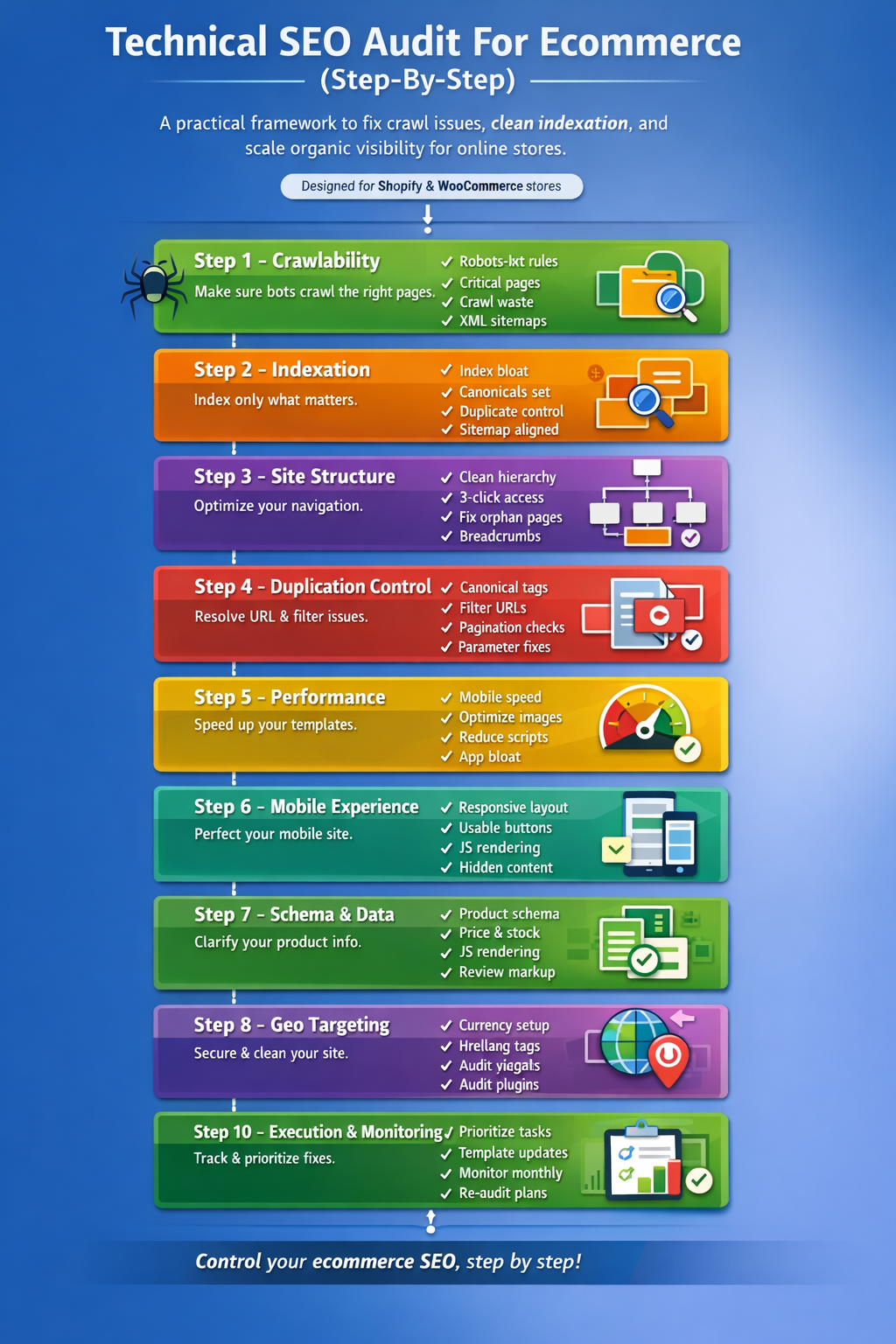
Audit Step 1: Crawlability (Can Search Engines Access Your Store?)
Crawlability is the foundation of every technical SEO audit. If search engines cannot properly crawl your ecommerce store, nothing else matters. Pages that aren’t crawled consistently cannot be indexed reliably, and pages that aren’t indexed won’t rank, no matter how good your products or content are.
For ecommerce websites, crawlability problems are common because stores generate a large number of URLs through filters, sorting options, pagination, internal search, and tracking parameters. The goal of this step is to make sure search engines spend their time crawling valuable pages, not wasting resources on URLs that should never appear in search results.
How Search Engines Crawl Ecommerce Websites
Search engines discover pages by following links and reading sitemaps. On ecommerce stores, this usually starts from the homepage, moves through category and subcategory pages, and eventually reaches product pages. Problems arise when crawlers are pulled into endless URL variations created by filters or when important pages are blocked or buried too deeply in the site structure.
Crawl efficiency matters more for ecommerce than for small sites. Even if Google can technically crawl thousands of URLs, it will not crawl all of them equally or frequently. Pages that are hard to reach, slow to load, or surrounded by low-value URLs often get deprioritized.
Robots.txt: What To Allow And What To Control
Your robots.txt file tells search engines which parts of your site they can and cannot crawl. A quick check here often reveals serious ecommerce issues.
Start by confirming that essential areas of the store are not blocked, including:
- product pages
- category or collection pages
- core CSS and JavaScript files required for rendering
Common ecommerce mistakes include accidentally blocking entire product or category directories, blocking JavaScript files needed for page rendering, or using overly broad rules that prevent crawlers from accessing important URLs.
At the same time, robots.txt is often used to control crawl waste. Internal search result pages, endless parameter-based URLs, or duplicate sorting variations are typical candidates for restriction, but these decisions must be made carefully. Blocking the wrong URLs can hide important pages from search engines entirely.
Crawl Budget And Why It Matters For Ecommerce
Crawl budget refers to how many URLs search engines are willing to crawl on your site within a given timeframe. While small sites rarely need to worry about this, ecommerce stores almost always do.
When the crawl budget is wasted on:
- filter combinations
- sorting parameters
- internal search pages
- session or tracking URLs
Search engines spend less time crawling product and category pages that actually matter. Over time, this can lead to delayed indexing, outdated product data in search results, and slower response to site changes such as price updates or stock availability.
A crawlability audit helps you identify where crawl budget is being spent inefficiently and where it should be redirected.
XML Sitemaps: Your Crawl Priority Signals
XML sitemaps act as a roadmap for search engines, highlighting the URLs you want crawled and indexed. For ecommerce stores, sitemaps should include only canonical, indexable pages.
When auditing sitemaps, check for:
- product or category URLs that return errors or redirects
- non-canonical URLs included by mistake
- pages marked noindex but still listed in the sitemap
- large mismatches between sitemap URLs and indexed pages
Some stores benefit from separating sitemaps by page type, such as products, categories, and content pages. This makes monitoring easier and helps isolate issues when indexing problems arise.
How To Audit Crawlability In Practice
To audit crawlability effectively:
- run a full site crawl and review which URLs are being discovered
- compare crawled URLs with sitemap URLs
- check robots.txt rules against what is actually being crawled
- identify URL patterns that generate large numbers of low-value pages
Focus on patterns rather than individual URLs. In ecommerce, fixing one rule can clean up thousands of pages at once.
What You Should Fix Before Moving Forward
Before continuing with the rest of the technical SEO audit, aim to:
- ensure critical product and category pages are crawlable
- reduce crawl waste from unnecessary URL variations
- clean up sitemaps so they reflect your true SEO priorities
Once crawlability is under control, you can move on to the next step: determining whether the right pages are being indexed, and whether low-value pages are polluting your index.
Audit Step 2: Indexation (Are The Right Pages Being Indexed?)
Once crawlability is under control, the next critical step is indexation. Indexation determines which pages from your ecommerce store actually enter search engine indexes and are eligible to rank. A store can be fully crawlable and still perform poorly if search engines index the wrong pages or ignore the ones that matter most.
For ecommerce websites, indexation problems are often subtle. Pages may be indexed, but not the right versions. Or important product and category pages may exist but never get indexed consistently because they’re buried under duplicate or low-value URLs.
Indexation Quality Matters More Than Indexation Volume
Many store owners focus on how many pages are indexed. That number alone is misleading. What matters is indexation quality.
A healthy ecommerce index:
- includes canonical category and product pages
- excludes internal search results and thin filter combinations
- avoids duplicate URLs caused by parameters or sorting
- reflects the current state of your catalog
An unhealthy index, by contrast, is bloated with URLs that offer no standalone value in search results. This dilutes ranking signals and makes it harder for important pages to perform well.
How To Check Indexation Status Correctly
The most reliable way to evaluate indexation is through Google Search Console. Use the indexing report to see how many pages are indexed, excluded, or flagged for issues. Pay attention to patterns, not just totals.
Look for signs such as:
- large numbers of “crawled, not indexed” URLs
- “duplicate, Google chose different canonical” warnings
- indexed URLs that don’t match your sitemap
- important categories or products missing entirely
Site-based search operators can be used for rough validation, but they should never replace Search Console data.
Common Ecommerce Causes Of Indexation Problems
Indexation issues in ecommerce usually come from structural patterns rather than individual mistakes.
Frequent causes include:
- faceted navigation creating thousands of near-duplicate pages
- internal search result pages being indexed
- pagination combined with filters and sorting
- product variants generating separate URLs without clear canonicals
- thin category pages with little unique value
When these patterns aren’t controlled, search engines struggle to decide which URLs deserve priority.
Diagnosing Index Bloat Step By Step
Index bloat occurs when too many low-value URLs enter the index. To diagnose it:
- compare the number of indexed pages to the number of products and categories you actually want indexed
- identify parameter-based URL patterns in indexed pages
- check whether filters or sorting options are appearing in search results
- review excluded URLs to understand what Google is ignoring and why
A significant mismatch between your catalog size and indexed pages is a strong signal that index bloat is present.
How To Fix Indexation Issues In Ecommerce Stores
Fixing indexation issues requires clear intent. Every page should have a reason to exist in the index.
Typical fixes include:
- applying noindex to internal search and low-value filter pages
- enforcing consistent canonical tags on product and category templates
- consolidating duplicate URLs into a single preferred version
- improving category pages that deserve to rank by adding real value
The goal is not to remove pages blindly, but to guide search engines toward the URLs that best represent your products and categories.
What To Confirm Before Moving On
Before advancing to the next audit step, make sure:
- your sitemap aligns with the pages you want indexed
- low-value URLs are clearly excluded or canonicalized
- core category and product pages are reliably indexed
With indexation cleaned up, you can now focus on how your ecommerce site structure and internal linking influence discovery and rankings.
Audit Step 3: Site Architecture And Internal Linking
Site architecture and internal linking determine how easily search engines and users can move through your ecommerce store. Even when pages are crawlable and indexable, poor structure can prevent important categories and products from getting the visibility they deserve.
For ecommerce websites, architecture issues usually don’t show up as “errors” in tools. Instead, they appear as weak rankings for core categories, slow discovery of new products, or inconsistent performance across similar pages. This step focuses on making sure authority flows naturally from top-level pages to revenue-driving URLs.
The Ideal Ecommerce Site Hierarchy
A clean ecommerce hierarchy is simple and predictable. Most stores perform best when they follow a structure similar to:
Homepage → Category → Subcategory → Product
This structure helps search engines understand which pages are most important and how products relate to broader categories. When products sit too deep or categories are disconnected from the main navigation, both crawlers and users struggle to find them.
During the audit, review how many clicks it takes to reach important category and product pages from the homepage. In most cases, core categories should be accessible within two to three clicks.
Navigation And Category Linking Checks
Your main navigation plays a critical role in internal linking. It signals priority pages and helps distribute link equity across your store.
Check whether:
- primary categories are linked directly from the main menu
- subcategories are logically grouped and not hidden behind excessive dropdowns
- seasonal or promotional categories don’t permanently displace core categories
- navigation links are crawlable HTML links, not JavaScript-only interactions
Navigation decisions should reflect both user intent and SEO priorities.
Internal Links Within Category Pages
Category pages are powerful internal linking hubs, but they’re often underused. During the audit, review how category pages link to:
- subcategories
- featured or best-selling products
- related categories
Internal links within categories should guide users and crawlers toward high-value products without creating clutter. Avoid infinite scroll implementations that hide links from search engines unless proper crawlable pagination is in place.
Product Page Internal Linking
Product pages should not exist in isolation. Each product page should clearly connect back to its most relevant category or subcategory.
Audit whether:
- product pages link back to their parent category
- breadcrumbs reflect real category relationships
- related or similar products are linked using standard HTML links
- discontinued or out-of-stock products link to alternatives
These links help search engines understand product relationships and help users continue their journey.
Identifying And Fixing Orphan Pages
Orphan pages are URLs that exist but are not linked from anywhere on your site. In ecommerce, this often happens with:
- older products
- hidden collections
- campaign landing pages
- URLs created by apps or plugins
Use crawl data to identify pages with no internal links pointing to them. If a page matters, add it into the appropriate category or navigation structure. If it doesn’t, consider whether it should be indexed at all.
How Internal Linking Impacts Crawl And Rankings
Strong internal linking improves more than just navigation. It helps:
- prioritize crawl paths for important pages
- distribute ranking signals more evenly
- reduce reliance on external backlinks
- support indexation for new or updated products
Poor internal linking, on the other hand, can undo even the best content and technical fixes.
What To Fix Before Continuing The Audit
Before moving forward, aim to:
- simplify your category and subcategory structure
- ensure important pages are reachable within a few clicks
- eliminate or fix orphan pages
- align internal linking with your SEO priorities
Once your site structure is clean and logical, you’re ready to audit how duplicate content, canonicals, and URL parameters are handled across your ecommerce store.
Audit Step 4: Duplicate Content, Canonicals, And URL Parameters
Duplicate content is one of the most common and most damaging technical SEO issues for ecommerce stores. It rarely looks like obvious plagiarism. Instead, it shows up as multiple URLs displaying nearly identical content due to filters, sorting options, product variants, pagination, and tracking parameters.
This step of the audit focuses on helping search engines understand which version of a page is the primary one, and ensuring that duplicates don’t compete with each other or dilute ranking signals.
Why Duplicate Content Is So Common In Ecommerce
Ecommerce platforms are designed to be flexible for users, not for search engines. A single product or category can often be accessed through multiple URLs depending on how a user filters, sorts, or navigates the store.
Common sources of duplication include:
- product variants that create separate URLs
- category pages with different sorting orders
- faceted navigation filters that generate unique URL combinations
- pagination combined with filters
- tracking or session parameters added to URLs
Without clear signals, search engines may index multiple versions of the same page, split authority, and rank none of them well.
Understanding Canonical Tags In Ecommerce
Canonical tags tell search engines which URL represents the preferred version of a page. In ecommerce, they are essential for managing duplication at scale.
During the audit, confirm that:
- each product and category page has a self-referencing canonical
- canonical URLs return a 200 status and are indexable
- filtered, sorted, or parameter-based URLs point to the correct canonical version
- canonical signals are consistent across templates
A common mistake is assuming canonicals alone will fix all duplication. They work best when paired with strong internal linking and clear indexation rules.
Auditing Canonicals At Scale
Rather than checking individual pages, audit canonicals by pattern.
Look for:
- canonicals that point to redirected or non-existent URLs
- multiple pages canonicalizing to the wrong parent
- inconsistent canonical behavior between desktop and mobile URLs
- products canonicalized to incorrect categories or variants
Even small template-level mistakes can affect thousands of URLs.
URL Parameters And Faceted Navigation Strategy
URL parameters are unavoidable in ecommerce, but they must be managed intentionally. The key question is not whether filter pages exist, but which ones deserve to be indexed.
During the audit, separate filters into two groups:
- high-intent, stable filters that users actively search for
- low-value combinations that exist only for browsing
High-intent filter pages may be optimized and indexed intentionally. Low-value combinations should be excluded using noindex, canonicalization, or internal linking controls.
Avoid blocking parameter URLs in robots.txt unless you fully understand the impact. Blocking prevents crawling but does not remove pages from the index if they are already indexed or linked externally.
Pagination And Duplicate Signals
Pagination can also create duplication when page sequences overlap heavily in content.
Check whether:
- paginated category pages use consistent canonicals
- pagination links are crawlable
- filters and sorting are not applied to paginated URLs unnecessarily
The goal is to help search engines understand pagination as part of a series, not as competing standalone pages.
Fixing Duplicate Content Without Breaking UX
One of the biggest challenges in ecommerce SEO is fixing duplication without harming user experience. Shoppers need filters and sorting options, but search engines don’t need to index all of them.
Effective fixes often include:
- controlling which filter pages are linked internally
- applying noindex selectively to low-value URLs
- enforcing canonical rules at the template level
- keeping user-facing functionality intact
The best solutions reduce duplication while preserving usability.
What To Confirm Before Moving On
Before continuing the audit, make sure:
- every important page has a clear canonical
- duplicate URL patterns are intentionally controlled
- parameter-based URLs are not polluting the index
With duplication under control, you can move on to evaluating site performance, speed, and core web vitals, which directly affect both rankings and user experience.
Audit Step 5: Site Performance And Core Web Vitals
Site performance plays a direct role in both search visibility and revenue for ecommerce stores. Slow-loading pages don’t just frustrate users; they reduce crawl efficiency, weaken rankings, and hurt conversion rates. For product and category pages, especially, performance issues compound quickly because the same template is reused across hundreds or thousands of URLs.
This step of the audit focuses on identifying performance bottlenecks that affect ecommerce templates and fixing them in a way that’s realistic for Shopify and WooCommerce stores.
Why Performance Matters More For Ecommerce
Ecommerce pages are heavier than most other page types. Product images, review widgets, tracking scripts, marketing apps, and third-party integrations all load at once. When performance isn’t controlled, this leads to slow first loads, delayed interactivity, and layout shifts that hurt both user experience and search rankings.
From a search perspective, poor performance can:
- reduce crawl efficiency for large stores
- delay indexing of new or updated products
- weaken rankings for competitive category terms
From a business perspective, even small delays on product pages can lead to abandoned sessions and lost sales.
Core Web Vitals In An Ecommerce Context
Core Web Vitals measure how real users experience your pages. For ecommerce stores, these metrics should be evaluated on key templates, not just a single URL.
Focus your audit on:
- homepage
- top category or collection pages
- product detail pages
- any template that receives organic traffic
Pay attention to how these templates perform on mobile, since most ecommerce traffic and crawling now happens on mobile devices.
How To Test Ecommerce Performance Properly
Performance testing should be consistent and intentional.
During the audit:
- test each key template separately
- prioritize mobile results over desktop
- run multiple tests to identify patterns, not one-off spikes
- compare performance before and after major theme or app changes
Look for recurring issues across templates. If one product page is slow, hundreds likely are.
Common Ecommerce Performance Issues To Watch For
Most ecommerce performance problems come from a small number of repeat causes.
These include:
- unoptimized or oversized product images
- too many third-party scripts and tracking pixels
- theme bloat and unused JavaScript
- apps loading sitewide even when not needed
- render-blocking resources delaying visible content
During the audit, identify which of these issues affect your store and where they appear most often.
Fixes That Actually Work For Online Stores
Performance improvements should be practical, not theoretical. Focus on changes that deliver real impact without breaking functionality.
Effective fixes often include:
- compressing and properly sizing product images
- using modern image formats where supported
- lazy loading below-the-fold media without hiding critical content
- removing or replacing unnecessary apps
- deferring non-critical scripts and styles
Always re-test after making changes. Performance gains should be measurable, not assumed.
Balancing Speed With Ecommerce Functionality
One of the challenges in ecommerce SEO is balancing speed with features such as reviews, personalization, and analytics. The goal is not to strip the site bare, but to ensure features load intelligently and don’t block the main shopping experience.
When auditing performance, ask:
- does this script add real value to conversions or insight
- does it need to load on every page
- can it load after the main content is visible
These decisions often have a bigger impact than minor technical tweaks.
What To Fix Before Moving Forward
Before moving on to the next audit step, aim to:
- stabilize performance on core templates
- address major mobile speed issues
- reduce sitewide scripts that slow every page
With performance under control, the next step is to evaluate how well your ecommerce store works on mobile devices and whether pages render correctly for users and search engines alike.
Audit Step 6: Mobile Usability And Rendering
Mobile usability is no longer a secondary consideration for ecommerce SEO. Search engines primarily crawl and evaluate your store using mobile versions of your pages, and most shoppers browse and buy on mobile devices. If your ecommerce site looks fine on desktop but breaks, shifts, or hides content on mobile, technical SEO performance will suffer.
This step of the audit focuses on whether your store renders correctly, functions smoothly, and remains usable on mobile, both for users and search engines.
Why Mobile Issues Hurt Ecommerce SEO So Quickly
Mobile problems often have a compounding effect on ecommerce stores. A single usability issue in a product or category template can impact hundreds of URLs at once. When users struggle to scroll, tap, or view content properly, engagement drops. When search engines see inconsistent rendering or hidden content, rankings can weaken.
Common consequences include:
- lower mobile rankings for category and product pages
- reduced crawl efficiency due to rendering issues
- higher bounce rates on high-intent pages
- missed conversions during product discovery and checkout
Because mobile is the default evaluation method, these issues rarely stay isolated for long.
Mobile-First Indexing And Ecommerce Templates
With mobile-first indexing, search engines primarily use the mobile version of your pages to determine relevance and rankings. This means anything missing, hidden, or broken on mobile may be treated as missing entirely.
During the audit, confirm that:
- mobile pages contain the same critical content as desktop
- product descriptions, pricing, and availability are visible
- internal links and navigation are accessible on mobile
- structured data is present on mobile-rendered pages
A stripped-down mobile experience may look clean, but it can unintentionally remove important SEO signals.
Common Mobile Usability Issues In Online Stores
Many mobile issues are design-driven rather than technical errors, which makes them easy to overlook.
Watch for problems such as:
- sticky headers or banners covering product information
- popups or consent notices blocking main content
- buttons or filters that are hard to tap accurately
- product images pushing key details too far below the fold
- variant selectors or add-to-cart buttons breaking layouts
Even small layout issues can disrupt the buying flow and reduce trust.
How To Audit Mobile Usability Effectively
Relying on a single test is not enough. Mobile usability should be reviewed using a combination of tools and real-world checks.
During the audit:
- review mobile usability reports in Google Search Console
- test key templates on real devices, not just emulators
- scroll through category and product pages as a user would
- check landscape and portrait orientations
- verify that interactive elements work as expected
Pay special attention to high-traffic and high-revenue pages.
Rendering Issues And Hidden Content Risks
Rendering problems occur when search engines cannot properly load or interpret page elements. This can happen when critical content depends on heavy JavaScript or loads only after user interaction.
Audit whether:
- important content loads without requiring taps or clicks
- filters and navigation links are visible in the HTML
- lazy-loaded elements are discoverable by crawlers
- mobile rendering matches what users actually see
If search engines can’t reliably render your pages, indexing and rankings can suffer even when crawlability appears fine.
Fixing Mobile Issues Without Hurting UX
Mobile fixes should improve clarity and usability, not just satisfy technical checks.
Effective improvements often include:
- reducing intrusive overlays and popups
- adjusting spacing and font sizes for readability
- ensuring buttons and filters are touch-friendly
- simplifying mobile navigation without hiding key links
Always test changes in a staging environment when possible, especially on ecommerce templates that affect checkout or cart behavior.
What To Confirm Before Moving On
Before proceeding to the next audit step, make sure:
- mobile pages render consistently and completely
- core content and internal links are accessible on mobile
- usability issues are resolved on high-priority templates
With mobile usability and rendering addressed, the next step is to audit structured data and schema markup, ensuring search engines clearly understand your products, categories, and ecommerce signals.
Audit Step 7: Structured Data And Schema Markup For Ecommerce
Structured data and schema markup are how you clearly explain your ecommerce store to search engines. While crawlability and indexation help search engines find your pages, schema markup helps them understand what those pages represent. For ecommerce websites, this understanding is critical because product details, pricing, availability, reviews, and category relationships change constantly.
This step of the audit focuses on making sure your structured data is accurate, complete, and aligned with what appears on the page, so search engines can confidently interpret and present your products in search results.
What Schema Markup Means In Simple Terms
Schema markup is a standardized way of labeling your content so search engines don’t have to guess. Instead of inferring what a product page contains, you explicitly tell them: this is a product, this is its price, this is whether it’s in stock, and this is how it fits into a category structure.
For ecommerce stores, schema markup does not guarantee special search results, but it improves eligibility for richer displays and reduces ambiguity. More importantly, it helps search engines process large product catalogs more accurately at scale.
Why Schema Is Especially Important For Ecommerce Stores
Ecommerce sites change more frequently than most websites. Prices update, stock levels fluctuate, products go out of stock, and new variants appear. Without structured data, search engines must re-interpret these changes repeatedly using page content alone.
When schema markup is implemented correctly, it:
- reinforces product details such as price and availability
- clarifies product relationships and breadcrumbs
- reduces misinterpretation caused by templates and dynamic content
- supports more stable indexing of product pages
When it’s implemented poorly, it can do the opposite by sending conflicting or outdated signals.
Schema Types That Matter Most For Ecommerce (Priority Order)
Not all schema types are equally important. During an ecommerce technical SEO audit, focus on the schema that directly supports product discovery and understanding.
The highest-priority schema types are:
- product structured data for product detail pages
- offer information nested within products, including price and availability
- breadcrumb markup to reflect category and subcategory relationships
- review and aggregate rating markup, only when reviews are genuine and visible
- basic organization and website markup at the site level
Attempting to implement everything at once often leads to errors. Prioritization keeps the markup accurate and manageable.
Core Rules Your Schema Must Follow
Before auditing or adding schema markup, it’s important to understand a few non-negotiable rules. Violating these often leads to ignored markup or manual issues.
Your schema must:
- match the visible content on the page
- reflect the current state of the product, not outdated data
- use consistent values across similar templates
- avoid marking up content that users cannot see
- stay synchronized with pricing, availability, and variants
Schema is not a place to add marketing claims or speculative data. Accuracy matters more than completeness.
Auditing Product Schema On Product Pages
Product pages are the most important place to audit structured data.
Start by checking whether product pages include:
- product name, description, and image references
- a clear offer with price and currency
- accurate availability status
- a unique identifier such as SKU or internal ID
- brand information, where applicable
Then verify whether this data matches what users see on the page. Even small mismatches, such as an outdated price in schema, can cause search engines to distrust the markup.
Handling Product Variants And Offers Correctly
Variants are one of the most common schema challenges in ecommerce. Size, color, or configuration options can create confusion if they are treated as separate products without clear relationships.
During the audit:
- confirm whether variants share a single canonical product page
- check how offers are represented for different variants
- ensure availability reflects the selected or default variant
- avoid duplicating identical product schema across multiple URLs
The goal is to represent the product accurately without inflating or fragmenting signals.
Breadcrumb Schema And Category Understanding
Breadcrumb markup helps search engines understand how products fit within your store’s category structure. This is especially valuable for large catalogs where category relationships are not always obvious.
Audit breadcrumb schema to ensure:
- breadcrumbs reflect real navigation paths
- category names match on-page labels
- product breadcrumbs link back to relevant categories
- breadcrumb markup is consistent across templates
Breadcrumb schema reinforces internal linking and improves contextual understanding of product pages.
Reviews And Ratings: Use With Caution
Review and aggregate rating schema can add valuable context, but only when implemented correctly.
During the audit:
- confirm reviews are collected legitimately
- ensure ratings are visible on the page
- avoid marking up global or sitewide ratings on individual products
- verify rating counts and values match displayed data
Misusing review schema is one of the fastest ways to lose trust in structured data.
How To Validate Structured Data Properly
Validation is a required part of any schema audit. Do not assume markup works just because it exists.
A proper validation workflow includes:
- testing representative product and category pages
- reviewing critical errors first, then warnings
- re-testing after fixes are deployed
- monitoring structured data reports over time
Validation should be repeated whenever themes, apps, or product templates change.
Common Ecommerce Schema Issues To Watch For
During audits, the same schema problems appear repeatedly.
Watch for:
- missing offer information on product pages
- incorrect availability statuses
- duplicated schema across multiple URLs
- breadcrumbs that don’t match real site structure
- outdated data caused by caching or app conflicts
Identifying these patterns early prevents widespread issues later.
What To Fix Before Moving On
Before advancing to the next audit step, make sure:
- product and breadcrumb schema are accurate and consistent
- structured data matches visible page content
- validation errors are resolved across key templates
With schema markup cleaned up and validated, the next step is to review international targeting, geographic considerations, and location-based technical signals that affect how your ecommerce store appears in different markets.
Audit Step 8: International Targeting And Geo Signals
International and geo-related signals help search engines understand where your ecommerce store operates and which audience each page is meant for. Even if you sell primarily in one country, these signals matter. When they’re unclear or misconfigured, search engines may show the wrong pages to the wrong users, suppress visibility in key regions, or misinterpret pricing and availability.
This step of the audit ensures your store’s technical setup aligns with how and where you actually sell.
One-Country Stores Vs Multi-Country Ecommerce Sites
Not every ecommerce store needs a complex international SEO setup. The first step is understanding which category you fall into.
If your store:
- sells only in one country
- uses a single currency
- ships domestically
Your audit should focus on clarity and consistency, not advanced international configuration.
If your store sells across multiple countries or regions, especially with different currencies, shipping rules, or languages, then international targeting becomes a core technical requirement rather than an optional enhancement.
Currency, Pricing, And Location Consistency
Search engines look for consistency between on-page content, structured data, and user experience.
Audit whether:
- prices match the primary target country’s currency
- currency switches are clearly implemented and not indexable duplicates
- structured data reflects the same pricing users see
- shipping and returns information is easy to find
Inconsistent currency signals are a common cause of mismatched search appearance and reduced trust.
Hreflang: When It’s Needed And When It’s Not
Hreflang helps search engines serve the correct version of a page to users based on language or region. However, it is often overused or implemented incorrectly.
You likely do not need hreflang if:
- your store has one language and one country focus
- currency switching does not create separate indexable URLs
You may need hreflang if:
- you have separate URLs for different countries or languages
- content, pricing, or shipping differs by region
- users in different locations should land on different versions of the same page
During the audit, verify whether hreflang exists and whether it actually matches your business model.
Auditing Hreflang Implementation
If hreflang is in use, check for:
- correct language and region codes
- reciprocal linking between page versions
- self-referencing hreflang tags
- consistency between hreflang, canonicals, and sitemaps
Hreflang errors often cancel out the intended benefits, so accuracy is essential.
URL Structure And Geo Strategy
International ecommerce stores typically use one of three URL structures:
- country or language subfolders
- subdomains
- separate domains
During the audit, evaluate whether the chosen structure:
- reflects how the business actually operates
- avoids unnecessary duplication
- keeps authority consolidated where possible
Switching structures later can be expensive, so clarity here matters.
Geo Signals Beyond URLs
Search engines use more than URLs to infer geographic relevance.
Additional signals include:
- shipping destinations and policies
- contact and business information
- localized content where appropriate
- regionally relevant internal linking
These signals should support your technical setup rather than contradict it.
Common Geo-Related Ecommerce Mistakes
Watch for issues such as:
- auto-redirecting users based on IP without crawlable alternatives
- blocking crawlers from accessing international versions
- mixing currencies and languages on the same indexable page
- using hreflang where it adds no real value
These mistakes often lead to indexing and ranking instability across regions.
What To Confirm Before Moving On
Before proceeding to the next audit step, make sure:
- your geographic targeting matches how you sell
- international signals are clear and consistent
- unnecessary complexity is removed
With geo and international targeting clarified, the next step is to audit security, redirects, and general technical hygiene to ensure your ecommerce store remains stable, trustworthy, and easy to maintain.
Audit Step 9: Security, Redirects, And Technical Hygiene
Security and technical hygiene issues often sit quietly in the background, but they can undermine even a well-optimized ecommerce store. Broken redirects, outdated protocols, and unmanaged errors create friction for both users and search engines, leading to crawl inefficiencies, lost authority, and trust issues.
This step of the audit focuses on keeping your store stable, secure, and technically clean, so previous SEO improvements aren’t weakened over time.
HTTPS And Mixed Content Checks
HTTPS is a baseline requirement for ecommerce websites, especially because transactions, user data, and checkout flows are involved. Most stores use HTTPS by default, but that doesn’t mean the setup is always clean.
During the audit, confirm that:
- all versions of the site resolve to a single HTTPS version
- HTTP URLs properly redirect to HTTPS
- no important pages are accessible over HTTP
- internal links consistently use HTTPS
Mixed content issues occur when secure pages load insecure resources such as images, scripts, or stylesheets. These issues can break rendering, trigger browser warnings, and reduce user trust.
Redirect Management And URL Consistency
Redirects are unavoidable in ecommerce. Products get discontinued, categories change, and URLs evolve over time. Problems arise when redirects are unmanaged or excessive.
Audit your store for:
- redirect chains where one URL redirects multiple times
- redirect loops that prevent access entirely
- mass redirects created by apps or migrations
- redirects pointing to irrelevant or low-quality pages
Every redirect should have a clear purpose and lead to the most relevant live page. Long chains waste crawl budget and slow down both bots and users.
Handling 404 Errors In Ecommerce
404 errors are not always bad, but they must be intentional and controlled.
During the audit:
- identify 404s generated by deleted products or categories
- check whether important pages are accidentally returning 404s
- review how 404 pages guide users back into the site
For discontinued products, decide whether to:
- redirect to a relevant alternative
- keep the page live with informational content
- return a proper 404 or 410 when no replacement exists
Random or unmanaged 404s weaken crawl efficiency and user experience.
Platform And Plugin Hygiene
Many ecommerce technical issues originate from apps, plugins, or extensions added over time. Each new addition can affect performance, URLs, schema, or rendering.
Audit whether:
- unused apps or plugins are still active
- multiple tools perform the same function
- plugins inject duplicate schema or scripts
- outdated extensions create security or performance risks
Reducing unnecessary dependencies improves stability and makes future audits easier.
Server Responses And Status Codes
Search engines rely on accurate server responses to understand page health.
During the audit, check:
- important pages return a 200 status
- redirected pages return correct 3xx codes
- removed pages return appropriate 404 or 410 codes
- error pages do not return misleading 200 responses
Incorrect status codes can cause indexing confusion and ranking issues that are hard to diagnose later.
Why Technical Hygiene Matters Long-Term
Technical SEO is not a one-time task. Ecommerce stores evolve constantly through new products, campaigns, themes, and integrations. Without regular hygiene checks, small issues compound into larger problems.
Clean technical foundations help:
- preserve crawl and index efficiency
- reduce unexpected ranking drops
- simplify future migrations or redesigns
- maintain trust with users and search engines
What To Confirm Before Moving On
Before moving to the final audit step, ensure that:
- security is consistent and free of warnings
- redirects are purposeful and minimal
- error handling is intentional and clean
- platform clutter is under control
With technical hygiene addressed, the final step is to turn all audit findings into a clear, prioritized action plan that your team can actually execute.
Audit Step 10: Turning Audit Findings Into A Fix Roadmap
A technical SEO audit is only valuable if it leads to action. Ecommerce audits often surface dozens of issues, but trying to fix everything at once usually creates confusion, delays, or unintended side effects. The final step is to turn your findings into a clear, prioritized roadmap that balances SEO impact, development effort, and business risk.
This step helps you move from analysis to execution in a way that actually improves rankings and revenue.
Why Prioritization Matters In Ecommerce SEO
Not all technical issues carry the same weight. Some problems quietly affect thousands of URLs and suppress growth, while others look alarming in tools but have little real impact.
For ecommerce stores, poor prioritization often leads to:
- time spent fixing low-impact warnings
- hesitation to fix high-impact template issues
- repeated audits with no measurable improvement
- SEO work disconnected from revenue goals
A structured roadmap keeps the focus on changes that matter.
How To Score And Prioritize Issues
A simple prioritization framework works best. Each issue should be evaluated using four practical factors:
Revenue Impact
Does this issue affect category pages, product visibility, or conversion-critical templates?
Indexation And Crawl Impact
Is this causing crawl waste, index bloat, or suppression of important pages?
Implementation Effort
Can this be fixed via settings or templates, or does it require deeper development work?
Risk Level
Could this change break navigation, checkout, or existing rankings if done incorrectly?
Issues that score high on impact and low on effort should be addressed first.
Group Issues By Template, Not By URL
Ecommerce SEO fixes are most effective when applied at the template level. Instead of listing hundreds of URLs, group findings by:
- product page templates
- category or collection templates
- navigation and filtering systems
- global elements such as schema, redirects, or scripts
This approach makes fixes scalable and easier for developers or platform specialists to implement.
Building A Practical 30–60 Day Action Plan
Rather than rigid weekly sprints, use phased priorities that reflect how ecommerce sites operate.
Phase 1: Critical Indexation And Crawl Fixes
Focus on issues that prevent search engines from accessing or prioritizing key pages, such as crawl waste, broken canonicals, and index bloat.
Phase 2: Template And Performance Improvements
Address performance bottlenecks, mobile usability issues, internal linking gaps, and duplication patterns at scale.
Phase 3: Structured Data And Enhancement Refinements
Roll out or clean up schema markup, validate structured data, and monitor for consistency as products change.
Each phase should deliver visible improvements before moving on.
Aligning SEO Fixes With Business Teams
Technical SEO often fails when it’s isolated from other teams. Use your roadmap to align with:
- developers or theme specialists
- merchandising teams managing categories and products
- marketing teams running promotions or seasonal campaigns
Clear documentation and prioritization reduce friction and prevent SEO fixes from being overwritten by future changes.
How To Track Progress After Implementation
Once fixes are deployed, tracking matters as much as implementation.
Monitor:
- indexation trends in search console
- changes in crawl behavior
- category and product ranking stability
- organic traffic and engagement on key templates
Tracking helps confirm whether fixes worked and identifies where follow-up adjustments are needed.
Making Technical SEO A Continuous Process
Ecommerce stores change constantly. New products, new filters, new apps, and new campaigns can reintroduce technical issues quickly.
Treat technical SEO audits as:
- a recurring process, not a one-time project
- a safeguard during theme changes and migrations
- a foundation for long-term organic growth
Closing The Loop
By turning audit findings into a structured roadmap, you ensure technical SEO supports your store’s growth instead of becoming an endless list of unresolved issues. With crawlability, indexation, performance, structure, schema, and hygiene aligned, your ecommerce site is positioned to compete consistently in search results.
How To Monitor Results After Fixes (So Your Technical SEO Improvements Stick)
Fixing technical SEO issues is only half the job. Ecommerce stores change constantly. Products go out of stock, new variants are added, apps inject new scripts, themes get updated, and seasonal collection pages come and go. That means a store that’s technically healthy today can quietly drift into crawl waste, index bloat, or broken schema within weeks if nothing is monitored.
This section gives you a detailed, beginner-friendly monitoring system you can follow after your audit fixes are implemented.
What To Expect After Technical Fixes
Most technical changes don’t show results overnight. Search engines need time to:
- recrawl affected templates and URLs
- process canonicals and indexation signals
- update structured data understanding
- re-evaluate performance and usability signals
In ecommerce, improvements often show up as:
- more consistent indexing of important products and categories
- fewer “excluded” URLs for duplicates and parameter pages
- more stable category rankings (less fluctuation)
- faster discovery of new products or restocked items
- cleaner rich result eligibility once schema errors drop
The key is to monitor the right indicators so you can tell whether the changes are actually being absorbed.
The Monitoring Dashboard You Should Set Up
You don’t need an elaborate reporting system. You need a few reliable checkpoints, tracked consistently.
At minimum, build your monitoring around:
- Google Search Console for crawl + index + enhancements
- GA4 (or analytics) for organic landing page performance
- Performance testing on key templates (monthly)
- A lightweight crawl of key sections (monthly or after major changes)
If you only track rankings, you’ll miss the technical reasons behind volatility. Monitoring is about early detection.
Weekly Checks (Fast, High-Impact)
These are the checks you should run weekly because they catch problems early without taking hours.
Check 1: Indexing Trends For Key Page Types
Go into Search Console and review indexing changes with a simple question:
Are the pages we want indexed staying indexed, and are the pages we don’t want indexed staying out?
Look specifically at:
- product pages
- category or collection pages
- parameter-based URLs (filters, sorting, pagination)
- internal search URLs (if your store generates them)
If the indexed count suddenly spikes or drops, don’t panic—but do investigate patterns.
Red flags to watch:
- a sudden rise in indexed parameter URLs
- many product pages shifting into “crawled, not indexed”
- important categories moving into “duplicate” or “alternate page with proper canonical”
Check 2: Sitemap Health And Indexing Alignment
Sitemaps should be one of your most stable signals.
Each week, quickly verify:
- sitemap is still submitting successfully
- the number of discovered URLs is stable
- there’s no sudden jump in “submitted URL not selected as canonical”
Why this matters for ecommerce:
Stores often introduce new URL patterns through apps or theme edits, and those URLs sometimes start entering sitemaps automatically. That’s how index bloat quietly comes back.
Check 3: Manual Spot Checks On Critical Templates
Pick a few representative pages and check:
- a top category page
- a best-selling product page
- a product that recently changed price or went out of stock
- a page that previously had schema issues
Confirm:
- canonicals are still correct
- the page still loads cleanly on mobile
- price and availability display correctly
- structured data matches what’s visible
This isn’t about checking everything. It’s about confirming nothing has “drifted” at the template level.
Monthly Checks (Deeper, Preventative)
Monthly checks take longer, but they prevent slow technical decay.
Check 1: Run A Focused Crawl Of Your Store
You don’t always need a full crawl of every URL. A monthly crawl focused on core areas can reveal a lot:
- category and subcategory sections
- product pages
- any filtered URL patterns that caused issues before
Use the crawl to answer:
- are parameter URLs multiplying again
- are there new redirect chains
- are orphan pages increasing
- are canonicals consistent across templates
- are noindex directives appearing where they shouldn’t
Tip for ecommerce:
Track URL counts by pattern. If filter URLs or sort URLs rise month over month, you’re headed back toward crawl waste.
Check 2: Monitor Core Web Vitals On Key Templates
Performance issues often return when:
- a new app is installed
- new scripts are added for tracking
- seasonal banners and popups are introduced
- theme updates change asset loading behavior
Every month, test:
- homepage
- top category page
- top product page
- a product page with heavy images/reviews
Look for patterns, not perfect scores. You’re trying to keep templates consistently fast and stable on mobile.
Red flags:
- sudden new layout shifts on product pages
- category pages loading much slower than last month
- new long delays before add-to-cart becomes responsive
Check 3: Validate Structured Data On A Sample Set
Schema markup is one of the easiest things to break unintentionally because it’s often generated through themes, apps, or plugins.
Once a month:
- test 5–10 product pages
- test 2–3 category pages (if you mark anything up there)
- test a product that is out of stock
- test a product with variants
Confirm:
- Offer price + currency are correct
- availability matches what users see
- review markup is consistent and genuine
- breadcrumbs reflect the real category path
Common drift issue:
A theme update changes how price is displayed on the page, but schema still references the old price format. That mismatch can make structured data unreliable.
Event-Based Checks (Do These Anytime The Store Changes)
These checks should happen whenever something major changes—because that’s when technical SEO breaks most often.
Run a quick technical check after:
- theme changes or redesigns
- installing or removing apps/plugins
- changing URL structures
- running large seasonal campaigns
- migrating product categories or collection structures
- adding country/currency versions or localization features
When these events happen, repeat a mini-audit:
- crawl key templates
- validate indexing in Search Console
- test structured data
- check speed on mobile
Ecommerce stores don’t “stay still,” so this is how you keep SEO stable while the business evolves.
What Metrics Actually Prove The Fixes Worked
It’s easy to feel like SEO is improving just because you “fixed issues.” Monitoring helps you measure real outcomes.
Look for:
- fewer excluded URLs caused by duplication or parameters
- improved index alignment between sitemap and indexed URLs
- stronger stability in category traffic and rankings
- faster indexing of new products
- fewer structured data errors over time
Also track organic performance by template type:
- category/collection landing pages
- product landing pages
- blog/content landing pages (if applicable)
If product traffic rises but category traffic drops, it may signal internal linking or indexation imbalance rather than overall growth.
How Often You Should Re-Audit Your Ecommerce Store
A full technical audit doesn’t need to happen every month, but it should happen regularly.
A practical schedule:
- mini checks weekly (indexing + sitemap + spot checks)
- template crawl monthly (to catch drift)
- full technical audit every 6–12 months
- immediate mini-audit after major changes
If your store is growing fast, adding many products, or frequently installing apps, you’ll benefit from auditing more often.
Making Technical SEO “Maintainable,” Not Stressful
The goal isn’t to become obsessed with tools. The goal is to build a monitoring routine where issues show up early, before rankings drop or sales slow down.
When you track crawlability, indexation, performance, and schema consistently, technical SEO becomes predictable. And when it’s predictable, your store can scale without constantly fighting SEO fires.
Common Ecommerce Technical SEO Audit Mistakes (And How To Avoid Them)
Even well-intentioned technical SEO audits can fail if they focus on the wrong things or stop at surface-level fixes. Ecommerce websites are complex systems, and small misunderstandings can lead to wasted effort or, worse, long-term ranking problems. This section highlights the most common mistakes teams make during ecommerce technical audits and how to avoid them.
Treating Ecommerce Like A Small Content Website
One of the biggest mistakes is auditing an ecommerce store the same way you would audit a blog or brochure site. Ecommerce SEO is pattern-driven. Issues rarely exist on one page; they exist across templates.
How to avoid it:
Always audit by URL patterns and templates. If one product page has a problem, assume hundreds do. Fix issues at the template or system level, not URL by URL.
Chasing Tool Warnings Without Context
SEO tools flag hundreds of “issues,” many of which have little or no real impact on ecommerce performance. Teams often waste time fixing warnings that don’t affect crawlability, indexation, or rankings.
How to avoid it:
Tie every fix back to one of three outcomes: better crawling, better indexation, or better understanding. If an issue doesn’t affect any of these, it’s usually a lower priority.
Over-Indexing Filter And Parameter Pages
Another common mistake is allowing too many filter, sort, and parameter-based URLs into the index. This creates index bloat, dilutes authority, and makes it harder for category pages to rank.
How to avoid it:
Be intentional about which filter pages deserve to rank. Everything else should be controlled through internal linking, noindex directives, or canonicalization. More indexed pages does not mean better SEO.
Relying On Canonicals Alone To Fix Duplication
Canonicals are powerful, but they are not magic. When internal linking, sitemaps, and navigation point to duplicate URLs, canonicals often get ignored or overridden.
How to avoid it:
Make sure canonicals are supported by consistent internal links, clean sitemaps, and controlled parameter usage. Canonicals work best when all signals agree.
Ignoring Mobile And Template-Level UX
Many audits focus heavily on crawl and index data but ignore how pages actually behave on mobile devices. For ecommerce, mobile usability issues can quietly destroy performance even when technical signals look fine.
How to avoid it:
Audit mobile templates manually. Scroll, tap, filter, and interact like a real user. If something feels frustrating, it probably is hurting both UX and SEO.
Implementing Schema Without Validation Or Maintenance
Schema markup is often added once and forgotten. Over time, prices change, availability updates, and themes evolve, causing schema to drift out of sync with visible content.
How to avoid it:
Validate schema regularly and re-check it after any theme, app, or pricing changes. Treat structured data as a living system, not a one-time setup.
Trying To Fix Everything At Once
Large ecommerce audits can feel overwhelming. Teams sometimes try to fix every issue simultaneously, leading to rushed changes, broken templates, or abandoned projects.
How to avoid it:
Use a clear roadmap. Fix high-impact, low-risk issues first. Measure results. Then move on to more complex improvements.
Conclusion: Building A Strong Technical Foundation For Ecommerce SEO
A technical SEO audit for ecommerce is not about ticking boxes or fixing isolated errors. It’s about creating a clean, scalable foundation that allows search engines to crawl efficiently, index the right pages, and clearly understand your products and categories.
When crawlability is controlled, indexation is intentional, internal linking is logical, performance is stable, mobile usability is strong, and structured data is accurate, everything else becomes easier. Content performs better. Category pages rank more consistently. New products get discovered faster. And SEO becomes a growth channel instead of a constant firefight.
This guide is designed to be practical. You can follow it step by step, use it as a recurring audit framework, or hand it to a developer or agency with clear expectations. The most important takeaway is that technical SEO for ecommerce is not a one-time task. It’s an ongoing process that evolves with your store.
If you want expert help auditing and implementing these fixes across Shopify or WooCommerce at scale, Cartiful works with ecommerce brands to clean up technical foundations, improve visibility, and support long-term organic growth.