Skip to content
Ecommerce keyword research is not about finding the most searched terms. It is about understanding how shoppers search, compare, and decide before buying. Product pages, category pages, and content pages all serve different roles in that journey. This guide explains how ecommerce keyword research works, how to identify high-intent keywords, and how to map them to the right pages so your store attracts traffic that is more likely to convert.
Understanding Keyword Intent (The Foundation of Ecommerce Keyword Research)
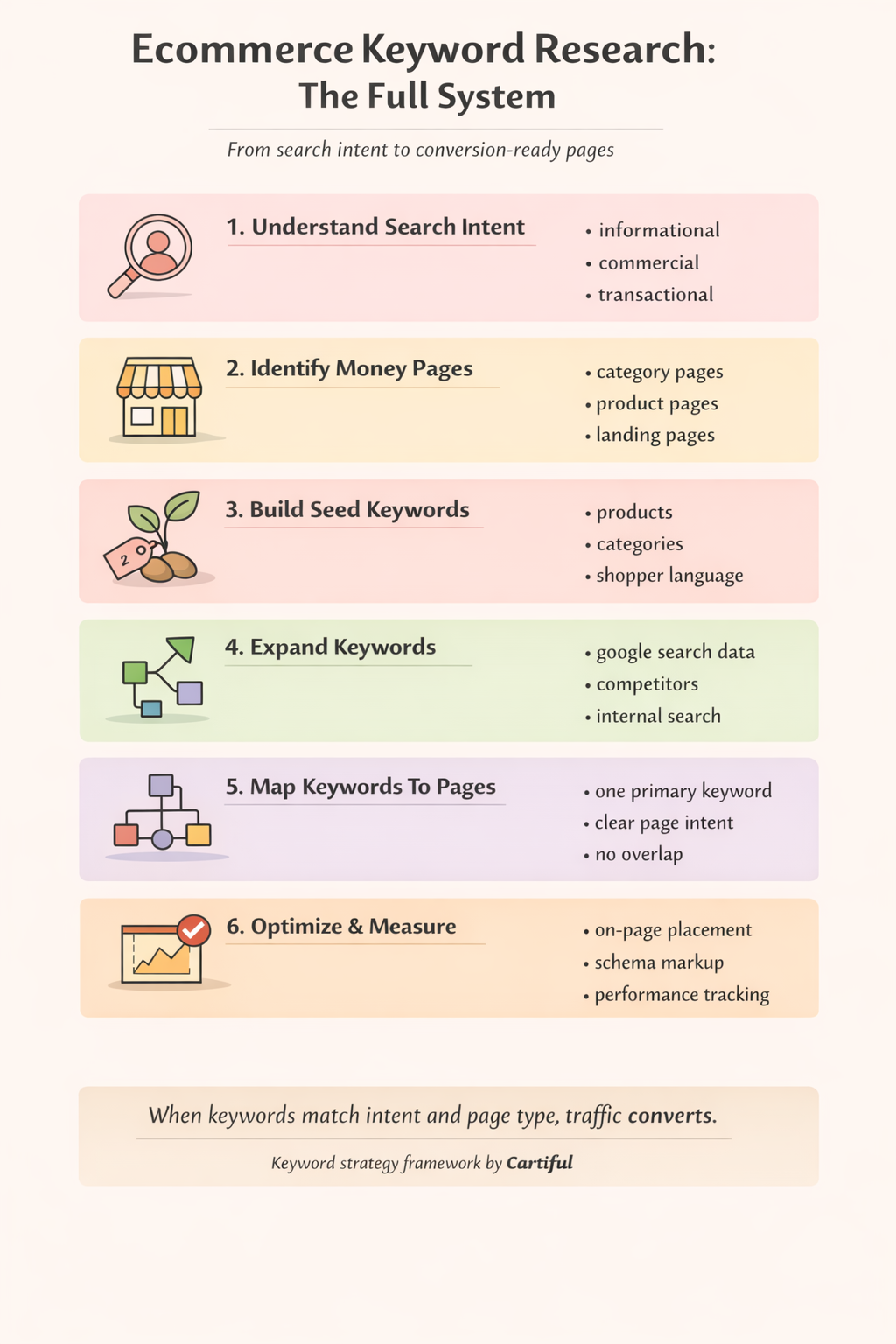
Before choosing any kehttps://cartiful.com/wp-content/uploads/2026/03/image3-10.pngyword, you need to understand why someone is searching. In ecommerce, keyword intent matters more than search volume because intent determines what kind of page should rank and whether that visit can turn into revenue.
Keyword intent describes the mindset of the shopper at the moment they type a query into Google. Are they learning? Comparing options? Ready to buy? Each of these stages requires a different type of page.
Why intent comes before keywords
Many ecommerce stores fail at keyword research because they start with tools instead of intent. They collect hundreds of keywords, but then:
- send buying searches to blog posts
- send browsing searches to product pages
- reuse the same keywords across multiple pages
When intent and page type don’t match, Google struggles to rank the page and users leave quickly. Understanding intent first prevents this mismatch.
The four core types of keyword intent in ecommerce
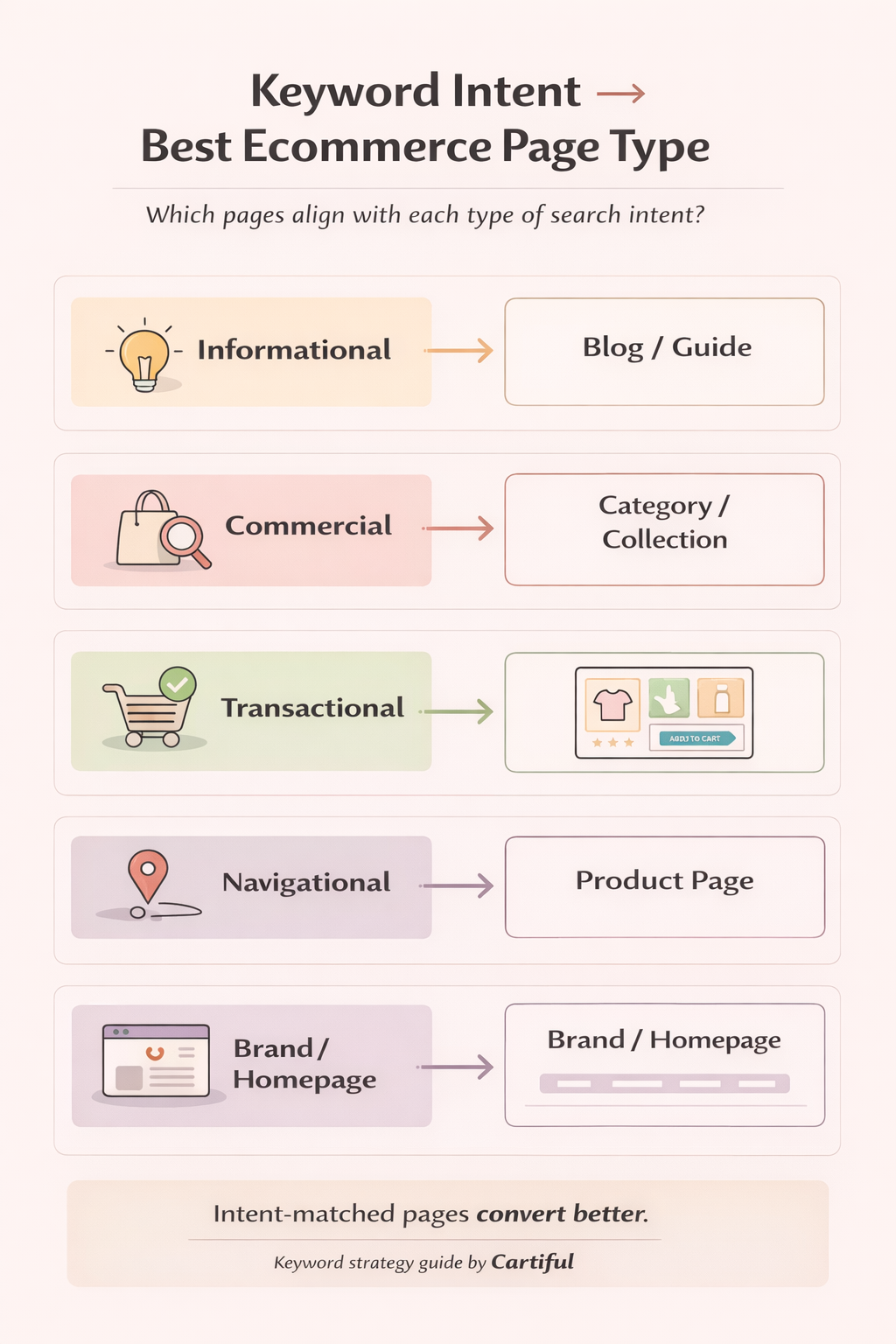
1. Informational intent (learning stage)
These searches come from people who are trying to understand a problem, product type, or solution.
Examples:
- “how to choose running shoes”
- “what is vitamin c serum”
- “best fabric for summer clothing”
What this shopper wants:
- explanations, guidance, clarity
- no pressure to buy yet
Best page type:
- blog posts, guides, educational content
Role in ecommerce SEO:
- builds early trust
- introduces product categories naturally
- supports category and product pages through internal linking
Informational keywords rarely convert on their own, but they prepare shoppers to convert later.
2. Commercial intent (comparison stage)
These searches signal that the shopper is actively evaluating options.
Examples:
- “best running shoes for flat feet”
- “top wireless earbuds under $100”
- “vitamin c serum for oily skin”
What this shopper wants:
- comparisons
- recommendations
- reassurance they’re choosing the right option
Best page type:
- category pages
- collection pages
- curated landing pages
- comparison-style blog posts that link to categories
This is where many ecommerce stores make money without relying on brand keywords. Commercial intent keywords often deliver high-quality traffic with strong conversion potential.
3. Transactional intent (purchase stage)
These searches indicate clear readiness to buy.
Examples:
- “buy nike air zoom pegasus”
- “dyson supersonic hair dryer price”
- “order vitamin c serum online”
What this shopper wants:
- a specific product
- price, availability, variants, shipping, and trust signals
Best page type:
- product pages
- sometimes tightly focused landing pages
Transactional keywords should almost never be targeted with blog content. Sending this traffic to anything other than a purchase-ready page usually results in lost sales.
4. Navigational intent (brand-led searches)
These searches happen when the shopper already knows the brand or store.
Examples:
- “brand name running shoes”
- “store name vitamin c serum”
- “brand official website”
What this shopper wants:
- to reach a specific brand or store
Best page type:
- homepage
- brand pages
- key category or product pages
Navigational intent is important for brand protection but usually grows after you’ve captured informational and commercial intent successfully.
How intent maps directly to ecommerce page types
A simple rule keeps ecommerce keyword research clean and scalable:
- informational keywords → content pages
- commercial keywords → category or collection pages
- transactional keywords → product pages
- navigational keywords → brand or homepage
When this mapping is clear, everything else becomes easier:
- internal linking makes sense
- cannibalization is reduced
- conversion rates improve
Common intent mistakes ecommerce stores make
Many stores rank poorly not because of weak SEO, but because of intent misalignment.
Typical mistakes include:
- targeting “best” or “top” keywords on product pages
- trying to rank category pages for “how to” searches
- using one page to target informational, commercial, and transactional intent at the same time
These pages confuse both users and search engines.
A real-world intent flow (how shoppers actually move)
Most ecommerce journeys follow this pattern:
- informational search → learning the problem
- commercial search → comparing solutions
- transactional search → buying the product
Good ecommerce keyword research respects this flow instead of forcing every visitor into checkout immediately.
When your content and pages align with intent at each stage, search engines reward clarity, and users feel guided rather than pushed.
Why intent-driven keyword research scales better
As your store grows:
- you add more products
- categories become deeper
- competition increases
Intent-based keyword research prevents chaos. It gives you a system where every new keyword has a clear role, a clear page, and a clear purpose in the buying journey.
Identify Your Money Pages Before Choosing Keywords
Before you open any keyword tool, you need to be clear about which pages actually make money for your store. Keyword research without page prioritization leads to scattered rankings, internal competition, and traffic that does not convert.
This section sets the foundation for everything that follows.
What “money pages” mean in ecommerce
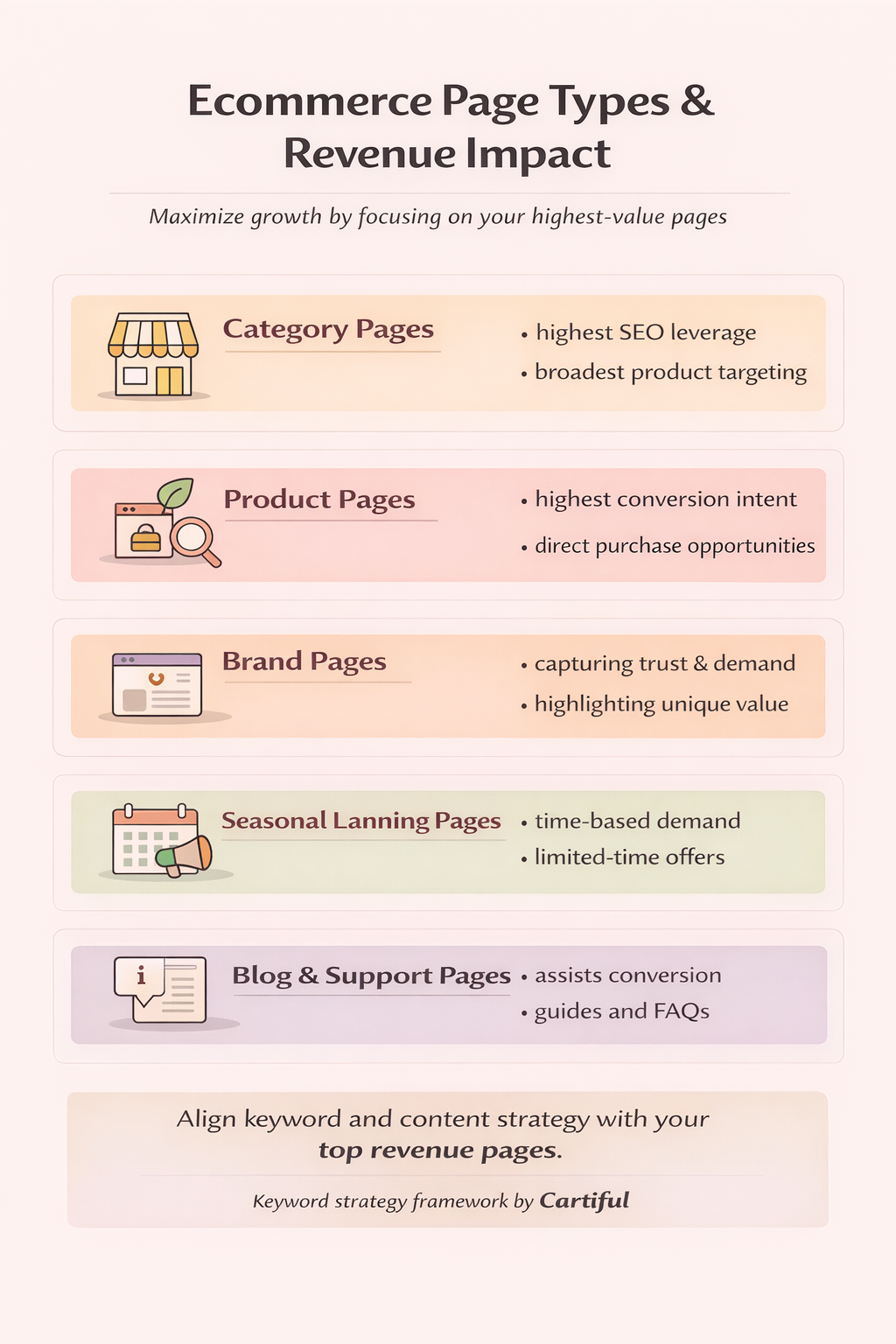
Money pages are the pages that directly contribute to revenue or strongly influence purchase decisions. These pages deserve priority in keyword research because they sit closest to conversion.
In most ecommerce stores, money pages include:
- category or collection pages
- product pages
- high-intent landing pages (seasonal or use-case driven)
- brand pages (if brand demand exists)
Blog posts support these pages, but they are rarely money pages on their own.
Why does identifying money pages come first
Many stores make the mistake of finding keywords first and then deciding where to use them. This often results in:
- product pages targeting broad category keywords
- multiple pages competing for the same term
- important categories being under-optimized
When you identify money pages first, keyword research becomes focused instead of overwhelming. Every keyword you find has a clear destination.
Core ecommerce page types you should audit first
1. Category or collection pages
These are usually the strongest SEO assets in an ecommerce store.
They work best for:
- broad commercial keywords
- category-level searches with modifiers
- comparison-style intent
Examples:
- “running shoes”
- “wireless earbuds under $100”
- “skincare products for oily skin”
If a category page is important for revenue, it should be a priority in your keyword strategy.
2. Product pages
Product pages should target specific, high-intent searches.
They are best suited for:
- exact product names
- model numbers
- brand + product combinations
- price or availability queries
Examples:
- “nike air zoom pegasus 40”
- “dyson supersonic hair dryer price”
- “vitamin c serum 15%”
Product pages are not meant to rank for broad discovery terms. Trying to force them to do so usually weakens performance.
3. Brand pages
Brand pages matter if:
- you sell multiple brands
- users search by brand name
- brand trust influences buying decisions
Examples:
- “cerave skincare products”
- “apple accessories”
- “samsung mobile phones”
These pages often convert well because brand-aware shoppers already have trust.
4. Seasonal and campaign landing pages
These pages capture time-bound demand and should not be ignored.
Examples:
- “ramadan sale”
- “black friday electronics deals”
- “summer lawn furniture sale”
Seasonal pages should be planned early, so keyword research aligns with demand timing, not after the season starts.
Separating money pages from support pages
To keep your site structure clean, separate pages by role:
- money pages: sell, compare, shortlist, convert
- support pages: educate, answer questions, guide decisions
Support pages (blogs, guides, FAQs) should:
- target informational keywords
- internally link to relevant money pages
- prepare users for commercial or transactional intent
They should not compete with categories or products for the same keywords.
A simple prioritization exercise (beginner-friendly)
Before moving forward, list:
- your top revenue categories
- your best-selling products
- any seasonal or campaign pages you rely on
Rank them by business importance, not by how many keywords you think they can rank for. This list becomes your keyword research roadmap.
Why this step saves time and rankings
When money pages are defined early:
- keyword mapping becomes easier
- content creation becomes intentional
- internal linking becomes logical
- keyword cannibalization is reduced
Most importantly, SEO efforts start supporting actual sales, not just visibility.
Building Your Seed Keyword List
Once your money pages are clearly defined, the next step is to create a seed keyword list. Seed keywords are the starting terms that describe what you sell before you expand them into long-tail, high-intent ecommerce keywords.
This step keeps keyword research structured and prevents random keyword collection.
What seed keywords are in ecommerce
Seed keywords are simple, core phrases that represent:
- your products
- your categories
- how shoppers naturally describe them
They are not meant to be final keywords. They exist to help you expand logically and consistently.
Examples:
- “running shoes”
- “wireless earbuds”
- “vitamin c serum”
- “office chair”
Each of these can later be expanded into dozens of intent-driven keywords.
Why seed keywords should come from your store, not tools
Many beginners start keyword research inside tools. This often leads to:
- irrelevant keyword ideas
- terms that don’t match actual products
- over-optimization for volume instead of intent
Your store already tells you what your best seed keywords are. Products, categories, and collections reflect real inventory and real buyer paths.
Step 1: Start with your category and collection names
Category pages usually represent your strongest commercial intent.
For each main category, write down:
- the category name as-is
- close variations shoppers might use
Example:
- Category: “Running Shoes”
- Seed keywords:
- running shoes
- running footwear
- jogging shoes
Avoid overthinking this stage. The goal is coverage, not perfection.
Step 2: Add product-level seed keywords
Next, extract seed keywords from your product catalog.
Include:
- product names
- model numbers
- product types
Example:
- “Nike Air Zoom Pegasus 40”
- “Wireless Lavalier Microphone”
- “Ergonomic Office Chair”
These will later help you capture transactional intent.
Step 3: Layer in shopper language and modifiers
This is where seed keywords start turning into ecommerce-ready keywords.
Add modifiers based on how people shop:
- use case: “for flat feet,” “for gaming,” “for oily skin”
- attributes: “wireless,” “waterproof,” “organic”
- price signals: “budget,” “premium,” “under $100”
- trust signals: “original,” “official,” “authentic”
Example:
- “wireless earbuds” → “wireless earbuds for calls”
- “office chair” → “ergonomic office chair for long hours”
Only include modifiers that genuinely apply to your products.
Step 4: Include location and delivery signals (only if relevant)
If your store serves specific regions or offers local delivery options, include those signals early.
Examples:
- “running shoes in pakistan”
- “cash on delivery office chair”
- “same day delivery earbuds”
These keywords often convert well because they remove friction and uncertainty.
Step 5: Group seed keywords by page type
Before expanding further, organize your seed keywords by where they should live.
- category seeds → category pages
- product seeds → product pages
- modifier-heavy seeds → category or landing pages
This step prevents keyword overlap later and prepares you for clean keyword mapping.
What a good seed keyword list looks like
A strong seed list is:
- small enough to manage
- clearly tied to real pages
- organized by category and product type
You don’t need hundreds of seed keywords. A focused list of 20–50 strong seeds is enough to build a complete ecommerce keyword strategy.
Finding Ecommerce Keywords Using The Right Sources
With a solid seed keyword list in place, the next step is to expand those seeds into real ecommerce keywords. This is where many guides overwhelm beginners with tools. Instead, the goal here is to understand where reliable keyword ideas actually come from and how to use each source correctly.
Good ecommerce keyword research pulls data from multiple places, not just one tool.
Start with Google Search itself
Google already shows you how people search. This makes it one of the most accurate sources for keyword expansion.
Google autocomplete reveals common completions when you type a seed keyword. These suggestions are based on real searches.
Example:
Typing “running shoes for” may reveal:
- running shoes for flat feet
- running shoes for men
- running shoes for beginners
These are high-intent modifiers worth capturing.
People Also Ask boxes show question-based searches related to your keyword. These are especially useful for:
- supporting blog content
- FAQs on category or product pages
Related searches at the bottom of results often surface commercial variations that tools miss.
Use Google Search Console for existing demand
If your store is already live, Google Search Console is one of the most valuable keyword research tools you have.
It shows:
- queries your pages already appear for
- keywords ranking on page 2 or 3 (easy wins)
- unexpected search terms users associate with your products
Focus on:
- impressions without clicks (optimize titles and intent match)
- keywords that almost rank but need better on-page targeting
This helps you improve performance without creating new pages.
Expand with Google Keyword Planner (direction, not precision)
Google Keyword Planner is useful for:
- discovering variations of seed keywords
- understanding relative demand
- spotting seasonality
For ecommerce, treat volume ranges as directional signals, not exact numbers. A keyword with lower volume but clear buying intent often outperforms a high-volume, vague term.
Study competitor pages, not just keywords
Competitors show you what already works in your niche.
Review:
- their category and collection names
- subcategory structures
- recurring keyword patterns in titles and headings
Look for:
- categories you don’t have yet
- modifiers they consistently target
- seasonal pages reused every year
The goal is not copying content, but identifying demand structures you may be missing.
Use internal site search data
If your store has a search bar, it’s a direct line into shopper language.
Internal search queries reveal:
- what visitors expect to find
- product terms you may not be highlighting
- gaps in navigation or filters
These keywords often convert well because they come from people already on your site.
Use marketplaces for product language
Marketplaces like Amazon or Daraz are excellent for understanding how shoppers describe products.
Use them to:
- find common naming conventions
- spot popular attributes and variations
- identify questions shoppers ask before buying
This helps refine product-level keywords and descriptions.
Combine sources before judging keywords
No single source is complete on its own. Strong ecommerce keyword research comes from cross-verifying ideas across:
- Google search results
- Search Console data
- competitor pages
- internal search
- marketplaces
If a keyword appears across multiple sources, it’s usually worth evaluating further.
What to avoid at this stage
- collecting keywords without knowing the target page
- relying only on volume metrics
- ignoring intent signals
- building massive lists you can’t prioritize
At this stage, clarity matters more than quantity.
Competitor Keyword Research (The Fastest Shortcut)
Competitor keyword research helps you avoid guesswork. Instead of starting from zero, you analyze what is already ranking in your niche and identify where demand exists and where gaps remain. For ecommerce stores, this is one of the fastest ways to find keywords that are proven to attract buyers.
Why competitor research matters in ecommerce
Search results are already filtered by Google. Pages ranking on page one show:
- which keywords Google considers relevant for a product or category
- what type of page matches that intent
- how competitors structure their categories and collections
By studying competitors, you reduce risk and focus on keywords with real commercial value.
Step 1: Identify your true competitors
Not every store in your niche is a true SEO competitor.
Focus on:
- stores selling similar products
- brands in the same price range
- websites ranking for your main category keywords
Avoid comparing yourself to large marketplaces unless your products and scale are comparable.
Step 2: Analyze competitor category and collection pages
Category pages reveal the strongest commercial keywords.
Review:
- category names
- page titles and H1 headings
- filter and subcategory structures
Look for:
- recurring keyword patterns
- modifiers they prioritize (price, use case, attributes)
- categories you do not currently offer
These insights help you refine both keyword targeting and site structure.
Step 3: Review competitor product pages
Product pages are useful for discovering:
- model-specific keywords
- naming conventions
- attribute-focused searches
Pay attention to:
- how products are titled
- how variants are described
- which features are highlighted consistently
This helps align your product pages with actual search behavior.
Step 4: Identify keyword gaps and overlaps
Keyword gaps represent missed opportunities.
Common gap types include:
- keywords competitors rank for and you don’t
- keywords where you rank on page two or three
- seasonal keywords you haven’t targeted yet
Overlaps help confirm which keywords are core to the niche and worth prioritizing.
Step 5: Separate inspiration from duplication
Competitor research is about understanding demand patterns, not copying pages.
Use competitor insights to:
- validate keyword intent
- discover missing categories
- improve keyword mapping
Avoid:
- copying titles or descriptions
- targeting identical keyword sets on the same page types
- mimicking poor UX or thin content
Step 6: Turn competitor insights into your own strategy
Once insights are collected:
- map keywords to your existing pages
- identify where new pages are needed
- prioritize keywords based on feasibility and business value
Competitor data becomes powerful only when combined with your store’s goals and structure.
Why this shortcut works
Competitor keyword research accelerates growth because:
- keywords are already proven
- intent is validated
- page types are clear
Instead of experimenting blindly, you build on what search engines already reward.
Evaluating And Prioritizing Ecommerce Keywords
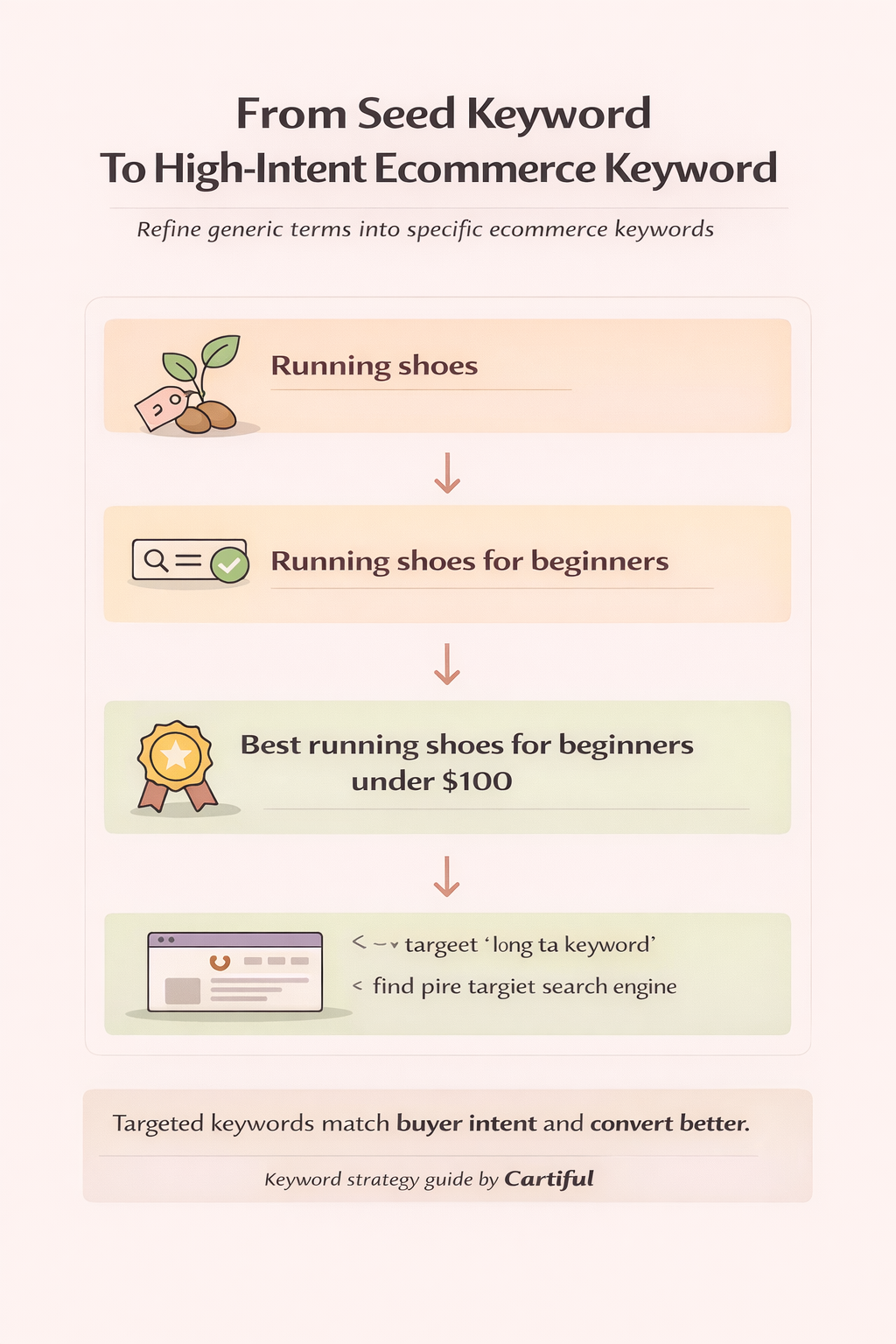
After expanding your keyword list, the next step is deciding which keywords are worth targeting. Not every keyword you find should be used. In ecommerce, the wrong priorities waste time and dilute rankings.
This section helps you filter keywords based on business value, intent strength, and feasibility.
Why prioritization matters in ecommerce SEO
Ecommerce stores often deal with:
- hundreds of products
- multiple categories
- limited time and resources
Trying to target everything at once leads to shallow optimization. Prioritization ensures your strongest pages go after the keywords most likely to drive revenue.
Core factors to evaluate ecommerce keywords
Intent strength
Intent tells you how close a keyword is to a purchase.
Higher priority keywords usually:
- include product attributes
- show comparison or buying signals
- clearly map to a category or product page
Lower priority keywords are often vague or purely informational without a clear path to conversion.
Relevance to inventory
A keyword should describe something you actually sell.
Ask:
- does this keyword match an existing product or category?
- can the page fully satisfy the search?
If the answer is no, the keyword should be deprioritized or ignored.
Feasibility and competition
Some keywords are valuable but unrealistic early on.
Consider:
- how strong the ranking competitors are
- whether results are dominated by large brands
- how well your page can match the intent
Early wins often come from mid-competition, high-intent keywords, not the biggest head terms.
Business value and AOV
Not all keywords contribute equally to revenue.
Higher priority keywords often:
- relate to higher-priced categories
- lead to bundles or multiple-item purchases
- attract repeat buyers
Ranking for a slightly lower-volume keyword that converts well often outperforms chasing traffic-heavy terms with low purchase intent.
A simple keyword prioritization framework
You don’t need complex scoring models. A simple evaluation works well:
| Keyword | Intent strength | Relevance | Feasibility | Priority |
| example keyword | high / medium / low | strong / weak | easy / medium / hard | high / medium / low |
This keeps decisions practical and consistent.
How many keywords should one page target?
A common mistake is assigning too many keywords to a single page.
Best practice:
- one primary keyword per page
- a small group of close variations
- related modifiers that support the main term
If a keyword feels different enough to deserve its own page, it probably does.
Avoiding keyword cannibalization
Keyword cannibalization happens when multiple pages compete for the same intent.
To avoid it:
- assign one page per primary intent
- keep product and category keywords separate
- use internal links to support, not compete
Clear prioritization prevents overlap and strengthens rankings.
What to deprioritize or ignore
Not every keyword deserves effort.
Deprioritize:
- keywords with unclear intent
- keywords unrelated to inventory
- keywords that require entirely new content without business value
Good keyword research is as much about what you ignore as what you target.
Keyword Mapping For Ecommerce Pages
Keyword mapping is the process of assigning each prioritized keyword to a specific page on your ecommerce site. This step turns keyword research into an actionable SEO plan and prevents multiple pages from competing for the same searches.
Without keyword mapping, even strong keywords fail to perform.
Why keyword mapping is critical for ecommerce
Ecommerce sites grow fast. New products, collections, and seasonal pages are added regularly. Without clear mapping:
- pages overlap in purpose
- rankings fluctuate
- internal linking becomes messy
- Google struggles to understand which page is most relevant
Keyword mapping creates clarity for both search engines and users.
The one-keyword-per-page rule (and how to apply it)
Each page should target:
- one primary keyword (the main intent)
- a small group of close variations
Variations should:
- share the same intent
- describe the same product or category
- fit naturally into the content
If a keyword introduces a new intent, it needs its own page.
Mapping keywords to category pages
Category pages work best for:
- broad commercial keywords
- comparison-style searches
- keywords with multiple product options
Example:
- Primary keyword: “running shoes”
- Variations:
- running shoes for men
- best running shoes for beginners
- lightweight running shoes
All of these share browsing and comparison intent, making them suitable for one category page.
Mapping keywords to product pages
Product pages should target:
- specific product names
- brand + model combinations
- purchase-focused keywords
Example:
- Primary keyword: “Nike Air Zoom Pegasus 40”
- Variations:
- nike pegasus 40 price
- buy nike pegasus 40 online
Product pages should not target broad category keywords, even if volume looks attractive.
Mapping keywords to blog and support content
Blog content supports ecommerce SEO when it:
- targets informational keywords
- answers pre-purchase questions
- links naturally to category and product pages
Example:
- Blog keyword: “how to choose running shoes”
- Supported pages:
- running shoes category
- beginner-friendly running shoes collection
This structure guides users from learning to buying.
Handling overlapping and edge-case keywords
Some keywords sit between categories and products.
In these cases:
- use curated landing pages
- create subcategories if demand is strong
- avoid forcing multiple intents into one page
If two pages feel like they could rank for the same keyword, choose one and support it internally.
Building a keyword-to-page map
A simple keyword map can include:
- page URL
- primary keyword
- supporting variations
- intent type
This becomes a reference document that keeps future SEO work consistent.
How keyword mapping improves performance
When mapping is done correctly:
- rankings stabilize
- click-through rates improve
- internal linking becomes intentional
- content creation aligns with revenue goals
Keyword mapping turns SEO from experimentation into a structured system.
On-Page Keyword Placement For Ecommerce Pages
Once keywords are mapped to the right pages, the next step is placing them correctly on the page. On-page keyword placement helps search engines understand what the page is about and helps shoppers quickly confirm they are in the right place.
This is not about stuffing keywords. It is about clarity, relevance, and usability.
Why on-page placement matters in ecommerce
Ecommerce pages must do two things at the same time:
- communicate relevance to search engines
- help shoppers make decisions quickly
When keywords are placed naturally and consistently, pages rank better and convert better.
Title tag and H1 alignment
The title tag is the strongest on-page signal.
Best practice:
- include the primary keyword once
- keep it readable and shopper-focused
- avoid repeating unnecessary words
The H1 should reinforce the same intent but does not need to be identical. Together, they signal strong relevance without duplication.
Category and collection page descriptions
Category descriptions help Google understand the page context and help users scan options.
Guidelines:
- include the primary keyword naturally
- mention key modifiers and use cases
- keep the content helpful, not salesy
Short, clear descriptions often outperform long, bloated text.
Product page descriptions
Product descriptions should:
- use the primary product keyword naturally
- highlight attributes shoppers care about
- answer common buying questions
Avoid writing only for search engines. Clear descriptions reduce bounce rate and support conversion.
Image alt text and media
Alt text improves accessibility and reinforces relevance.
Best practice:
- describe the image accurately
- include keywords only when they fit naturally
- avoid repeating the same keyword across every image
URLs and internal links
URLs should be:
- short
- descriptive
- aligned with the page’s primary keyword
Internal links help distribute relevance across the site. Use natural anchor text that reflects the page intent instead of forcing exact matches.
FAQs and expandable sections
FAQs are especially useful on category and product pages.
They help:
- answer long-tail questions
- reduce purchase hesitation
- support rich results when implemented correctly
Each FAQ should answer a real shopper question and relate directly to the page.
What to avoid in on-page optimization
Avoid:
- keyword stuffing
- repeating the same keyword in every element
- using one page to target multiple unrelated intents
Good on-page placement feels natural to the reader.
How on-page placement supports AEO and GEO
Clear headings, concise answers, and structured content make pages easier for search engines and AI systems to understand. This improves eligibility for featured snippets, AI overviews, and rich results without sacrificing user experience.
Using Keywords Across Paid Ads And Social Media
Ecommerce keyword research should not live only inside SEO. The same insights that help pages rank can also improve paid ads performance, landing page alignment, and social content relevance. When keywords are shared across channels, messaging becomes consistent and conversion paths become clearer.
Why keyword insights should be reused across channels
Keywords reveal:
- how shoppers describe problems
- what features they care about
- which words trigger buying intent
Using different language in ads, landing pages, and social posts creates friction. Reusing keyword language reduces confusion and improves performance.
Using keywords in paid search campaigns
High-intent ecommerce keywords are especially valuable for paid ads.
Best practices:
- transactional keywords → product-focused ad groups
- commercial keywords → category or collection landing pages
- avoid sending high-intent clicks to generic homepages
Keywords used in SEO titles and headings often perform well as ad headlines because they already match search intent.
Aligning landing pages with keyword intent
Paid traffic converts best when the keyword, ad copy, and landing page match perfectly.
For example:
- “best wireless earbuds under $100” → curated collection page
- “buy noise cancelling earbuds” → product or tightly focused landing page
Keyword research helps ensure that each ad sends users to the page most likely to convert.
Using keyword language in social media content
While social platforms are not keyword-driven like search engines, language still matters.
Keywords help:
- shape captions and hooks
- clarify product positioning
- match user expectations when ads or posts are clicked
Commercial keywords often translate well into:
- short-form video scripts
- carousel headlines
- comparison-style posts
Supporting organic SEO with paid data
Paid ads provide fast feedback.
You can use ad performance to:
- validate keyword intent
- identify high-converting phrases
- prioritize keywords for SEO pages
Keywords that consistently convert in ads are often strong candidates for deeper organic optimization.
Building a unified keyword system
A unified system means:
- the same core keywords guide SEO, ads, and social
- messaging stays consistent across channels
- insights compound instead of staying siloed
This approach reduces wasted spend and strengthens overall ecommerce growth.
Tracking Performance And Iterating Your Keyword Strategy
Keyword research is not a one-time task. In ecommerce, search behavior changes as products evolve, seasons shift, and competition increases. Tracking performance helps you understand what is working, what needs improvement, and where to focus next.
Why tracking matters in ecommerce keyword research
Without measurement, keyword decisions become assumptions.
Tracking allows you to:
- see which pages attract high-intent traffic
- identify keywords that drive revenue, not just clicks
- spot early ranking opportunities before competitors do
This turns keyword research into a repeatable system rather than a static list.
Key metrics to monitor regularly
Focus on metrics that connect keywords to business outcomes.
Important signals include:
- impressions and clicks for priority pages
- average ranking position for primary keywords
- click-through rate from search results
- conversion rate by landing page
- revenue generated from organic traffic
These metrics help determine whether keyword intent and page mapping are aligned.
Using Google Search Console for keyword insights
Google Search Console shows how your pages perform in real searches.
Use it to:
- find keywords ranking just outside page one
- identify pages with high impressions but low CTR
- detect new queries emerging for existing pages
Small optimizations often lead to noticeable gains.
Iterating keywords without breaking structure
Iteration does not mean constant page rewrites.
Smart iteration includes:
- refining titles and headings
- expanding FAQs based on new queries
- improving internal linking
- adjusting keyword focus slightly, not drastically
This preserves page authority while improving relevance.
Watching for cannibalization and overlap
As new pages are added, keyword overlap can occur.
Monitor:
- multiple pages ranking for the same keyword
- sudden ranking drops across similar pages
When overlap appears, reinforce the primary page and support it with internal links instead of creating duplicates.
Seasonal and trend-based updates
Some ecommerce keywords fluctuate by season.
Prepare for:
- holiday and sale-related keywords
- product launches and new variations
- changing shopper preferences
Updating pages early gives search engines time to re-evaluate relevance.
Turning tracking into a growth loop
The most effective ecommerce keyword strategies follow a loop:
- research and map keywords
- optimize pages
- track performance
- refine and expand
This loop keeps keyword research aligned with growth rather than one-off optimization.
Final takeaway
Ecommerce keyword research works when it reflects how people actually shop, not just how tools report data. Keywords need to match intent, page type, and timing across the buying journey. When research, mapping, and measurement work together, SEO stops being experimental and starts driving predictable growth.
Cartiful helps ecommerce brands turn keyword research into action, connecting SEO, paid ads, and landing pages so traffic is not only visible, but conversion-ready. If you want a keyword strategy built around revenue pages instead of guesswork, Cartiful can help you structure it right.
FAQs: Keyword Research Guide For Ecommerce
What is ecommerce keyword research?
Ecommerce keyword research is the process of finding search terms shoppers use to browse, compare, and buy products online. It focuses on matching keywords to the correct page types—such as category pages, product pages, or guides—so traffic aligns with buying intent and can convert.
How is ecommerce keyword research different from blog keyword research?
Blog keyword research targets informational intent, while ecommerce keyword research targets commercial and transactional intent. Ecommerce keywords must lead to pages that allow comparison, selection, and purchase, not just explanations or answers.
How many keywords should a product page target?
A product page should target one primary keyword and a small group of close variations that share the same intent. Targeting too many keywords or mixed intent can confuse search engines and reduce rankings.
Should category pages target long-tail keywords?
Yes. Category pages often perform best when they target long-tail commercial keywords with modifiers such as use case, price range, or attributes. These keywords usually convert better than broad head terms.
What are commercial vs transactional keywords in ecommerce?
Commercial keywords indicate comparison and evaluation (such as “best running shoes for flat feet”), while transactional keywords show purchase intent (such as “buy nike running shoes”). Commercial keywords fit the category or landing pages, while transactional keywords fit product pages.
How do I avoid keyword cannibalization in an ecommerce store?
Avoid cannibalization by assigning one primary keyword per page, separating category and product intent, and using internal links to support priority pages instead of competing with them.
Which tools are best for ecommerce keyword research?
Effective ecommerce keyword research uses multiple sources, including Google Search Console, Google autocomplete, keyword planners, competitor pages, internal site search data, and marketplace search behavior. No single tool is enough on its own.
How does keyword research support paid ads and social media?
Keyword research reveals the language shoppers use at different stages of intent. These insights improve ad targeting, landing page alignment, and social content clarity, helping campaigns convert more efficiently across channels.