
Technical SEO for ecommerce is the infrastructure that allows search engines to properly crawl, understand, and index your online store. Unlike simple websites, ecommerce platforms generate thousands of URLs through products, filters, variants, and pagination. Without proper control, this creates duplication, crawl waste, and indexing issues.
This guide explains how to structure, manage, and optimize your store’s technical foundation so high-value pages rank efficiently while low-value URLs stay out of the way.
How Search Engines Crawl Ecommerce Websites
Before rankings happen, crawling happens.
Search engines use automated bots to discover pages by following links. They move from your homepage to categories, from categories to products, and through internal links across your store. If a page is not properly linked or is buried too deep, it may never be discovered.
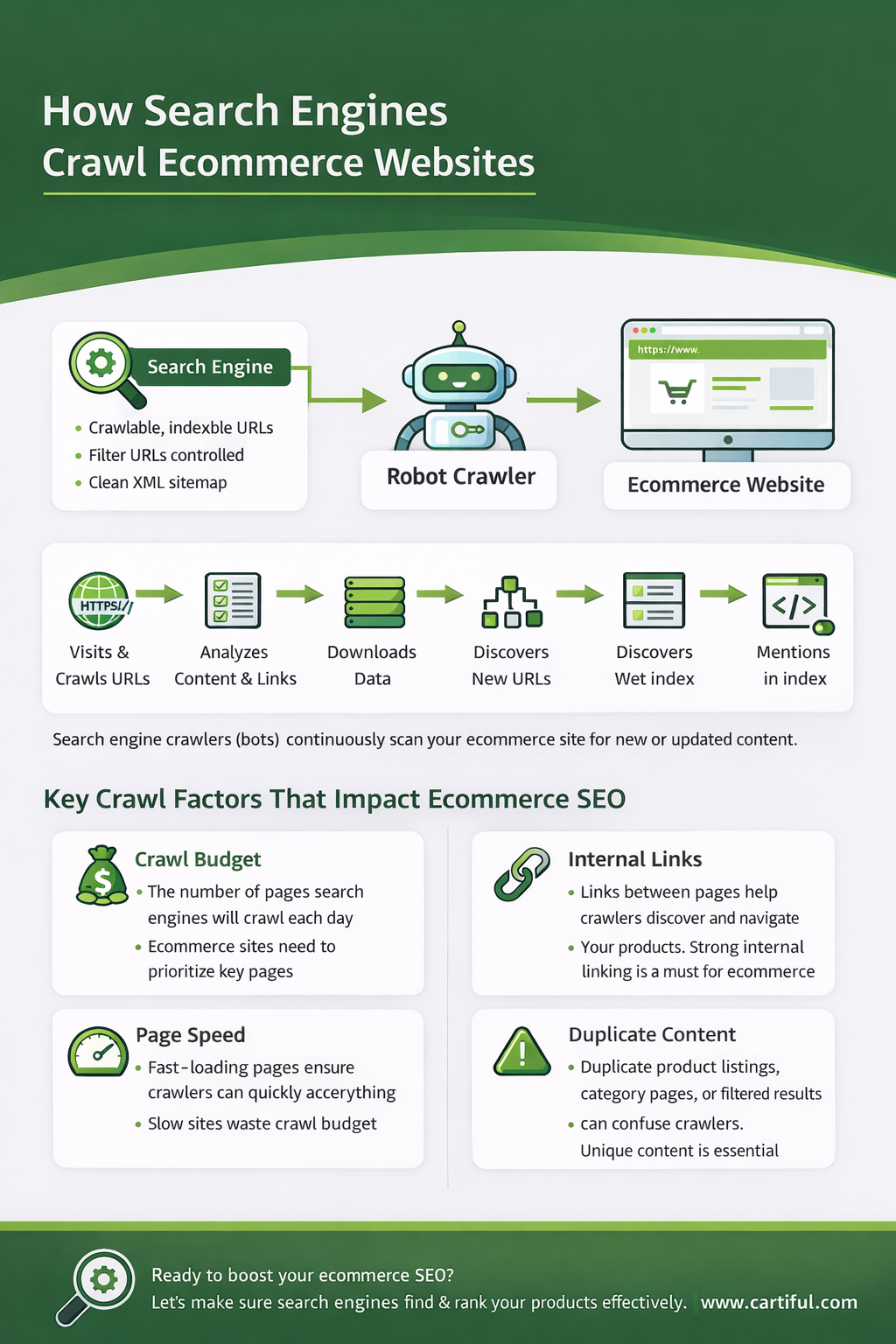
Ecommerce websites create unique crawling challenges because of scale. A small blog might have 100 URLs. An online store can easily generate thousands through:
- Product pages
- Category and subcategory layers
- Faceted filters (color, size, price, brand)
- Sorting parameters
- Internal search result pages
- Pagination
Without control, bots spend time crawling duplicate or low-value URLs instead of your important product and category pages.
Crawl Budget in Ecommerce
Crawl budget refers to the number of pages search engines allocate to crawl on your website within a given timeframe. Large ecommerce stores must manage this carefully.
If search engines waste resources crawling filter combinations or parameter URLs, they may:
- Delay indexing new products
- Miss updated inventory
- Ignore deeper pages
- Revisit low-value URLs repeatedly
Indexing Control: What Should and Shouldn’t Be Indexed
Crawling discovers pages.
Indexing decides which pages are eligible to rank.
Not every page on your ecommerce site should be indexed. One of the biggest technical SEO mistakes is allowing everything to enter the index.
More indexed pages does not mean more traffic. It often means more dilution.
Pages That Should Be Indexed
These are your value-driving assets:
- Homepage
- Core category pages
- High-demand subcategories
- Active product pages
- Strategic buying guides or blog content
These pages target real search intent and deserve visibility.
Pages That Often Should NOT Be Indexed
Many ecommerce platforms automatically generate pages that provide little unique value.
Common examples:
- Filter combinations (e.g., ?color=black&size=large&price=low)
- Sorting parameters (?sort=price-desc)
- Internal search result pages
- Duplicate tag archives
- Tracking parameter URLs
Indexing these pages creates duplication and weakens overall site quality signals.
Noindex vs Canonical: When to Use Each
This is where confusion happens.
Canonical Tag
Use when multiple URLs show similar content but you want one preferred version indexed.
Example:
Filtered category URLs → canonical to main category.
Canonical says:
“This page exists, but treat this other page as the main version.”
Noindex Tag
Use when a page should not appear in search results at all.
Example:
Internal search result pages.
Noindex says:
“This page should not be in the index.”
Common Indexing Mistakes
- Important categories accidentally set to noindex
- Product variants indexed separately without purpose
- Canonical pointing to irrelevant pages
- Filter URLs left fully indexable
Index control is about intentional visibility.
Perfect. Now we’re moving into the structural backbone. This section needs depth because architecture is where ecommerce SEO either scales… or collapses quietly.
Ecommerce Site Architecture: The Foundation of Scalable SEO
If crawling is discovery and indexing is eligibility, site architecture is control.
Architecture determines:
- How easily bots reach important pages
- How authority flows across your store
- How users navigate categories
- How scalable your SEO becomes as you add products
Ecommerce stores are not static websites. They grow. New products are added weekly. Categories expand. Filters multiply. Without a structured hierarchy, complexity spirals.
Let’s break this down properly.
The Ideal Ecommerce Hierarchy
At a high level, your structure should look like this:
Homepage
→ Main Categories
→ Subcategories
→ Products
This creates logical layers.
Each level narrows intent.
Example:
Homepage
→ Office Furniture
→ Office Chairs
→ Leather Office Chairs
→ ErgoMax Executive Chair
This structure does three important things:
- Establishes topical relevance
- Creates contextual internal links
- Keeps authority flowing logically downward
Search engines interpret structure as meaning.
Flat vs Deep Architecture
A deep structure looks like this:
Homepage
→ Category
→ Subcategory
→ Sub-subcategory
→ Filtered Page
→ Product
That’s 5–6 clicks deep.
The deeper a page is, the weaker it tends to be from a crawl and authority perspective.
A flatter structure keeps important pages within 3 clicks from the homepage whenever possible.
Why Click Depth Matters
Search engines prioritize:
- Frequently linked pages
- Pages closer to the root
- Pages that are easier to discover
If your best-selling product is buried 6 layers deep with no contextual links pointing to it, it sends a weak signal.
The goal is not zero depth. The goal is controlled, intentional depth.
Internal Linking as Structural Reinforcement
Architecture isn’t just navigation menus.
It includes:
- Breadcrumbs
- Related products
- Featured collections
- Blog-to-category links
- Category cross-linking
Strong ecommerce architecture reinforces key pages from multiple directions.
For example:
- Homepage links to top categories
- Categories link to best sellers
- Blog posts link to commercial pages
- Products link back to relevant categories
This creates a web of relevance instead of isolated silos.
Category Design and SEO Scalability
Categories are not just organizational folders. They are SEO assets.
Well-designed category structures:
- Target meaningful search demand
- Avoid overlapping themes
- Prevent cannibalization
- Allow expansion without duplication
Bad structure example:
- “Office Chairs”
- “Chairs for Office”
- “Executive Chairs”
- “Premium Office Chairs”
If these overlap heavily, search engines struggle to differentiate them.
Instead, categories should have clear thematic boundaries.
Clarity reduces competition between your own pages.
Breadcrumbs: Structural Signals in Action
Breadcrumbs do two important things:
- Help users understand where they are
- Help search engines understand hierarchy
Example:
Home > Office Furniture > Office Chairs > Leather Office Chairs
Breadcrumb structure reinforces architecture programmatically.
When combined with breadcrumb structured data, it strengthens hierarchical clarity.
Scaling Architecture for Large Catalogs
As stores grow:
- New categories should fit logically into existing hierarchy
- Avoid creating random top-level categories
- Maintain naming consistency
- Avoid duplicating similar structures under different labels
If structure changes frequently, authority gets diluted.
Think long-term before expanding category trees.
Now we enter one of the most persistent technical problems in ecommerce.
Duplicate Content in Ecommerce: Where It Comes From and How to Fix It
Duplicate content in ecommerce is rarely intentional. It’s structural.
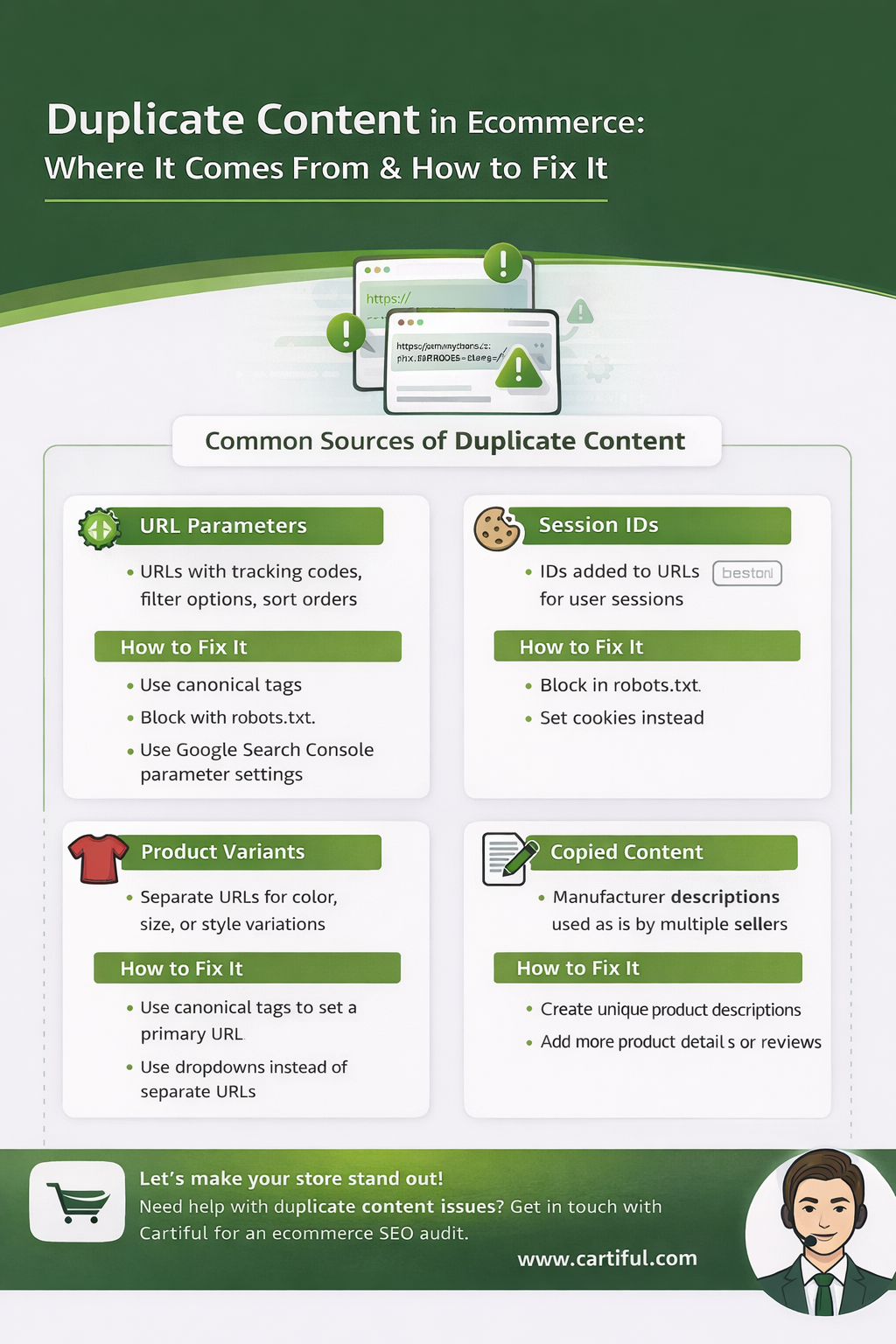
Online stores naturally generate multiple URLs that display identical or near-identical content. When search engines encounter duplication at scale, they must choose which version to rank, and often, they choose inconsistently.
The result:
- Keyword cannibalization
- Index bloat
- Crawl waste
- Unstable rankings
Let’s break down the main sources of duplication in ecommerce and how to control each one properly.
Product Variants (Color, Size, Material)
This is the most common duplication source.
Example:
- /ergomax-chair-black
- /ergomax-chair-brown
- /ergomax-chair-large
If these URLs contain identical descriptions and only minor attribute changes, search engines may see them as duplicates.
Fix Strategy
If variants live on separate URLs:
- Use canonical tags to point to the primary version (if variants don’t deserve independent ranking).
- Ensure each variant page adds meaningful unique content if it remains indexable.
If variants live under one URL with selectable options:
- Keep a single canonical.
- Use structured data properly to represent offers.
The key principle:
Only index pages that offer distinct search value.
Faceted Navigation (Filters Creating URL Explosions)
Filters can create thousands of combinations:
- /office-chairs?color=black
- /office-chairs?color=black&price=under-200
- /office-chairs?color=black&price=under-200&brand=ergomax
Each URL loads similar content.
Why This Is Dangerous
- Consumes crawl budget
- Creates near-duplicate pages
- Dilutes ranking signals
Fix Strategy
- Canonical filtered URLs to the main category page (unless strategically optimized).
- Use noindex for low-value combinations.
- Only allow indexation for filter combinations with real search demand.
Controlled expansion beats automatic expansion.
Sorting and Parameter URLs
Examples:
- ?sort=price-asc
- ?sort=rating
- ?utm_source=ads
These URLs show the same content, just arranged differently.
Fix Strategy
- Canonical to clean version.
- Prevent indexing of parameter-based URLs.
- Use consistent URL structure.
Sorting should improve usability, not create index clutter.
Manufacturer Descriptions
Many ecommerce stores copy product descriptions provided by manufacturers.
This creates duplication across multiple websites.
While search engines do not “penalize” duplicate content automatically, they choose one version as primary. If your content is identical to dozens of competitors, your page has no differentiation advantage.
Fix Strategy
- Rewrite descriptions uniquely.
- Add use cases.
- Include FAQs.
- Add structured specification sections.
- Provide unique value beyond supplier copy.
Uniqueness increases ranking potential.
Session IDs and Tracking Parameters
Some platforms append dynamic parameters:
- ?sessionid=
- ?ref=
- ?campaign=
These create infinite URL variations.
Fix Strategy
- Canonical to clean URL.
- Configure parameter handling.
- Ensure sitemaps only include clean versions.
Duplicate Categories
Sometimes stores create overlapping categories like:
- “Luxury Office Chairs”
- “Premium Office Chairs”
- “High-End Office Chairs”
If product sets overlap heavily and content is thin, duplication occurs conceptually — even if URLs differ.
Fix Strategy
- Consolidate similar categories.
- Clarify keyword mapping.
- Strengthen thematic boundaries.
Clarity reduces internal competition.
Systematic Duplicate Control Checklist
- Self-referencing canonicals on all indexable pages
- Filter URLs controlled
- Parameter URLs canonicalized
- Manufacturer content rewritten
- Overlapping categories merged
- Sitemap includes only clean URLs
Excellent. Now we refine the technical layer that quietly affects everything.
URL Structure and Technical Hygiene
URLs are more than addresses. They communicate structure, hierarchy, and clarity to search engines.
A clean URL tells search engines exactly what a page represents. A messy one introduces ambiguity.
In ecommerce, poor URL management often leads to duplication, crawl waste, and diluted authority.
Let’s structure this properly.
Clean, Logical URL Structure
A good ecommerce URL should be:
- Short
- Readable
- Keyword-aligned
- Hierarchical
- Free from unnecessary parameters
Example of strong structure:
/office-furniture/office-chairs/leather-office-chairs/
/office-chairs/ergomax-executive-leather-chair/
Bad example:
/prod?id=38472&cat=12&ref=abc&utm=paid
Search engines prefer clarity over complexity.
Consistent URL Hierarchy
Hierarchy should reflect your architecture.
If your structure is:
Homepage
→ Office Furniture
→ Office Chairs
→ Leather Office Chairs
Your URLs should reflect that logic consistently.
Avoid mixing structures like:
- /office-chairs/leather/
- /leather-chairs-office/
- /chairs/premium/leather/
Consistency reinforces topical grouping.
Avoid Dynamic URL Clutter
Dynamic parameters often create duplication:
- ?color=black
- ?size=large
- ?sort=price
- ?ref=campaign
If left uncontrolled, these generate multiple crawlable versions of the same page.
Best practice:
- Keep the clean version as canonical.
- Prevent indexing of parameterized URLs unless strategically optimized.
- Avoid including parameters in XML sitemaps.
Dynamic URLs should improve user filtering, not expand your index artificially.
Avoid Frequent URL Changes
Changing URLs breaks accumulated authority.
If you must change a URL:
- Implement a proper 301 redirect.
- Update internal links.
- Update sitemaps.
- Monitor indexing in Google Search Console.
Frequent restructuring weakens SEO stability.
Structure once. Improve content later.
Use Hyphens, Not Underscores
Search engines treat hyphens as word separators.
Use:
leather-office-chair
Avoid:
leather_office_chair
This is a small detail, but consistency matters at scale.
Avoid Over-Nesting Subfolders
Too many nested folders increase depth unnecessarily.
Example of over-nesting:
/store/products/furniture/office/chairs/leather/ergomax/
Keep important product URLs within a manageable structure.
Simplicity supports crawl efficiency.
Technical Hygiene Beyond URLs
Technical hygiene also includes:
- No broken internal links
- No redirect chains
- No mixed protocol issues (HTTP/HTTPS conflicts)
- Proper HTTPS enforcement
- Clean 404 handling
Broken technical hygiene introduces friction.
Friction reduces crawl confidence.
Now we move into guidance signals.
If architecture defines structure, XML sitemaps define priority.
XML Sitemaps for Ecommerce
An XML sitemap is a structured file that tells search engines which URLs exist on your site and which ones you consider important.
For small websites, sitemaps are helpful.
For ecommerce websites, they are essential.
Large stores often contain thousands of URLs. Without a clean sitemap strategy, search engines may crawl unnecessary pages while missing high-value ones.
What an Ecommerce Sitemap Should Include
Only include URLs that:
- Are indexable
- Return 200 status codes
- Contain valuable content
- Represent your preferred canonical version
Typically, this includes:
- Homepage
- Core category pages
- Subcategories
- Active product pages
- Strategic blog content
Your sitemap should represent your “ideal index.”
If you wouldn’t want a page ranking, it should not be in your sitemap.
What an Ecommerce Sitemap Should NOT Include
Avoid including:
- Noindexed pages
- Filtered parameter URLs
- Internal search result pages
- Redirected URLs
- Duplicate product variants
- Outdated or discontinued URLs (if redirected)
A cluttered sitemap sends mixed signals.
Clarity increases crawl efficiency.
Large Store Sitemap Strategy
For ecommerce stores with thousands of products, one sitemap is often not enough.
Best practice:
- Separate sitemaps by type (products, categories, blog)
- Use a sitemap index file
- Keep each sitemap under 50,000 URLs
- Automatically update when products are added or removed
This improves crawl management and scalability.
Updating Frequency and Accuracy
Your sitemap should update when:
- New products are added
- Products are removed or redirected
- Categories change
- URLs change
Outdated sitemaps reduce trust signals.
Automated generation through your platform is usually best.
Submitting and Monitoring
Submit your sitemap in Google Search Console to ensure search engines can access it properly.
Monitor:
- Indexed vs submitted URLs
- Coverage errors
- Excluded pages
Sitemaps don’t force indexing.
They guide discovery.
Core Web Vitals and Performance for Ecommerce
Technical SEO isn’t only about crawlability. It’s also about usability.
Ecommerce websites are typically heavier than blogs. They contain:
- High-resolution product images
- Third-party scripts
- Tracking pixels
- Review widgets
- Payment integrations
- Marketing apps
All of these add weight.
Performance directly impacts:
- User experience
- Conversion rate
- Bounce rate
- Search visibility stability
Why Speed Matters More for Ecommerce
If a blog loads in 3 seconds, a reader might wait.
If a product page loads in 3–4 seconds, a buyer might leave.
Ecommerce traffic is high intent. Slow load times interrupt purchase momentum.
Search engines measure performance signals using Core Web Vitals, which evaluate real-world user experience.
These focus on:
- Loading performance
- Interactivity
- Visual stability
While speed alone does not guarantee rankings, slow websites consistently underperform.
Common Ecommerce Speed Problems
Most ecommerce stores slow down due to:
1) Large, Uncompressed Images
High-quality product images are necessary, but oversized files increase load time.
2) Too Many Apps or Plugins
Each installed app adds scripts and network requests.
3) Heavy Themes
Over-designed themes often include unused CSS and JavaScript.
4) Render-Blocking Scripts
Scripts that prevent page content from loading quickly affect performance metrics.
5) Excessive Tracking Pixels
Multiple ad platforms and tracking codes increase resource load.
Practical Performance Improvements
You don’t need to be a developer to improve performance.
Start with:
- Compressing and resizing images properly
- Removing unnecessary apps
- Auditing third-party scripts
- Lazy loading images below the fold
- Using a lightweight theme
- Leveraging browser caching
For advanced stores, consider:
- Content delivery networks (CDNs)
- Code splitting
- Script deferral
Small optimizations compound across thousands of product pages.
Mobile Performance Is Non-Negotiable
Search engines primarily evaluate mobile versions of websites.
If your mobile layout:
- Loads slowly
- Shifts content while loading
- Hides key content
- Breaks navigation
It affects both rankings and conversions.
Test mobile performance first, not desktop.
Mobile-First Indexing and Ecommerce: What Actually Matters
Search engines now primarily use the mobile version of your website for indexing and ranking. This is called mobile-first indexing.
That means:
- The mobile version determines what gets indexed.
- The mobile content determines what ranks.
- The mobile experience determines performance signals.
If your mobile version is weaker than your desktop version, your rankings can suffer — even if your desktop site is perfect.
For ecommerce stores, this is critical because most traffic now comes from mobile devices.
What Mobile-First Indexing Really Means
Mobile-first indexing does not mean “mobile-friendly.”
It means search engines evaluate:
- Mobile content
- Mobile layout
- Mobile structured data
- Mobile internal links
- Mobile performance
If something exists on desktop but is hidden or missing on mobile, it may not be considered fully.
For ecommerce, common mistakes include:
- Hiding product descriptions on mobile
- Collapsing important content behind expandable tabs that don’t load properly
- Removing internal links to simplify layout
- Using lightweight mobile pages that lack full content
Mobile content parity is essential.
Content Parity Between Desktop and Mobile
Content parity means the mobile version must contain the same important content as desktop.
For product pages, ensure mobile includes:
- Full product description
- Specifications
- Reviews
- FAQs
- Internal links
- Breadcrumbs
- Structured data
If mobile shows only a short summary while desktop shows detailed specs, search engines primarily see the mobile version.
That weakens ranking signals.
Mobile Navigation and Crawlability
Mobile menus often use:
- Hamburger navigation
- Collapsible sections
- Dynamic loading
If internal links are hidden behind JavaScript that search engines cannot easily process, crawlability suffers.
Best practices:
- Ensure category links are accessible in mobile navigation.
- Avoid blocking internal links inside scripts.
- Test mobile crawlability using Search Console tools.
Navigation simplification should not reduce crawl access.
Mobile Performance Challenges in Ecommerce
Mobile users often experience:
- Slower connections
- Smaller devices
- Higher impatience
Common mobile issues:
- Large hero banners
- Auto-playing videos
- Heavy third-party scripts
- Sticky pop-ups
- Intrusive overlays
Mobile speed affects both rankings and revenue.
If your mobile product page takes too long to load, users leave before adding to cart.
Responsive vs m-dot Websites
Modern ecommerce stores should use responsive design.
Responsive design:
- Uses one URL
- Adjusts layout based on screen size
- Avoids duplication between desktop and mobile versions
Older “m-dot” sites (like m.example.com) create complexity:
- Duplicate content
- Separate canonicals
- Redirect issues
- Tracking inconsistencies
Responsive architecture simplifies SEO control.
Structured Data on Mobile
Structured data must exist in the mobile HTML.
If schema is dynamically injected or removed on mobile, rich result eligibility may break.
Ensure:
- Product schema is consistent across devices
- Breadcrumb schema is present
- FAQ schema matches visible mobile content
Search engines do not treat desktop and mobile schema separately. They prioritize mobile.
Mobile UX and Conversion Signals
Even beyond indexing, mobile experience affects:
- Bounce rate
- Time on page
- Engagement
- Conversion rate
Technical SEO and UX overlap here.
If:
- Add-to-cart buttons are hidden
- Checkout flow is clunky
- Layout shifts while loading
Then mobile performance indirectly weakens overall site quality signals.
Mobile SEO Audit Checklist for Ecommerce
Check:
- Content parity between desktop and mobile
- Internal links accessible on mobile
- Structured data present
- No mobile-only noindex tags
- Mobile speed performance acceptable
- No intrusive interstitial penalties
Mobile-first indexing means mobile is not secondary.
It is primary.
Technical SEO for Large Product Catalogs
Small stores can survive with imperfect structure.
Large stores cannot.
Once your catalog grows into hundreds or thousands of products, small technical weaknesses multiply. Pagination expands. Filters explode. Inventory changes daily. Discontinued products accumulate. Crawl budget becomes real.
This section focuses on how to maintain technical stability as your ecommerce store scales.
Pagination Strategy: Preventing Crawl and Authority Fragmentation
Large category pages often span multiple paginated URLs:
- /office-chairs
- /office-chairs?page=2
- /office-chairs?page=3
Pagination exists to improve usability, but it also affects crawl flow and authority distribution.
Why Pagination Matters
If search engines cannot properly access paginated pages:
- Deeper products may never be crawled.
- Older products may disappear from the index.
- Authority may concentrate only on page one.
Best Practices for Pagination
- Ensure paginated URLs are crawlable.
- Do not block them in robots.txt.
- Avoid canonicalizing all paginated pages to page one.
- Maintain internal linking consistency.
- Ensure product links exist on each page.
Paginated pages should serve as discovery pathways, not SEO dead ends.
Infinite Scroll: The Hidden Crawl Trap
Many ecommerce stores use infinite scroll to improve user experience.
The problem: search engines do not scroll.
If infinite scroll loads products dynamically without crawlable pagination URLs in the background, deeper products become invisible.
Correct Implementation
- Infinite scroll should progressively load content.
- Underlying paginated URLs must still exist.
- Each pagination URL must be accessible and indexable.
- Internal links must exist in HTML, not only via JavaScript events.
UX improvements should not remove crawl pathways.
Out-of-Stock Products: Retain or Remove?
Inventory fluctuation is normal in ecommerce.
Technical SEO decisions here impact long-term authority.
Temporary Out of Stock
Keep the page live.
Why?
- The URL has historical authority.
- The page may still rank.
- It may attract backlinks.
- Users may return when restocked.
Add:
- Clear out-of-stock notice
- Alternative product suggestions
- Email restock notifications
Do not remove temporarily unavailable products.
Permanently Discontinued Products
Here you have options:
- Redirect to closest relevant alternative.
- Redirect to parent category.
- Keep page live with explanation and alternatives (if it has strong traffic).
Avoid mass 404 responses for high-value URLs. That wastes accumulated authority.
Managing Large Filter Structures
Large catalogs often include multiple filtering dimensions:
- Brand
- Size
- Price
- Color
- Rating
- Availability
Each combination multiplies URLs exponentially.
Without control, you may create tens of thousands of crawlable variations.
Scalable Filter Strategy
- Identify filter combinations with real search demand.
- Only allow strategic combinations to be indexable.
- Canonical the rest.
- Monitor crawl stats in Search Console.
Expansion should be intentional, not automatic.
Product Lifecycle Management
As your store scales:
- New products are added weekly.
- Old products are discontinued.
- Prices change.
- Variants expand.
Technical SEO must adapt to lifecycle changes.
Key processes:
- Automatic sitemap updates.
- Proper 301 redirect handling.
- Schema price updates.
- Regular crawl audits.
- Thin product detection.
SEO for large stores is operational discipline.
Crawl Budget Prioritization for Large Stores
As your catalog grows, search engines allocate crawl resources strategically.
If bots repeatedly crawl:
- Filtered URLs
- Session parameters
- Thin tag pages
They may reduce frequency on:
- New product launches
- Updated high-value categories
How to Protect Crawl Budget
- Eliminate crawl traps.
- Simplify navigation.
- Control duplicate URLs.
- Monitor crawl statistics.
- Keep internal linking focused on important assets.
Scale without control leads to dilution.
Scale with structure leads to compounding growth.
Monitoring at Scale
Large ecommerce stores must track:
- Indexed pages vs submitted pages
- Crawl errors
- Duplicate page clusters
- Soft 404 reports
- Mobile performance issues
- Structured data errors
Technical SEO at scale requires monitoring systems, not one-time audits.
Excellent. Now we move into automation and precision — because structured data becomes exponentially more complex as your product catalog grows.
Structured Data at Scale: Automation, Monitoring, and Consistency
Adding Product schema to 10 pages is simple.
Maintaining accurate structured data across 5,000 products is operational discipline.
At scale, schema errors multiply quickly:
- Price mismatches
- Availability inconsistencies
- Missing fields
- Duplicate schema blocks
- Outdated discontinued products
Structured data must evolve with your catalog.
Automating Product Schema Correctly
Most ecommerce platforms generate Product schema automatically. That’s helpful — but automation must be accurate.
Each product page should dynamically pull:
- Product name
- Description
- Image
- SKU
- Brand
- Price
- Currency
- Availability
The key principle:
Schema must reflect real-time page content.
If your price changes from $199 to $179 and your schema still shows $199, eligibility for rich results may break.
Automation must sync with inventory and pricing databases.
Handling Variants in Structured Data
Variants introduce complexity.
If your product has:
- 5 sizes
- 3 colors
- 2 materials
You must decide how to represent those offers.
Common scalable approach:
- Single Product entity
- Multiple Offer entries
- Dynamic availability per variant
The schema structure must mirror how variants function on-page.
Do not mark up each variant as separate indexed product unless they truly deserve separate ranking.
Consistency prevents confusion.
Monitoring Structured Data Errors
As catalogs grow, schema issues appear.
Regularly monitor:
- Structured data enhancement reports in Google Search Console
- Errors vs warnings
- Sudden drops in valid items
- Rich result eligibility changes
Common large-store issues:
- Missing “price” field after inventory update
- Out-of-stock products still marked as InStock
- Schema removed due to theme update
- Duplicate structured data from multiple plugins
Structured data monitoring should be ongoing, not reactive.
Breadcrumb and Hierarchy Consistency
Breadcrumb schema must match:
- Visible breadcrumb navigation
- Site hierarchy
- URL structure
If breadcrumbs show:
Home → Furniture → Chairs → Leather Chairs
But URL shows:
/office-chairs/leather/
Mismatch weakens clarity signals.
At scale, automated breadcrumb generation must stay aligned with architecture changes.
FAQ and Review Schema Governance
Large stores often accumulate:
- Hundreds of reviews
- FAQ modules
- Q&A sections
Structured data must:
- Only reflect visible reviews
- Update aggregate rating dynamically
- Avoid duplicating ratings sitewide
- Avoid marking up hidden FAQs
Improper review markup is one of the most common structured data violations in ecommerce.
Accuracy > Aggression.
Schema and Product Lifecycle
When products are:
- Discontinued
- Redirected
- Temporarily unavailable
Schema must update accordingly.
If a product is redirected but schema remains active elsewhere, errors accumulate.
Lifecycle management must include:
- Removing schema for redirected URLs
- Updating availability instantly
- Reflecting final price changes
Structured data cannot be static in a dynamic store.
Scalable Governance System
For large ecommerce operations, structured data requires:
- Automated generation
- Weekly validation checks
- Monthly audit of errors
- Change tracking after theme or app updates
- Clear ownership (developer or SEO lead)
Structured data at scale is not about adding more fields.
It’s about maintaining accuracy across thousands of URLs.
Log File Analysis: Seeing How Search Engines Actually Crawl Your Store
Everything we’ve discussed so far is based on theory and best practices.
Log files show reality.
Server log files record every request made to your website, including when search engine bots visit specific URLs. For large ecommerce stores, log analysis reveals:
- Which pages are crawled frequently
- Which pages are ignored
- Where crawl budget is being wasted
- How often new products are discovered
- Whether important pages are under-crawled
It’s the closest you get to observing search engine behavior directly.
What Log Files Contain
Server logs typically include:
- IP address of the requester
- User agent (identifies Googlebot, Bingbot, etc.)
- Timestamp
- Requested URL
- HTTP status code (200, 301, 404, etc.)
- Response size
From this data, you can analyze crawl patterns over time.
For ecommerce sites, patterns matter more than individual visits.
What to Look for in Ecommerce Log Analysis
1) Crawl Frequency Distribution
Are bots spending time on:
- Filter URLs?
- Parameter-based URLs?
- Old discontinued products?
- Internal search pages?
Or are they prioritizing:
- Core categories
- High-revenue products
- Newly added SKUs
If bots focus on low-value URLs, crawl waste exists.
2) Crawl Depth Patterns
Check whether deeper product pages are being crawled.
If page 1 of a category is crawled daily but page 4 is rarely crawled, deeper products may struggle to get indexed.
This often signals:
- Poor pagination handling
- Weak internal linking
- Excessive crawl traps
3) Status Code Monitoring
Log files show real crawl errors:
- 404 responses
- 500 server errors
- Redirect chains
- Soft 404 pages
Frequent server errors reduce crawl trust and efficiency.
4) New Product Discovery Speed
For growing ecommerce stores, speed of indexation matters.
Logs can reveal:
- How quickly Googlebot visits newly added products
- Whether new products are ignored
- If sitemap updates are being followed
Slow discovery often means internal linking or crawl prioritization issues.
Common Ecommerce Crawl Problems Revealed by Logs
- Bots repeatedly crawling filtered URLs
- Crawling internal search result pages
- Re-crawling outdated discontinued products
- Ignoring deeper category layers
- High frequency of 301 redirects
Log analysis replaces assumptions with data.
When Log Analysis Is Worth It
Log file analysis is most valuable when:
- Your store has thousands of products
- Indexing delays occur
- Crawl budget seems limited
- New pages aren’t ranking
- You suspect crawl inefficiency
For smaller stores, standard auditing tools may be enough.
For large ecommerce operations, logs reveal hidden bottlenecks.
Technical Discipline at Scale
As your ecommerce store grows, technical SEO shifts from optimization to governance.
Log analysis helps you:
- Identify crawl waste
- Reallocate crawl focus
- Fix structural inefficiencies
- Monitor crawl behavior after major updates
Technical SEO Checklist for Ecommerce Websites
This is your operational layer.
Use this section as a recurring audit framework, quarterly for small stores, monthly for large catalogs.
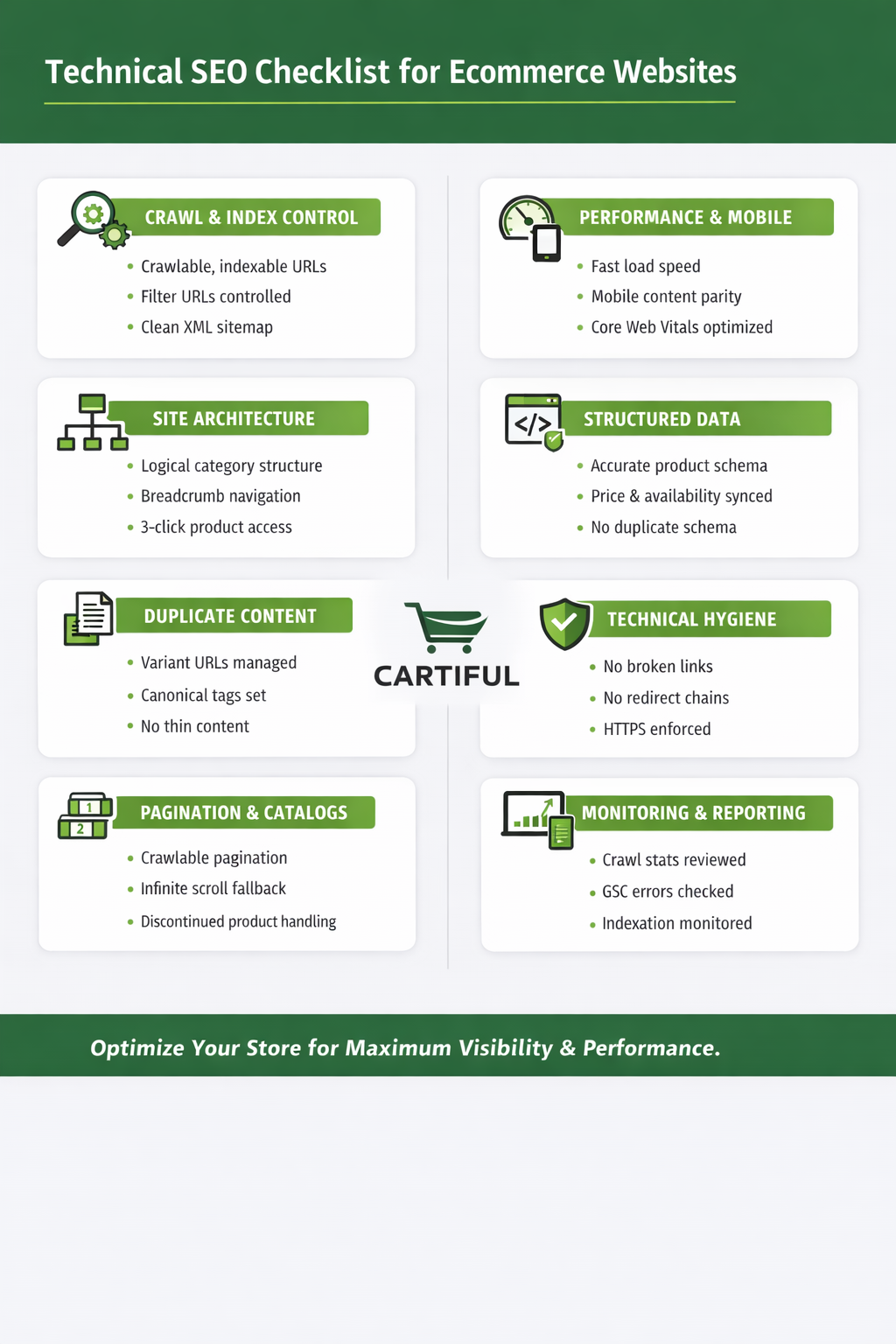
We’ll divide it into logical segments.
A) Crawl & Index Control
- Important pages are crawlable and not blocked in robots.txt
- Only high-value pages are indexable
- Filter combinations are controlled
- Sorting parameters are canonicalized
- Internal search pages are noindexed
- Canonical tags are self-referencing on all indexable pages
- No canonical chains
- No accidental noindex on categories or products
- XML sitemap contains only clean, indexable URLs
- Sitemap updates automatically
B) Site Architecture & Internal Linking
- Homepage links to primary categories
- Categories link to subcategories logically
- Products linked within 3 clicks from homepage
- Breadcrumb navigation consistent and crawlable
- No orphan products
- No unnecessary duplicate category structures
- Clear hierarchy reflected in URL structure
C) Duplicate Content Control
- Product variants managed properly
- Manufacturer descriptions rewritten
- Filter-generated URLs controlled
- Session parameters canonicalized
- No duplicate categories targeting same intent
- Redirected URLs removed from sitemap
D) Pagination & Large Catalog Management
- Pagination crawlable
- Infinite scroll implemented with fallback pagination
- Page 2+ not canonicalized to page 1
- Out-of-stock products handled strategically
- Discontinued products redirected logically
- Crawl depth monitored
E) Performance & Mobile
- Mobile content parity with desktop
- Core Web Vitals within acceptable thresholds
- Images compressed
- Unused apps/plugins removed
- JavaScript minimized where possible
- No intrusive mobile interstitials
F) Structured Data Governance
- Product schema accurate
- Price and availability synced dynamically
- AggregateRating only used with real reviews
- Breadcrumb schema matches visible structure
- Schema errors monitored regularly
- No duplicate schema blocks
G) Technical Hygiene
- No broken internal links
- No redirect chains
- HTTPS enforced
- No mixed content issues
- Clean 404 handling
- Server errors monitored
H) Monitoring & Reporting
- Google Search Console checked weekly
- Coverage report reviewed
- Crawl stats reviewed
- Structured data enhancement reports monitored
- New product indexation speed tracked
- Soft 404 warnings reviewed
Priority Framework
If you need prioritization:
- Fix crawl and index control first
- Clean duplication and URL structure
- Improve architecture and internal linking
- Address performance and mobile issues
- Scale structured data governance
Structure before expansion.
Conclusion
Technical SEO is the infrastructure that determines whether your ecommerce store can scale smoothly or struggle with crawl waste, duplication, and indexing issues. Clean architecture, controlled URLs, optimized performance, and accurate structured data ensure search engines focus on your most valuable pages, not technical clutter.
If your store is growing and you want a scalable technical foundation that supports rankings and revenue, Cartiful can audit and optimize your ecommerce infrastructure end-to-end.
Book a technical SEO audit with Cartiful and turn your store’s backend into a growth engine.
Frequently Asked Questions
What is crawl budget in ecommerce SEO?
Crawl budget is the number of pages search engines choose to crawl on your site. In ecommerce, poor URL control can waste crawl budget on duplicate or low-value pages, limiting visibility for important products and categories.
What pages should be indexed on an ecommerce website?
Only high-value pages such as core categories, active products, and strategic content should be indexed. Low-value filter combinations, parameter URLs, and internal search pages should usually be controlled with canonical or noindex directives.
What is the best site structure for ecommerce SEO?
A clear hierarchical structure where the homepage links to main categories, categories link to subcategories, and subcategories link to products. Important pages should remain within three clicks of the homepage, and internal linking should reinforce commercial pages strategically.
Why is duplicate content common in ecommerce?
Ecommerce sites generate multiple URLs through variants, filters, sorting parameters, and reused product descriptions. Without proper canonical and indexing control, this creates duplication that weakens ranking signals and wastes crawl budget.
Why does URL structure matter in ecommerce SEO?
Clean, consistent URLs improve crawl clarity, reduce duplication, and reinforce site hierarchy. Dynamic clutter and inconsistent structures can dilute authority and waste crawl budget.
What should be included in an ecommerce XML sitemap?
Only clean, indexable, high-value URLs such as core categories, active products, and strategic content. Avoid including filtered, parameter-based, duplicate, or noindexed pages.
Why are Core Web Vitals important for ecommerce SEO?
Core Web Vitals measure real-world loading performance, interactivity, and visual stability. In ecommerce, slow pages hurt both rankings and conversions because users expect fast, seamless shopping experiences.
What is mobile-first indexing in ecommerce SEO?
Mobile-first indexing means search engines primarily use the mobile version of your ecommerce website for crawling, indexing, and ranking. If mobile content, structure, or performance is weaker than desktop, rankings can decline.
How should large ecommerce websites handle technical SEO?
Large ecommerce stores must manage pagination correctly, control filter-generated URLs, handle out-of-stock products strategically, maintain sitemap accuracy, and prevent crawl waste. Scalability depends on structured lifecycle and duplication management.
How do large ecommerce stores manage structured data?
Large stores automate product and offer schema dynamically, monitor structured data reports regularly, ensure price and availability accuracy, maintain breadcrumb consistency, and update schema as products change lifecycle status.
What is log file analysis in ecommerce SEO?
Log file analysis examines server logs to understand how search engine bots crawl your ecommerce website. It reveals crawl frequency, wasted crawl budget, indexing inefficiencies, and technical errors affecting visibility.
What is included in a technical SEO audit for ecommerce?
A technical SEO audit for ecommerce reviews crawl control, indexing accuracy, duplication management, architecture, pagination, performance, structured data, and ongoing monitoring systems to ensure scalable search visibility.