Skip to content
Running an ecommerce website is not just about adding products and driving traffic.
How your pages are organized and connected plays a major role in how search engines crawl your store and how users move through it.
Ecommerce site architecture and internal linking determine whether product pages get discovered, indexed, and ranked. They also influence bounce rates, product discoverability, and how easily shoppers find what they need.
This guide explains how to structure an ecommerce website and build an internal linking strategy that supports long-term growth.
What is Ecommerce Site Architecture?
Ecommerce site architecture refers to how pages are structured, grouped, and connected within an online store.
It includes category pages, product pages, blog posts, landing pages, and supporting content such as buying guides or FAQs.
A well-planned website architecture makes it easy for both users and search engine crawlers to move through the site logically.
When the structure is weak, pages become buried too deep, orphaned pages appear, and crawling paths break. This often results in wasted crawl budget and weaker search visibility.
Why Site Architecture Matters for Ecommerce Websites
Search engines rely on a clear website structure to understand how pages relate to each other.
If important pages are too deep or poorly linked, search engine bots may not crawl them efficiently.
From a user perspective, confusing navigation menus and cluttered site structure increase bounce rates. Shoppers leave when they cannot quickly reach category pages, product detail pages, or related products.
A strong ecommerce site architecture supports:
- Faster crawling by search engine bots
- Better distribution of link equity
- Stronger Internal PageRank flow
- Improved user experience and engagement
Google explains how site structure helps crawlers discover and prioritize pages in its official documentation on crawling and indexing.
How to Plan an Ecommerce Site Architecture
Building an ecommerce site structure is easier when approached as a step-by-step framework.
Step 1: Define Product Categories
Start by grouping products into clear categories based on how customers search for them.
Categories should reflect commercial intent and real shopping behavior rather than internal product organization.
Step 2: Build a Shallow Hierarchy
Aim to keep most pages within three to four clicks from the homepage.
A shallow hierarchy helps search engines crawl the store efficiently and prevents important pages from being buried too deep in the site.
Step 3: Create Strong Category Pages
Category pages should clearly represent product groups and target relevant search queries. Well-structured category pages act as hubs that distribute link equity deeper into the store.
Step 4: Link Categories to Product Pages
Every product page should connect logically to its parent category. This strengthens crawl paths and ensures search engines understand how products fit within the store structure.
Step 5: Support With Content Hubs
Blog posts, buying guides, and comparison articles can reinforce category relevance by linking back to product categories and related product pages.
When properly planned, this architectural framework supports both search engine crawling and real-user navigation.
The Ideal Ecommerce Website Structure
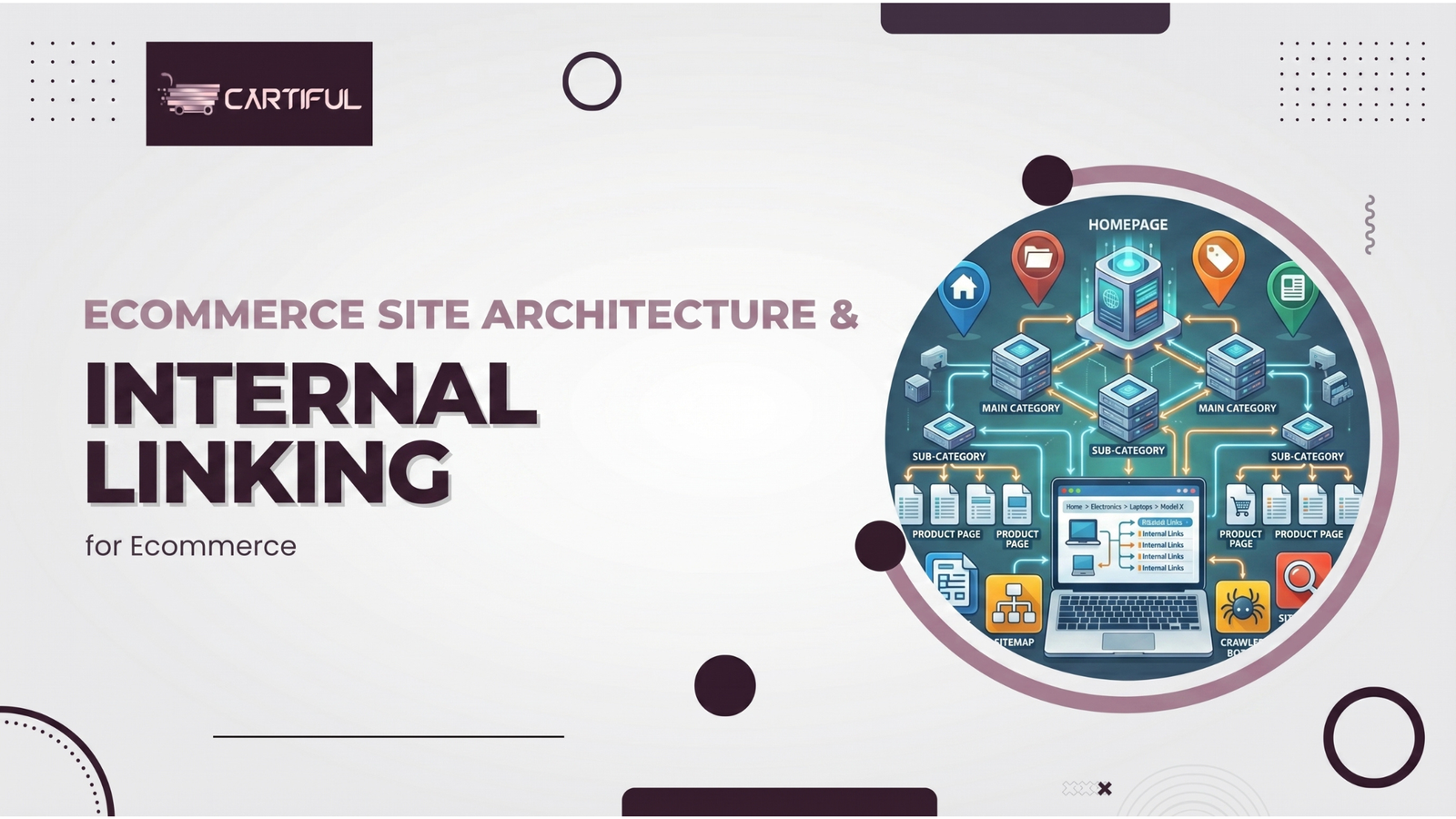
Most high-performing ecommerce websites follow a hierarchical structure that flows from broad pages to specific pages.
This structure helps both users and search engines understand where each page fits within the store.
Example of a Clean Ecommerce Site Structure
| Level | Page Type | Purpose |
| Level 1 | Homepage | Entry point and authority hub |
| Level 2 | Category Pages | Organize product types |
| Level 3 | Product Pages | Show product details |
| Level 4 | Supporting Content | Blogs, guides, UGC content |
Keeping this structure shallow reduces crawl depth and improves product discoverability across the store.
Practical Example: Good vs Poor Ecommerce Architecture
A simple example shows how structure affects discoverability.
Poor architecture
Homepage
→ Products
→ Running
→ Shoes
→ Nike
Here, important product pages sit too deep in the hierarchy. Search engines need multiple crawl steps to reach them, and users must click through several layers before finding a product.
Improved architecture
Homepage
→ Running Shoes
→ Nike Pegasus 40
This structure is clearer and reduces crawl depth. Category intent is clear, and the product page is easier for both users and search engines to find.
Small structural improvements like this can significantly improve crawl efficiency and product discoverability.
Category Pages: The Backbone of Ecommerce Architecture
Category pages sit between the homepage and product pages, making them one of the most important parts of ecommerce site’s architecture.
They often receive strong internal links and pass link equity deeper into the site.
Well-optimized category pages:
- Group related products in a logical way
- Match commercial search intent
- Link naturally to subcategories and product detail pages
Avoid overloading category pages with unnecessary filters that generate duplicate URLs.
Faceted navigation should be carefully managed using canonical tags and URL parameter handling, as explained in Google’s guidance on URL structure and crawl control.
Product Pages and Product Detail Pages
Product pages are where conversions happen, so they should never be isolated.
Every product detail page should be reachable within a few clicks from the homepage.
When pages sit too deep, search engines assign them less ranking power, and users struggle to find them. This directly affects both crawl efficiency and sales performance.
Effective product page internal linking includes:
- Links back to the parent category page
- Links to related products or variants
- A breadcrumb trail showing page hierarchy
Breadcrumbs help users understand their location within a website and clarify the page hierarchy. Google also confirms that breadcrumbs improve structural understanding in its breadcrumb structured data documentation.
Internal Linking: The Hidden Growth Lever
Internal linking connects pages within the same ecommerce website.
Unlike external link building, internal link building is fully controlled by store owners.
A clear internal linking strategy helps search engines discover pages faster, understand their importance, and pass link juice more effectively.
At the same time, it guides users through logical paths that support browsing and purchasing.
Types of Internal Links in Ecommerce Websites
Different internal links serve different roles within a store.
Balancing these links improves both crawling paths and user navigation.
-
Navigation Links
Navigation menus, footer links, and breadcrumbs create consistent crawling paths for search engine bots.
They ensure important category pages and landing pages are always reachable.
- Contextual Links
Contextual internal links appear within blog posts, buying guides, or content hubs.
These links are highly valuable because they provide relevance and context, not just access.
-
Related Product Links
Links to related products or frequently bought together items improve user engagement and session depth.
They also reduce orphaned pages and improve internal link architecture.
Anchor Text and Internal Links
Anchor text tells search engines what the linked page is about. Using descriptive anchor text improves relevance without forcing keywords.
Avoid generic anchors such as “click here” or “read more.”
Instead, use natural phrases that reflect the destination page, such as product names or category terms.
Google’s documentation on crawlable links and anchor text explains how search engines use internal links to interpret content relationships.
Avoiding Common Ecommerce Architecture Problems
Orphan Pages and Orphaned Pages
Orphan pages are pages with no internal links pointing to them.
Even if they exist in XML sitemaps, search engine crawlers may struggle to discover them.
Running regular site audits using tools like Screaming Frog helps identify orphan pages and broken internal links.
Excessive Crawl Depth
Crawl depth measures how many clicks it takes to reach a page from the homepage.
Important pages should usually be reachable within three to four clicks.
Pages buried deeper receive less link equity and weaker Internal PageRank, which limits ranking potential.
Redirect Chains and Redirect Loops
Redirect chains slow down crawling and waste crawl budget by forcing search engine bots to follow multiple hops before reaching the final page. Redirect loops are even more harmful, as they can block bots from accessing pages altogether.
Google explains best practices for managing redirects and avoiding crawl issues in its guidance on site moves and URL changes.
Broken Internal Links and 404 Status Codes
Broken internal links disrupt crawling paths and degrade the user experience.
They also weaken the link authority flow across the site.
Google Search Console provides detailed reports for monitoring crawl errors and 404 pages, helping site owners quickly detect and resolve internal linking issues.
XML Sitemaps and HTML Sitemaps
XML sitemaps help search engines discover and evaluate the coverage of pages across an ecommerce site.
They provide a structured list of important URLs, helping search engine crawlers understand which pages exist and how frequently they change. This improves URL discovery, crawl coverage, and crawl prioritization, especially for large ecommerce stores with thousands of product pages.
However, XML sitemaps do not replace internal linking. Search engines still rely on internal links to determine page importance and distribute ranking signals.
HTML sitemaps serve a different role. They improve navigation for users while providing additional crawl paths to deeper pages that may not receive many internal links.
Both sitemap types should reflect the current website architecture and be updated whenever new categories, products, or content pages are added.
Google’s sitemap guidelines explain how sitemap files support crawling.
Internal Linking for Blog Posts and Content Hubs
Blog posts should support the ecommerce store, not sit in isolation. They work best when organized into topic clusters and content silos.
A content hub links related blog articles back to category pages and relevant product pages.
This strengthens link popularity while supporting commercial search intent.
Measuring Architecture and Internal Linking Performance
Data helps validate whether your internal linking strategy is working.
Use analytics and crawl tools to track progress.
Key metrics to monitor include:
- Indexed vs non-indexed pages
- Crawl coverage and crawl stats
- Bounce rates on category and product pages
- User navigation paths and engagement
Google Analytics helps track how users move through internal links, while Google Search Console provides crawl and indexing insights.
Final Thoughts: Strong Ecommerce Growth Starts With Structure
Ecommerce site architecture and internal linking determine how efficiently an online store can grow in search visibility and user engagement.
A clear hierarchy helps search engines crawl the store and distribute link equity across categories and products. At the same time, strong internal linking guides shoppers toward relevant pages, reducing friction in the buying journey.
Stores that scale successfully rarely rely on product pages alone. They combine structured category pages, logical internal linking, and supporting content hubs to strengthen both search visibility and product discoverability.
When architecture and internal links work together, the ecommerce website becomes easier to crawl and navigate, and far more capable of sustainable organic growth.