Skip to content
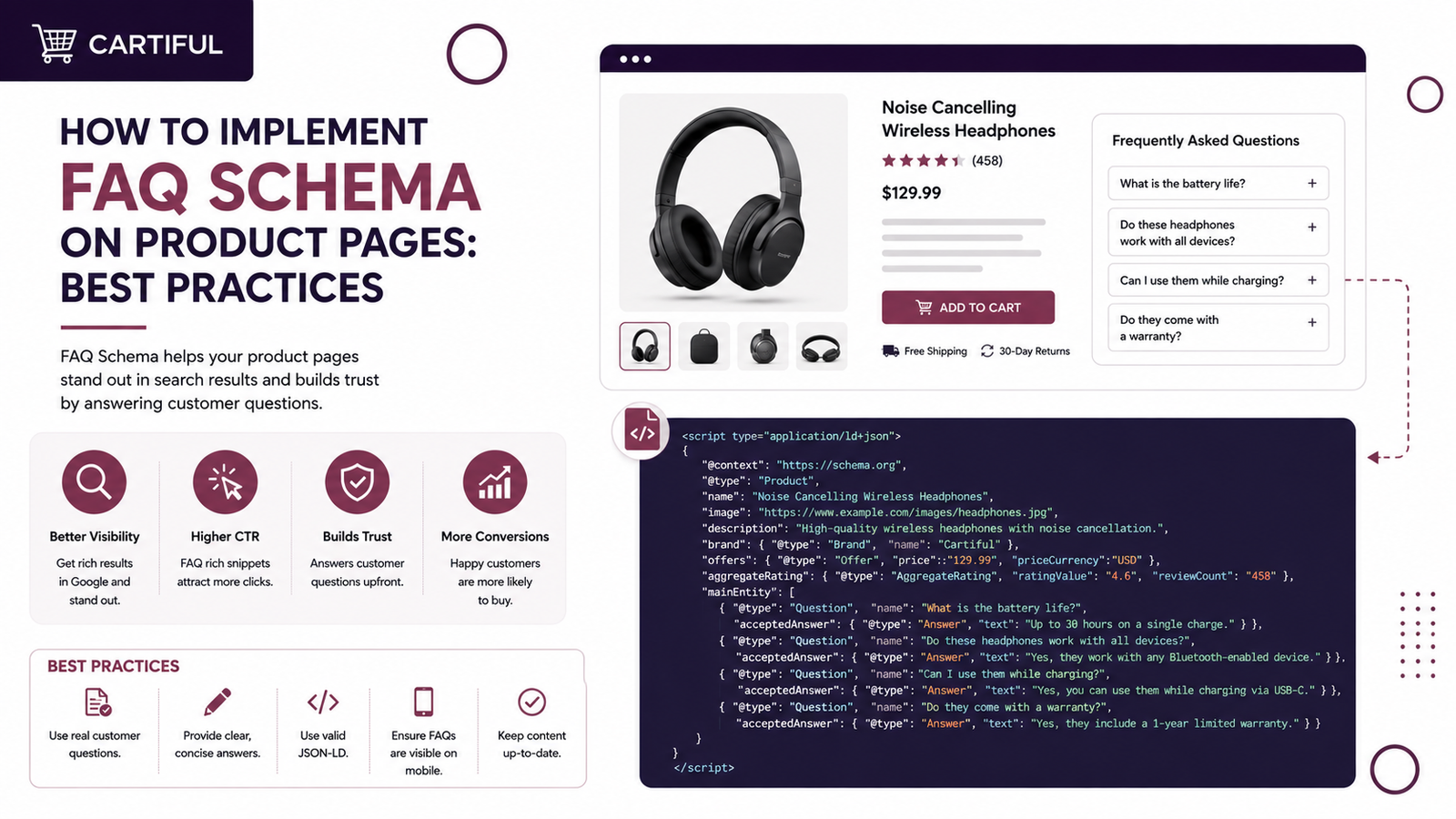
FAQ schema helps search engines understand the questions and answers shown on a page. For product pages, it clarifies details about sizing, shipping, returns, warranty, compatibility, ingredients, usage, delivery, payment options, and other purchase-related questions.
As of May 2026, Google will also remove FAQ rich results in Search. It will also remove FAQ reporting and Rich Results Test support in June 2026, followed by Search Console API support in August 2026.
That means FAQ schema should not be treated as a Google rich-result tactic anymore. It can still help organize page data for Schema.org, site clarity, and non-Google systems that read structured data.
For e-commerce product pages, FAQ schema should support the page, not replace the proper Product schema. Google’s product structured data guide says product data can be provided through page markup, Merchant Center feeds, or both. Product pages should still use Product and Offer markup for product name, image, price, availability, reviews, shipping, and return details where relevant.
What Is FAQ Schema?
FAQ schema is structured data that marks up a list of questions and answers on a page. The Schema.org type is FAQPage, which represents a page that contains one or more frequently asked questions.
On product pages, FAQ schema can be used for product-specific questions, such as:
Does this product come with a warranty?
What size should I order?
Is cash on delivery available?
How long does delivery take?
Can I return this product?
Is this compatible with a specific model?
How should I clean or use this product?
Do not use the FAQ schema for questions that are not visible on the product page. Google’s structured data rules say structured data should match visible page content and should not describe content hidden from users.
Should You Still Add FAQ Schema to Product Pages in 2026?
Yes, but with the right expectation.
FAQ schema will not create Google FAQ dropdowns anymore. Still, adding clean FAQ markup can help search engines, AI systems, and other parsers understand your page content in a structured way. It can also support better internal content structure for e-commerce pages.
For store owners, the bigger value is not only the schema. The FAQ section itself can reduce purchase hesitation by answering objections directly on the product page.
When Should Product Pages Use FAQ Schema?
Product pages should use FAQ schema markup when they include visible, product-specific questions and answers about sizing, shipping, returns, warranty, materials, compatibility, payments, or usage. Avoid it for hidden, copied, promotional, or user-submitted answers.
FAQ Schema vs Product Schema
Product schema and FAQ schema serve different purposes. Here is a quick overview:
Schema Type | Purpose | Product Page Use |
Product | Describes the product | Name, image, SKU, brand, price, reviews, availability |
Offer | Describes the sale offer | Price, currency, stock status, seller, valid dates |
AggregateRating | Describes rating summary | Average rating and review count |
Review | Describes individual reviews | Customer review text, author, rating |
FAQPage | Describes visible Q&A content | Product-specific FAQs |
BreadcrumbList | Describes page path | Home > Category > Product |
For e-commerce SEO, Product schema should come first. FAQ schema should be added only when the page has useful FAQ content.
Step 1: Add a Visible FAQ Section to the Product Page
Before writing schema, add the FAQ content to the product page itself. The schema should mirror the visible content.
Example FAQ section:
1. How long does delivery take?
Delivery usually takes 3 to 5 business days, depending on your city and courier availability.
2. Can I return this product?
Yes. You can request a return within 7 days if the product is unused, undamaged, and in its original packaging.
3. Is cash on delivery available?
Yes. Cash on delivery is available for eligible cities and order values.
For Cartiful clients, this type of FAQ section can be added during product page optimization, especially for stores running Meta Ads or Google Ads. It gives paid traffic clearer answers before checkout and can reduce unnecessary support messages.
Step 2: Pick Product-Specific Questions
Do not add the same generic FAQ section to every product page. Product-page FAQs should answer buyer concerns tied to that item.
For example, a clothing product page may need:
Size and fit
Fabric
Washing instructions
Return policy
Delivery time
A tech accessory page may need:
Compatibility
Warranty
Charging support
Material
Package contents
This matters because Google’s structured data rules require the markup to describe the main content of the page accurately.
Step 3: Write Short, Direct Answers
FAQ answers should be short, clear, and useful. Avoid long sales copy.
Weak answer:
Our product is made with the highest care and gives customers the best shopping experience with premium quality and amazing value.
Better answer:
This rug is made from wool and cotton. Vacuum it weekly and avoid direct sunlight to reduce fading.
Good product FAQ answers usually include:
Clear answer first
Specific condition or limit
No hype
No keyword stuffing
No false claim
No hidden policy detail
Step 4: Add FAQPage Schema Using JSON-LD
Google supports JSON-LD, Microdata, and RDFa, but Google recommends JSON-LD for structured data when possible.
Here is a clean FAQ schema example for a product page:
<script type=”application/ld+json”>
{
“@context”: “https://schema.org”,
“@type”: “FAQPage”,
“mainEntity”: [
{
“@type”: “Question”,
“name”: “How long does delivery take?”,
“acceptedAnswer”: {
“@type”: “Answer”,
“text”: “Delivery usually takes 3 to 5 business days, depending on your city and courier availability.”
}
},
{
“@type”: “Question”,
“name”: “Can I return this product?”,
“acceptedAnswer”: {
“@type”: “Answer”,
“text”: “Yes. You can request a return within 7 days if the product is unused, undamaged, and in its original packaging.”
}
},
{
“@type”: “Question”,
“name”: “Is cash on delivery available?”,
“acceptedAnswer”: {
“@type”: “Answer”,
“text”: “Yes. Cash on delivery is available for eligible cities and order values.”
}
}
]
}
</script>
Place this script in the <head> or body of the product page. The key point is that the questions and answers in the JSON-LD must also be visible to users on that same page.
Step 5: Use FAQ Schema with Product Schema
Most product pages should have both Product schema and FAQ schema when both are relevant.
A product page can include multiple structured data types. Google says pages may contain more than one item type when the visible page content supports it, but the primary structured data type should match the page’s main purpose. For a product page, the main type is usually Product
Step 6: Test the Markup
Because Google is removing FAQ support from the Rich Results Test in June 2026, do not rely only on FAQ-specific rich result testing. Use a mix of tools:
Schema Markup Validator to check Schema.org validity
Google Rich Results Test for supported Google rich result types
Google Search Console to monitor indexed pages and product structured data
URL Inspection in Search Console after deployment
Google’s structured data rules also note that valid markup does not guarantee a rich result. The page still needs to meet Google’s search, content, access, and quality rules.
Step 7: Add FAQ Schema Through Shopify
For Shopify product pages, you can add FAQ schema in three common ways:
Option 1: Theme Code
Add the FAQ section in your product template and output JSON-LD dynamically through Liquid. This is best when FAQs are stored as product metafields.
Example setup:
Product metafield: FAQ question 1
Product metafield: FAQ answer 1
Product metafield: FAQ question 2
Product metafield: FAQ answer 2
Product template pulls those fields into visible content
JSON-LD pulls the same fields into the schema
This prevents a mismatch between visible content and structured data.
Option 2: SEO App
Some Shopify SEO apps can add structured data automatically. This is faster, but store owners should still check whether the app is adding duplicate schema or generic FAQs across all product pages.
Option 3: Custom Product FAQ Section
For larger stores, a custom FAQ block is often better. It lets the store owner add product-specific questions without having to edit code every time.
Step 8: Add FAQ Schema Through WooCommerce
For WooCommerce product pages, you can add FAQ schema through:
Custom theme fields
ACF fields
SEO plugins
Product tabs
Custom JSON-LD added to the product template
For WordPress stores, avoid plugin overlap. Many SEO plugins already output Product schema. If another plugin adds a separate schema, you may end up with duplicate or conflicting structured data.
FAQ Schema Best Practices for Product Pages
1. Keep FAQs Product-Specific
A product page FAQ should answer questions about that exact product. Generic store-wide questions such as “What payment methods do you accept?” may be better placed on a shipping, returns, or help page unless they directly affect checkout decisions on that product page.
2. Keep Answers Visible
If the FAQ is in the schema, it should be visible on the page. Do not add hidden questions only for search engines.
3. Avoid Keyword Stuffing
Do not force the product keyword into every question and answer. Write the way customers ask before buying.
Weak: Is this best premium rug online in Pakistan for the living room at the best price?
Better: Is this rug suitable for a living room?
4. Do Not Mark Up Reviews as FAQs
Customer reviews, star ratings, and testimonials should not be marked as FAQ content. Use review-related schema only when it follows Google’s review snippet rules and the reviews are visible on the page.
5. Use Product Schema First
For e-commerce pages, Product schema matters more than FAQ schema. Product data supports product snippets, merchant listings, pricing, availability, ratings, and shopping-related search features when implemented correctly.
6. Update FAQs When Policies Change
If shipping time, return rules, warranty, or payment options change, update both the visible FAQ and the schema. Outdated structured data can create trust issues and structured data quality problems.
Common FAQ Schema Mistakes
1. Adding FAQ Schema Without Visible FAQs
This is one of the most common mistakes. If the question and answer are not visible to users, do not add them to the schema.
2. Using the Same FAQ on Every Product Page
Generic FAQs across hundreds of product pages add little value. Use page-level questions based on the product, category, price point, material, size, or buyer concern.
3. Treating FAQ Schema as a Ranking Factor
FAQ schema does not directly make a product page rank higher. Structured data helps search engines understand page content and may make pages eligible for supported search features, but Google does not guarantee rich results.
4. Forgetting Product Schema
If a product page has FAQ schema but no Product or Offer schema, the setup is incomplete. Product pages need product data first.
5. Using FAQPage for User Discussion Pages
If users submit multiple answers to a question, use QAPage, not FAQPage. The FAQ page is for pages where the site provides the questions and answers.
Product Page FAQ Examples by Store Type
Fashion Store
Question: What size should I order?
Answer: Check the size chart above the add-to-cart button. If you are between two sizes, choose the larger size for a relaxed fit.
Beauty Store
Question: Is this product suitable for sensitive skin?
Answer: This product is made for general use. Check the ingredient list before ordering and do a patch test before full use.
Electronics Store
Question: Is this charger compatible with my phone?
Answer: This charger supports USB-C devices. Check your phone’s charging port and wattage support before ordering.
Marketplace Seller
Question: Is cash on delivery available?
Answer: Cash on delivery is available for selected cities and order values. Availability is confirmed during checkout.
Key Takeaways
FAQ schema works best when it supports visible, product-specific questions that help shoppers decide faster. Use it with a proper Product schema, keep answers accurate, avoid copied FAQs, and test the markup before publishing.
Cartiful helps e-commerce store owners improve product pages with stronger copy, useful FAQs, cleaner page structure, internal linking, CRO fixes, and search-friendly schema markup.
FAQs
1. Does FAQ schema still work for Google?
FAQ schema no longer creates Google FAQ rich results as of May 7, 2026. Google says FAQ rich results are no longer appearing in Search, and related reporting will be removed in stages. The FAQ schema can still be a valid Schema.org markup.
2. Should product pages still use FAQ schema?
Yes, when the page has visible product-specific FAQs. It can help structure page content for machines and support clearer product pages for users. It should not be used only to chase Google FAQ dropdowns.
3. Is FAQ schema a direct ranking factor?
No. Structured data does not guarantee higher rankings or rich search display. Google says structured data can make content eligible for supported search features, but appearance is not guaranteed.
4. Can I add the same FAQ schema to every product page?
You can, but it is usually not a good SEO practice. Product pages should answer questions tied to the specific item. Repeating the same generic FAQ across all products can make the page less useful.
5. Should FAQ schema replace Product schema?
No. Product schema should be the main structured data type on product pages. FAQ schema is only a supporting markup type when the page includes visible questions and answers.
6. What is the best format for FAQ schema?
JSON-LD is usually the best format because it is easier to add, edit, test, and manage. Google also lists JSON-LD as the recommended structured data format