Skip to content
Many ecommerce stores invest heavily in product pages, ads, and content, yet still appear unclear in Google Search.
Product URLs show up as long strings, categories feel disconnected, and shoppers land on pages without knowing where they are in the store.
This confusion hurts both user experience and click-through rates.
Breadcrumbs schema solves this by giving search engines and shoppers a clear navigation path, showing exactly how a product page fits into your site structure.
For ecommerce store owners, implementing the breadcrumbs schema is not about adding another SEO task. It is about helping search engines understand how your pages connect while making search results clearer and easier to trust.
At Cartiful, breadcrumbs schema is treated as a structural fix. It connects product pages and categories into a clear, crawlable structure that supports both visibility and navigation.
What is Breadcrumbs Schema?
Breadcrumbs schema is structured data that explains a page’s position in a site hierarchy.
It tells search engines how a product page connects to parent categories and the homepage. In Google SERPs, breadcrumbs replace raw URLs with readable breadcrumb trails.
What does Breadcrumbs Schema do?
Breadcrumbs schema shows search engines how a page fits into your site structure. It replaces long URLs with readable category paths in search results and helps users understand where they are within your store.
How Breadcrumb Navigation Works on Ecommerce Websites
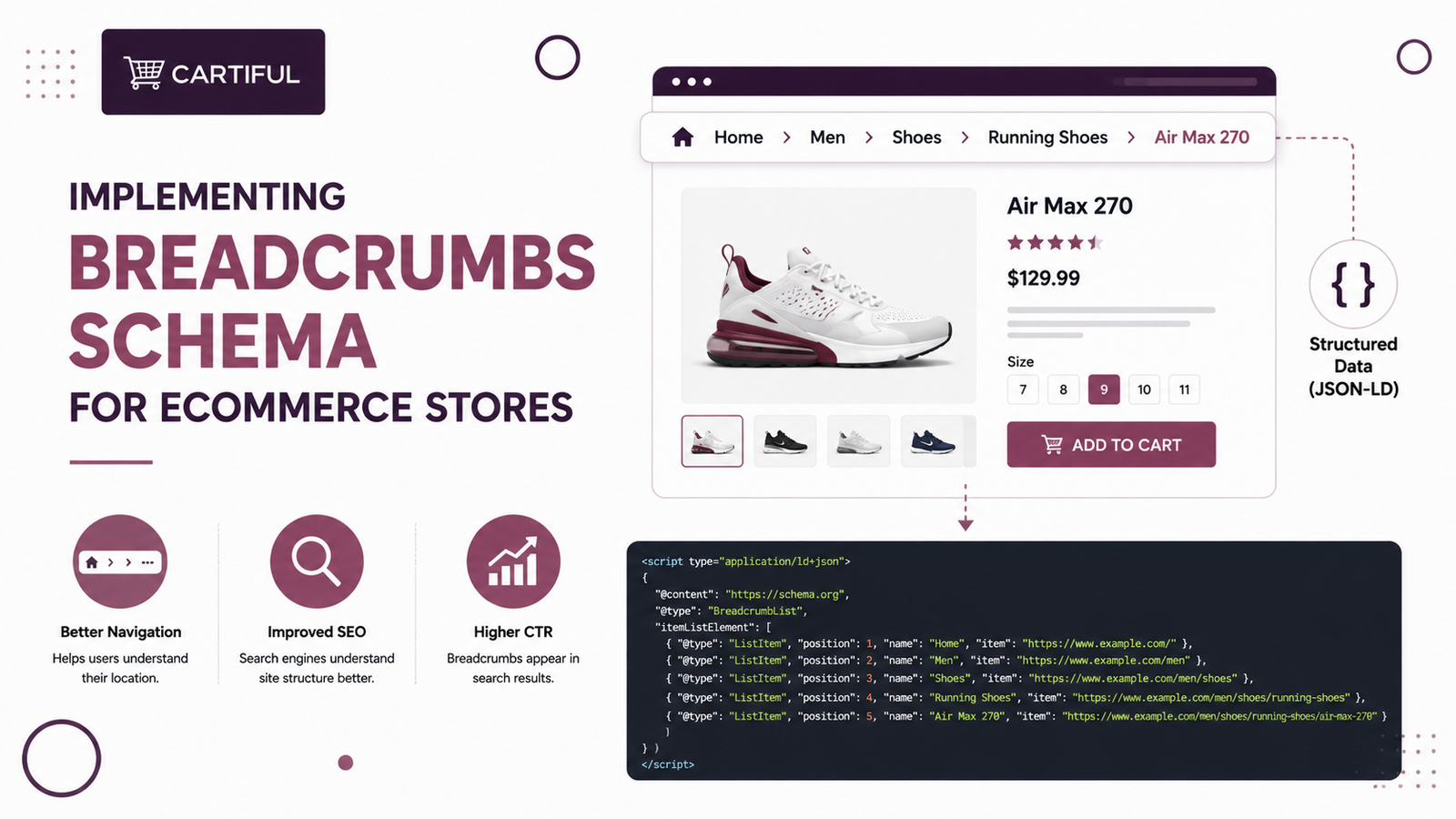
Breadcrumb navigation is the clickable trail you see near the top of product and category pages on ecommerce websites. It shows the full navigation path, usually starting from Home, moving through category and subcategories, and ending at the product name.
Each part of the breadcrumb trail links back to a higher-level page.
This helps shoppers move around easily and helps search engines understand how pages relate to each other.
Why Breadcrumbs Schema Matters for Ecommerce SEO
Breadcrumbs schema clarifies page relationships in search results and improves how listings appear, which is essential for Ecommerce SEO.
It shortens crawl paths and strengthens category page signals. For ecommerce websites, this leads to better indexing of product pages and clearer context in Google Search results.
Breadcrumbs Schema vs Visual Breadcrumbs
Visual breadcrumbs are part of website navigation. They help shoppers understand where they are and move back through categories on product pages.
Breadcrumbs schema is structured data.
It helps search engines interpret the breadcrumb trail, site hierarchy, and navigation path for SERP snippets.
You need both for ecommerce websites.
Visual breadcrumbs support user experience, while schema markup supports search engines and internal linking. Without schema markup, search engines may not fully understand the breadcrumb structure shown on the page.
How Breadcrumbs Appear in Google SERPs
When the breadcrumbs schema is implemented correctly, Google replaces the raw URL with a breadcrumb trail in search results.
This breadcrumb trail appears directly under the page title in the Google SERP.
For ecommerce pages, this helps users instantly see the product’s category path. Clear category context leads to cleaner SERP snippets and often improves click-through rates for competitive product searches.
For example:
example.com/product/12345 → Home > Shoes > Running Shoes
Impact of Breadcrumbs Schema on Click-Through Rate
Breadcrumb trails make SERP snippets easier to scan in Google Search.
For ecommerce searches with many similar product pages, this context matters.
Clear breadcrumb trails improve click-through rates by helping users judge relevance faster, especially on mobile devices. Breadcrumbs support decision clarity, not direct ranking gains.
How Breadcrumbs Schema Supports Site Hierarchy?
Breadcrumbs schema defines a clear site hierarchy by linking product pages to parent categories and the homepage.
This helps search engines understand internal relationships, content hierarchy, and navigation paths across ecommerce websites. A clear structure reduces orphaned pages and improves internal linking efficiency.
Breadcrumbs Schema and Crawl Depth
Deep product pages are harder for search engine robots to reach.
Breadcrumbs schema creates direct internal links from products back to higher-level category pages.
This reduces crawl depth and improves crawl efficiency. It also helps search engines discover new or updated product pages faster through structured internal links.
Required Schema Type for Breadcrumbs
Each breadcrumb item must include:
- position (order in the trail)
- name (category or page name)
- item (canonical URL)
This structured format creates a readable navigation path for search engines and SERP snippets.
Recommended Format: JSON-LD
Google recommends using JSON-LD for breadcrumbs schema.
It is easier to manage, less error-prone, and works cleanly with modern ecommerce website structures.
JSON-LD can be added through HTML-based markup, Server-Side Rendering, or SEO plugins. Compared to microdata attributes, JSON-LD reduces implementation errors and schema conflicts.
Example Breadcrumbs Schema (JSON-LD):
{
“@context”: “https://schema.org”,
“@type”: “BreadcrumbList”,
“itemListElement”: [
{
“@type”: “ListItem”,
“position”: 1,
“name”: “Home”,
“item”: “https://example.com”
},
{
“@type”: “ListItem”,
“position”: 2,
“name”: “Category”,
“item”: “https://example.com/category”
}
]
}
How to Implement Breadcrumbs Schema on Ecommerce Platforms
Shopify
Most Shopify themes include breadcrumb navigation, but not always schema. Use apps like JSON-LD for SEO or edit theme.liquid to add BreadcrumbList markup.
WooCommerce
Breadcrumbs are built in via themes or plugins like Yoast SEO. Ensure schema is enabled in plugin settings.
Custom Stores
Add JSON-LD manually inside <script type=”application/ld+json”> in page templates.
Common Ecommerce Pages that Need Breadcrumbs Schema
Breadcrumbs schema should be implemented on pages that form your website structure and content hierarchy. These pages help search engines understand navigation paths and internal links.
Apply breadcrumbs schema to:
- category pages
- subcategory pages
- product pages
Breadcrumbs schema is usually not needed on cart or checkout pages. Those pages are transactional and do not contribute to crawl depth or navigation clarity.
Breadcrumbs Schema and Product Schema Compatibility
Breadcrumbs schema works alongside product schema. They serve different purposes.
Schema Type | Purpose |
BreadcrumbList | explains navigation path |
Product schema | explains product details |
Review schema | explains ratings and reviews |
They should coexist without overlap or duplication.
Breadcrumbs Schema and Internal Linking
Breadcrumbs create structured internal links that connect product pages to their parent categories and broader sections of the store. This helps search engines understand how pages relate to each other without relying only on menus or footer links.
For ecommerce websites, this structure strengthens category pages by consistently linking products back to them.
For example, a breadcrumb path like Home → Furniture → Living Room → Sofas reinforces the importance of both the category and subcategory pages.
Over time, this improves crawl paths, reduces isolated product pages, and helps category pages gain stronger visibility in search results.
Example Scenario:
A Shopify store selling 5000+ products often struggles with deep product URLs. Without breadcrumbs, Google sees isolated pages.
With breadcrumbs:
- products connect to categories
- crawl paths improve
- category pages gain authority
Breadcrumbs Schema for Mobile Devices
On mobile devices, navigation options are limited, and deep menus are harder to use. Breadcrumbs act as a simple, visible navigation shortcut that allows users to quickly move back to broader categories without restarting their journey.
This is especially important for ecommerce stores with multiple category layers, where users often land directly on product pages from search.
Clear breadcrumb navigation reduces confusion, improves product discovery, and can lower bounce rates by helping users explore related categories with minimal effort.
Desktop vs Mobile Breadcrumbs Behavior
On desktop devices, breadcrumbs help users explore related categories and products.
On mobile devices, they often act as quick exits back to broader categories.
Both experiences benefit from the breadcrumbs schema. Schema markup keeps SERP snippets consistent across devices, even when on-page behavior differs.
Breadcrumbs Schema and AI Overviews
AI engines and AI Overviews depend on structured signals to understand page relationships.
Breadcrumbs schema provides an explicit hierarchical structure, showing how product pages connect to categories and the homepage.
For ecommerce websites, this helps AI systems interpret how pages connect across your store.
Clear breadcrumb data reduces ambiguity when products sit inside multiple category layers.
Breadcrumbs Schema and the Google Knowledge Graph
Breadcrumbs schema helps search engines define entity relationships across an ecommerce site. Categories, subcategories, and product pages become clearer entities instead of isolated URLs.
When combined with product schema, product reviews, ratings, and product names, breadcrumbs improve how pages connect inside the Google Knowledge Graph.
This strengthens contextual understanding across search results and SERP snippets.
This matters most for large ecommerce stores where products exist across multiple category layers.
How to Implement Breadcrumbs Schema for Ecommerce (Step-by-Step Guide)
Step 1: Test In Google Rich Results Test
Open Google Rich Results Test and paste the URL of your category page or product page.
Check that breadcrumb schema (BreadcrumbList) is detected and that the result shows valid structured data.
Step 2: Confirm The Correct Schema Type And Fields
Make sure the schema type is BreadcrumbList and each ListItem includes position, name, and item (URL).
Incorrect positions, missing URLs, or wrong names can break breadcrumb trails in SERP snippets.
Step 3: Check The Breadcrumbs Report In Google Search Console
In Google Search Console, open the Breadcrumbs enhancement report.
Review errors and warnings across your ecommerce website, especially for product pages and category pages.
Fix issues affecting indexing and search results appearance.
Step 4: Match Schema Breadcrumbs To Your UI Breadcrumb Navigation
Compare the structured breadcrumb trail to your on-page breadcrumb navigation.
The navigation path should match the visible trail (Home → Category → Subcategory → Product name) to avoid mixed signals for search engines.
Step 5: Re-Test After Fixes And Request Revalidation
After updating schema codes, re-run the Google Rich Results Test.
Then use Search Console to validate fixes so Google can update SERP snippets faster and reduce broken breadcrumb trails in Google Search.
Using Google Search Console to Monitor Breadcrumbs
Search Console shows:
- Valid breadcrumb items
- Errors
- Warnings
Fixing breadcrumb issues often improves SERP snippet appearance within weeks.
Breadcrumbs Schema and SEO Plugins
Most SEO plugins for ecommerce platforms support breadcrumbs schema out of the box.
This includes plugins for Shopify, WooCommerce, and custom CMS setups.
Plugins can generate breadcrumb navigation and schema automatically. However, store owners should always review the output to avoid duplicated schema types, incorrect category paths, or conflicts with product schema and internal linking.
Server-Side Rendering and Breadcrumbs Schema
Server-Side Rendering (SSR) ensures breadcrumbs schema loads before search engine robots crawl the page.
This improves reliability and makes structured data immediately visible during indexing.
Client-side schema injection can delay or block breadcrumb detection. For ecommerce websites with deep product pages, server-side implementation helps maintain consistent SERP snippets and accurate site hierarchy signals.
Breadcrumbs Schema Mistakes Ecommerce Stores Make
Many ecommerce stores add breadcrumbs schema but miss small details that break how search engines read the navigation path.
Common mistakes include:
- Using incorrect or incomplete category paths
- Changing breadcrumb trails dynamically based on filters
- Mismatching visible breadcrumb navigation and schema markup
- Repeating product names instead of category names
- Skipping or misordering breadcrumb positions
Breadcrumbs Schema and Video or FAQ Schema
Breadcrumbs schema can coexist with other schema types without conflict.
Common combinations include:
- Video schema markup for product or explainer videos
- FAQ structured data markup for product or category questions
Each schema type should serve a single purpose. Breadcrumbs schema defines navigation paths, while video and FAQ schema explain content and intent.
Measuring Success After Implementation
Once breadcrumbs schema is live, results should be tracked through search performance and crawl signals, not rankings alone. The impact shows up gradually as search engines better understand your website structure.
Track:
- Click-through rates in Google Search Console
- SERP snippet appearance for product and category pages
- Crawl depth improvements across ecommerce websites
- Product page impressions in Google Search
Breadcrumbs schema does not create instant ranking jumps. It improves navigation clarity, internal linking, and crawl efficiency over time.
Key Takeaways
Breadcrumbs schema clarifies how pages connect across your store, helping both search engines and users understand structure.
When implemented correctly, it improves SERP snippets, strengthens internal linking, and shortens crawl paths, leading to better visibility and navigation.
For ecommerce stores, the breadcrumbs schema is not about chasing rankings. It is about building a clear, crawlable structure that supports discovery, usability, and long-term growth.
Frequently Asked Questions
Does breadcrumbs schema help rankings directly?
Breadcrumbs schema does not usually create direct ranking gains on its own. Its value comes from improving crawl paths, clarifying page relationships, and making search snippets easier to understand, which can support better visibility and click-through rates.
1. What is the difference between breadcrumbs and breadcrumbs schema?
Breadcrumbs are the visible navigation links users click on a page. Breadcrumbs schema is the structured data behind that trail that helps search engines interpret the same path correctly in search results.
2. Should product pages and category pages both have breadcrumbs schema?
Yes. Category pages, subcategory pages, and product pages benefit most because they reflect the store’s structure clearly. Cart and checkout pages usually do not need breadcrumbs schema because they are transactional.
3. Can the breadcrumbs schema work with the product schema?
Yes. Breadcrumbs schema and product schema serve different purposes and should work together. Breadcrumbs explain the navigation path, while product schema explains product-specific details such as name, price, availability, and reviews.
4. How do I check if breadcrumbs schema is working?
Use Google Rich Results Test to confirm that BreadcrumbList is detected and valid. Then check the Breadcrumbs report in Google Search Console to monitor errors, warnings, and overall implementation health across the site.