Skip to content
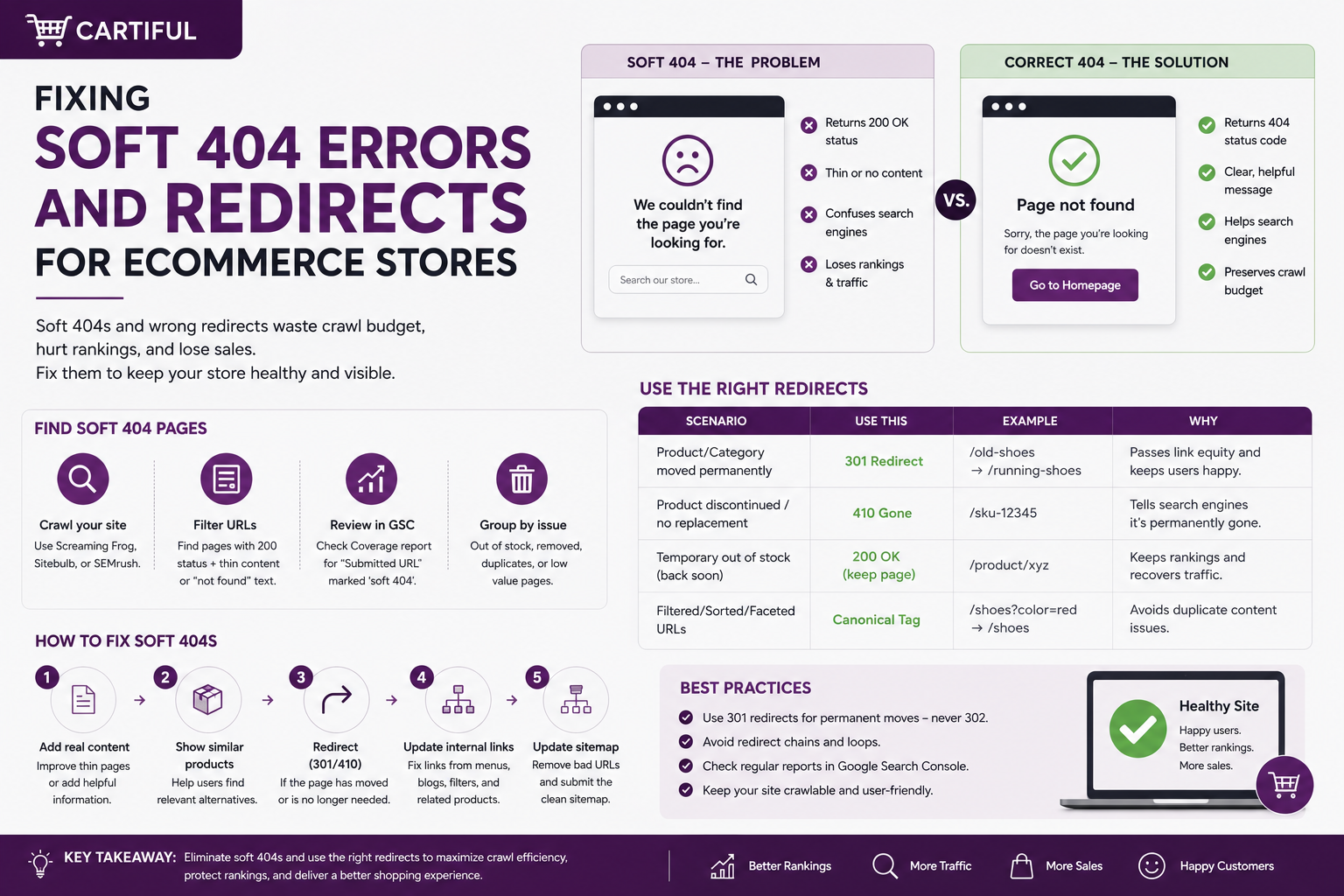
Soft 404 issues on ecommerce sites usually occur when a product page no longer reflects its actual status. The product may be gone, the page may stay live with thin content, or the store may redirect the URL to the home page or a broad category page. That creates a weak signal for search engines and a poor experience for shoppers. Semrush also notes that soft 404s can waste crawl budget and cause important pages to be left out of search results.
For ecommerce stores, the fix depends on the product’s actual state: temporarily out of stock, permanently discontinued, replaced by a newer item, or moved to a new URL.
At Cartiful, this is where SEO, product feeds, merchandising, and redirect rules need to work together.
Soft 404 Fixes: What to Do First
Use this rule set first:
- Keep the product page live if the item is temporarily out of stock.
- Use a permanent redirect only when there is a true replacement or a real URL move.
- Return 404 or 410 when the product is gone, and there is no close replacement.
- Do not redirect discontinued products to the home page.
- Do not redirect many removed products to one broad category page.
- Check rendered output on JavaScript-heavy stores, because broken rendering can create soft 404s even when the page should be valid.
What Is a Soft 404 on an Ecommerce Site?
A soft 404 happens when a page appears missing, empty, or broken, but the server still returns a 200 success status. In ecommerce, this usually appears in a few common ways:
- A discontinued product page says “product not found,” but still returns 200.
- A product page has only a title and no useful product content.
- A category or internal search page shows zero results with no helpful alternatives.
- A product URL redirects to a weakly related category or the home page.
- A JavaScript-heavy product page loads as a blank shell for Google.
- A removed product is still listed in the sitemap, internal links, the product feed, or on an ad landing page.
The issue is not only technical.
A shopper who clicks a product result expects that product, a close replacement, or a clear explanation. If they land on a dead page, empty grid, or random destination, the experience breaks.
Why Ecommerce Stores Create Soft 404s So Often
Blogs and service pages are usually stable. Product URLs are not. Products sell out, come back, change SKUs, get replaced, go out of season, or disappear from the catalog.
Soft 404s often come from:
- Out-of-stock templates that remove most product content
- Auto-redirect rules for deleted products
- Bulk product imports that break URLs
- Old product URLs left in sitemaps
- Expired product feed URLs
- Empty search result pages
- Faceted filters with zero products
- Shopify, WooCommerce, or headless storefront routes returning 200 for missing items
- JavaScript rendering problems where Google sees less than the user sees
This is why “redirect every 404” is a weak ecommerce SEO policy. It looks clean in a dashboard, but it often sends the wrong signal to Google and shoppers.
The Right Fix Depends on the Product State
The cleanest way to fix soft 404s is to sort product URLs by what actually happened to the product.
1. Temporarily out of stock
If the product is expected to return, the safest move is to keep the product page live. Do not delete it, noindex it, or redirect it unless there is a strong business reason.
A good temporary out-of-stock product page should keep:
- Product title
- Product images
- Product description
- Specs and size details
- Reviews
- FAQs
- Product schema where applicable
- Clear stock messaging
- Back-in-stock alert option
- Links to close alternatives
For Google Merchant Center, the product landing page should clearly show availability and match the product data feed. Google’s Merchant Center landing page requirements say out-of-stock products can show clear text such as “sold out” or “item not available,” use a disabled or greyed-out buy button, or disable unavailable variants in the selection grid.
A thin “sold out” page with no useful content left is risky. It can look like a dead page even if the product is only temporarily unavailable.
2. Permanently discontinued with no replacement
If the product is gone and there is no close replacement, return 404 or 410.
This is often better than forcing users onto a page that does not match what they wanted. A real 404 is not always a problem. A misleading redirect usually is.
A good example:
- Old URL: /products/sony-alpha-a6100-kit
- Status: product retired, no direct successor sold anymore
- Best response: 404 or 410, plus a useful custom 404 page with site search, top categories, and close alternatives if available
Google also recommends making custom 404 pages useful for users by keeping normal site navigation and adding helpful links, while still returning the actual 404 status code.
3. Permanently replaced by a close successor
If a product has a clear replacement, use a permanent redirect. Google’s redirect guidance says 301 and 308 redirects tell Google a page has permanently moved to a new location.
Example:
- Old URL: /products/iphone-14-pro-128gb
- New reality: product retired, direct successor available
- Best response: 301 redirect to the closest replacement product page
The test is simple: would a shopper who wanted the old product find the new destination useful?
If yes, redirect. If no, use 404 or 410.
4. Product Moved to a New URL
Sometimes the product is not discontinued. The URL changed due to a platform migration, collection cleanup, a slug change, or product variant restructuring.
In that case, use a permanent redirect from the old URL to the new version of the same product. Also update:
- Internal links
- Canonicals
- XML sitemaps
- Product feed URLs
- Paid ad landing pages
- Email campaign links
- Marketplace or social catalog references, where possible
For stores running Google Ads or Meta Ads, this matters beyond SEO. Broken or redirected product URLs can affect campaign performance, feed quality, and landing page experience.
5. Temporarily Unavailable for Operational Reasons
Some products are not gone, but the store cannot sell them for a short period. This can happen because of warehouse issues, regional shipping pauses, supplier delays, preorder windows, or site maintenance.
Use a temporary redirect only when the interruption is short-term, and the original URL should remain the main URL later.
Good temporary-use cases:
- Short-term warehouse pause
- Temporary preorder hold
- Regional shipping restriction
- Planned landing page maintenance
Do not use temporary redirects as a default fix for discontinued products.
When a 404 or 410 Is Better Than a Redirect
A 404 or 410 is the better answer when:
- The product is truly gone.
- There is no close replacement.
- The category page is too broad.
- The home page is clearly irrelevant.
- The current page is a dead end.
- The only reason for redirecting is “saving SEO value.”
Many store owners fear 404s because they look bad in reports. But for ecommerce SEO, the goal is not zero 404s. The goal is accurate signals and useful paths.
If a deleted product has no replacement, a 404 or 410 is clean. A fake redirect is not.
When a Redirect Is the Right Answer
Use a redirect when the user’s original intent still has a strong match elsewhere.
That usually means:
- the product moved to a new URL
- the model was replaced by a near-identical successor
- duplicate PDPs were merged into one canonical page
- a legacy URL format was cleaned up and mapped properly
Use a permanent server-side redirect for permanent moves. Also, keep redirect chains short. Google advises redirecting to the final destination directly, where possible.
Why Home Page and Broad Category Redirects Backfire
Redirecting removed products to the home page is one of the most common ecommerce SEO mistakes.
Google says not to redirect many old URLs to one irrelevant destination, such as the home page, because it can confuse users and may be treated as a soft 404. Screaming Frog also notes that pages returning 200 but looking like error pages should be reviewed and fixed with proper status codes where needed.
Weak redirect patterns include:
- 500 removed product pages redirected to the home page
- All retired laptops redirected to /laptops/
- Every deleted shoe variant redirected to a general footwear category
- Old product URLs redirected to a sale page with unrelated products
These redirects may make the CMS look clean, but they usually do not match user intent.
Soft 404s Are Not Only Product Page Issues
Product pages get most of the attention, but ecommerce soft 404s can also come from thin non-product URLs.
Common examples:
- Internal search result pages with no results
- Faceted filter pages with empty product grids
- Category pages where the product feed fails
- Collection pages with no main content
- Headless storefront routes that return 200 for missing products
- JavaScript templates that fail to render product data
Example:
/search?q=blue-suede-jacket
If the page returns 200 and only says “No products found,” it may be treated as a low-value page. A better user experience would include useful suggestions, related searches, popular categories, or a noindex rule where indexing is not needed.
For deeper category and product linking issues, Cartiful’s guide on best practices for linking category and product pages can support the internal-linking aspect of the fix.
Examples of the Right Fix
Example 1: seasonal product coming back next month
- Keep the PDP live
- Show “out of stock” clearly
- Keep the buy button visible but disabled
- Keep content, images, and reviews on the page
- Offer email alerts or similar products
Example 2: discontinued product with no successor
Best fix:
- Return 404 or 410.
- Use a helpful custom 404 page.
- Remove the URL from key internal links.
- Remove it from XML sitemaps.
- Stop sending paid ads or email traffic to that URL.
Example 3: discontinued product replaced by a newer model
Best fix:
- Use a 301 or 308 redirect.
- Redirect to the closest replacement product page.
- Update internal links and canonicals.
- Update product feed and campaign URLs.
Example 4: missing product on a headless storefront
- Do not let the route return 200 with an empty shell
- Redirect to a real 404 URL or use noindex on the error state
- Check rendered HTML in URL Inspection
Practical Decision Checklist
Use this before changing any product URL behavior.
Keep the page live when:
- the product is temporarily out of stock
- the PDP still has useful content
- the product is expected back
- the page can clearly show availability and next steps
Redirect when:
- the product moved permanently
- there is a close replacement
- the new page satisfies the same shopper intent
- the redirect is server-side and permanent for a permanent change
Return 404 or 410 when:
- the product is gone
- there is no strong replacement
- a category or home page would be too broad or misleading
- the current page is basically a dead end
Investigate rendering when:
- Search Console shows a soft 404 on a page that should be valid
- the page depends heavily on JavaScript
- Google may be seeing missing content, missing resources, or an error message during render
How to Audit Soft 404s at Scale
A practical workflow for ecommerce stores:
- Export soft 404 URLs from Search Console’s Page Indexing report.
- Group URLs by template type: product, category, search, filter, blog, or app route.
- Check the live HTTP status code.
- Crawl the URLs using a tool such as Screaming Frog.
- Review a sample of each URL pattern manually.
- Use URL Inspection to compare the rendered page with the browser view.
- Decide whether each pattern should stay live, redirect, return 404/410, or noindex.
- Update internal links, sitemaps, canonicals, product feeds, and ad URLs.
- Recheck after Google recrawls the affected URLs.
The goal is not just fixing the URLs listed in Search Console. The goal is to find the template, feed, or platform rule causing the issue.
Common Mistakes to Avoid
Avoid these ecommerce soft 404 and redirect mistakes:
- Returning 200 on deleted product pages
- Redirecting discontinued products to the home page
- Redirecting too many old products to one broad category
- Removing all useful content from out-of-stock pages
- Hiding availability from shoppers
- Letting product feed availability differ from the landing page
- Using permanent redirects for short-term issues
- Letting JavaScript error states return 200
- Keeping deleted product URLs in sitemaps
- Sending paid traffic to missing or redirected product URLs
- Ignoring internal links after removing products
If you run paid campaigns, this is not only an SEO problem.
A messy product URL setup can also affect Shopping ads, Meta catalog ads, retargeting, and landing page performance. If you are comparing channels, Cartiful’s guide on Google Ads vs Meta Ads for Shopify explains how store setup and traffic quality affect sales results.
1. What is a soft 404 on an ecommerce site?
A soft 404 on an ecommerce site is a page that looks missing, empty, or broken but still returns a 200 status code. This often happens when a discontinued product page stays live, an internal search page shows no results, or a redirect sends users to an unrelated page.
2. Should discontinued product pages return 404 or 301?
Discontinued product pages should return 404 or 410 when there is no close replacement. A 301 redirect should only be used when the old product has a clear successor, the URL has moved, or another page closely matches the shopper’s original intent.
3. Is redirecting old product pages to the home page bad for SEO?
Redirecting old product pages to the home page is usually bad for SEO because the home page does not match the shopper’s product-specific intent. If many removed product URLs point to the home page, search engines may treat those redirects as weak or irrelevant.
4. How should temporarily out-of-stock product pages be handled?
Temporarily out-of-stock product pages should stay live when the item is expected to return. The page should keep the product description, title, images, reviews, availability message, and useful alternatives. The buy button can be disabled, and the page can offer back-in-stock alerts.
5. What is the difference between 404 and 410 for product pages?
The difference between 404 and 410 is that 404 means the page is not found, while 410 means the page is permanently gone. For ecommerce product pages, both can be used when a product has been removed and there is no close replacement.
6. Can empty filter or search pages trigger soft 404s?
Empty filter or search pages can trigger soft 404 issues when they return 200 but show no useful results or main content. This often happens with faceted navigation, internal search pages, or filtered category URLs that create thin pages with no products.
7. How do JavaScript storefronts create soft 404s?
JavaScript storefronts create soft 404s when a missing product page returns 200 but shows an error message, blank shell, or empty product template. In headless or single-page app setups, missing product routes should use a proper 404 response or a noindex error state.
Final Takeaway
Fixing ecommerce soft 404s is not about adding more redirects. It is about matching each product URL to the product’s real status. Keep temporary out-of-stock pages useful, redirect only to a true replacement, and return 404 or 410 when there is no close match.
Need help cleaning up product URLs, redirects, and ecommerce SEO issues? Book a call to review your store.