Skip to content
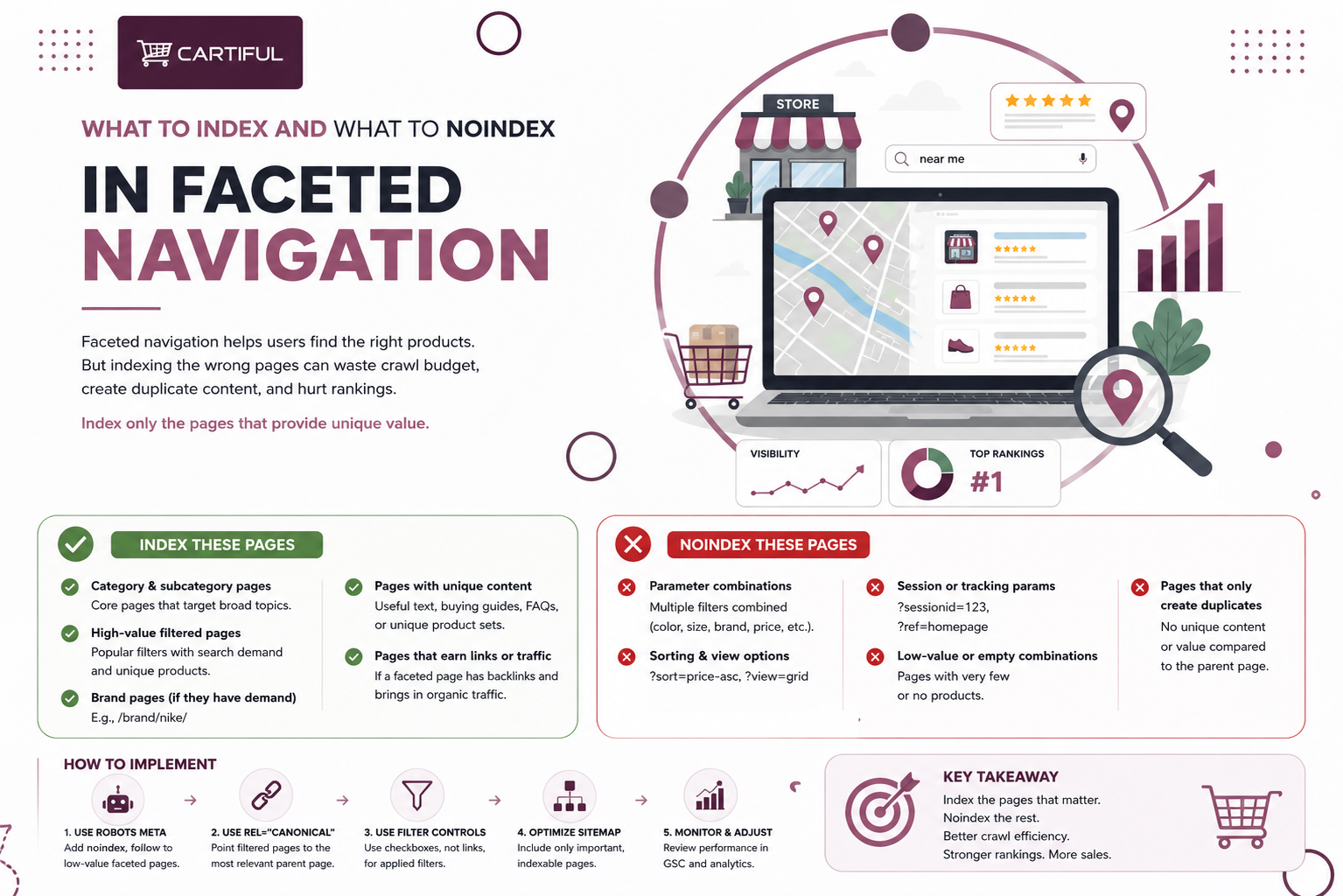
Faceted navigation helps shoppers narrow products by filters such as color, size, price, brand, material, and availability. But when every filter creates a new URL, one category page can quickly turn into hundreds or thousands of low-value pages.
For SEO, the goal is not to index or block everything. The goal is to choose which filtered pages deserve to rank and control the rest. At Cartiful, we start with search intent: if a filtered URL does not match a real query or provide a useful product set, it should usually not be treated as an SEO landing page.
The Short Rule for Faceted URLs
Index a faceted page only when it matches a real search query, holds a stable and useful product set, and is strong enough to stand on its own as a landing page.
Do not index random combinations, deep multi-filter states, sort orders, thin results, or temporary browsing states. If you do not need faceted URLs indexed, preventing them from being crawled is often the best approach; if you do need them indexed, they should follow strict best practices.
In practice, most ecommerce sites should use a mix of:
- Index for a small set of high-value filter pages
- Noindex for low-value pages that can still be crawled
- Robots.txt for URL patterns that should not be crawled at all
- Canonical tags for duplicate or near-duplicate versions
- 404s for empty, invalid, or nonsense filter combinations
Why Faceted Navigation Creates SEO Problems
A shopper might land on a category page and apply filters to narrow the product list. That is normal browsing behavior.
For search engines, the same setup can generate thousands of URLs from a single category.
Example:
/running-shoes/?color=black
/running-shoes/?color=black&brand=nike
/running-shoes/?color=black&brand=nike&size=9
/running-shoes/?color=black&brand=nike&size=9&sort=price-asc
These pages may help shoppers, but they do not all deserve a place in Google’s index. A filter can improve product discovery without becoming a page that should rank.
This matters even more for ecommerce stores running paid ads, social campaigns, and email traffic. If users land on messy category pages with confusing filters, weak product sets, or broken combinations, the issue is not only SEO. It can hurt conversion, too.
Crawl, Index, and Canonical Tags Do Different Jobs
A common faceted navigation mistake is treating crawl control, index control, and canonicalization as the same thing. They are different.
- Crawling is when a search engine accesses a URL.
- Indexing is when a URL can appear in search results.
- Canonicalization is when search engines choose the preferred version from duplicate or near-duplicate pages.
This matters because robots.txt is not a deindexing tool.
It mainly controls crawler access. Screaming Frog notes that URLs blocked by robots.txt can still be indexed if search engines find them through internal or external links. That means robots.txt can stop crawling, but it does not always remove a URL from search.
Noindex works differently. A noindex tag tells search engines not to show that page in search results, but the page usually needs to be crawlable for the tag to be seen. Canonical tags are another layer. Ahrefs explains that canonical tags help search engines identify the main version of duplicate or similar pages.
For faceted URLs, the fix is rarely one tag. A clean setup usually requires a mix of robots.txt rules, noindex tags, canonical tags, internal-linking controls, and sitemap cleanup.
What Should Be Indexed in Faceted Navigation
A faceted page should only be indexed when it can work as a real category landing page. It should match search demand, show enough relevant products, and be different enough from the main category page.
Here at Cartiful, we usually ask four questions before allowing any filtered URL into the index:
- Do people actually search for this combination?
- Does the page show a stable, useful product set?
- Can the page support unique copy, metadata, and internal links?
- Would we be comfortable treating it like a real SEO landing page six months from now?
If the answer is no to most of those, it usually should not be indexable.
Good indexing candidates often include pages like:
- men’s black running shoes
- leather sectional sofas
- gaming laptops
- gold hoop earrings
- waterproof hiking boots
These pages often match commercial search intent and can support stronger category copy. They can also be integrated into a broader ecommerce SEO strategy rather than treated as random filter URLs.
What Usually Should Not Be Indexed
Most faceted URLs should not be indexed by default. This is especially true when filters produce narrow, temporary, or low-value states rather than destination pages.
Common non-index candidates include:
- size-only URLs
- price-range URLs
- in-stock toggles
- sort-order URLs
- paginated filtered URLs
- deep multi-filter combinations
- combinations with very few products
- session or tracking parameter URLs
For example, URLs such as these are usually poor SEO pages:
- ?size=9
- ?price=100-150
- ?availability=in-stock
- ?sort=price-asc
- ?brand=nike&color=red&size=9&page=4
Google recommends using as few parameters as possible in URLs, and its faceted navigation guidance also stresses that unnecessary faceted URLs can consume heavy crawl resources.
When to Use Noindex
Use noindex when a faceted page should stay accessible to shoppers but should not appear in search results.
A standard HTML example looks like this:
<meta name=”robots” content=”noindex”>
Noindex is a good fit when:
- the page helps shoppers filter products
- the page still needs to exist on the site
- the page is too thin or narrow to rank
- the page should be removed from search results
- the filter pattern is not ready to be blocked from crawling yet
For example, a filtered page such as ?size=9 or ?price=100-150 may help shoppers browse, but it usually does not need to rank as its own page.
One important point: noindex is not a crawl-saving fix.
Search engines still need to crawl the page to see the noindex tag. So if a store is creating thousands of weak filter URLs, noindex alone may not be enough.
When Blocking Crawl Is the Better Move
Block crawl for a whole group of faceted URLs that have no search value and should not be crawled at all.
This is usually best for:
- sort parameters
- deep filter combinations
- session-based URLs
- tracking parameters
- low-value filter states that should never rank
Example:
User-agent: Googlebot
Disallow: /*?*sort=
Disallow: /*?*size=
Disallow: /*?*price=
Use crawl blocking to reduce access to weak URL patterns, not to remove already-indexed pages. A blocked URL can still appear in search if search engines find links to it elsewhere. For better control, combine robots.txt with clean internal linking and sitemap rules.
Where Canonical Tags Fit
Canonical tags help search engines identify the preferred version of duplicate or near-duplicate pages.
Example:
<link rel=”canonical” href=”https://www.example.com/running-shoes/black/”>
Use canonical tags when a faceted page is mostly another version of a stronger page. For example, a weak multi-filter URL may point back to the main category or to a stronger single-filter landing page.
Canonicals work best when:
- the page is very similar to another URL
- the product set overlaps heavily
- another page is the better ranking target
- the filtered page does not need separate indexing
Do not rely on canonicals alone for large faceted navigation issues. They should work with noindex rules, robots.txt, XML sitemap cleanup, and stronger category-page structure.
What Should Happen to Empty or Broken Filter Pages?
Empty or invalid filter combinations should return a proper 404 status code on that exact URL. This includes filters that show zero products, duplicate filters, nonsense combinations, or paginated filter pages that do not exist.
Do not redirect these URLs to a generic category page. That can create confusion for search engines and shoppers. If the page has no valid product result, let it return a clear 404 and keep it out of the index.
Recommended Rules By Facet Type
The best setup depends on the catalog, but this framework works for most ecommerce sites.
Facet type | Usually index? | Notes |
Brand | Sometimes | Good candidate when users search by brand within a category |
Material | Sometimes | Works well when it changes intent clearly, such as leather sofas |
Product style/type | Sometimes | Often strong when it matches how shoppers search |
Compatibility/use case | Sometimes | Useful for electronics, accessories, automotive, and similar catalogs |
Color | Case by case | Worth indexing only when there is demand and enough products |
Size | Usually no | Often too narrow and unstable to justify separate indexing |
Price range | Usually no | Usually weak for SEO and can create lots of thin URL states |
Availability | Usually no | Good for users, rarely a useful landing page |
Sort order | No | Should not be indexed and often should not be crawled |
Deep multi-filter combinations | No | Usually cause bloat, duplication, and crawl waste |
This kind of selective approach aligns with Google’s current faceted navigation guidance and the recurring advice from SEO practitioners working with medium- and large-scale ecommerce catalogs.
A Practical Decision Framework
If you want a simple rule your team can apply consistently, use this:
Index the page if:
- there is clear search demand
- the page shows a meaningful, stable product set
- the page serves a distinct shopping intent
- the page can support unique metadata and content
- the page is worth keeping as a landing page over time
Noindex the page if:
- it helps shoppers but should not rank
- it still needs to be crawlable for now
- it adds little search value
- it is thin, temporary, or too narrow
Block crawl if:
- the URL pattern has no search value
- the site is generating too many low-value filter URLs
- the pages are consuming crawl resources without traffic
- the filters are purely for on-site browsing
Canonicalize if:
- the page is mostly a duplicate
- signals should be consolidated
- another page is the stronger representative URL
Return 404 if:
- the filter combination returns no products
- the combination is invalid or nonsense
- the same filter is duplicated
- the paginated result does not exist
What Practitioner Discussions Keep Showing
Practitioner threads show the same faceted navigation problem again and again: once filter URLs are left open, a store can create thousands of extra pages without meaning to.
One TechSEO discussion described faceted navigation as almost “programmatic SEO” because filters can generate large sets of product archive pages. That is the risk. A store may think it is only helping shoppers browse, while search engines start finding hundreds or thousands of low-value URLs.
Another PrestaShop case showed how quickly this can grow. The site owner reported indexed pages jumping from around 1,600 to 24,000 after faceted URLs started getting picked up.
For Cartiful ecommerce audits, this is one of the first things worth checking. The issue is not whether filters exist. The issue is whether filter pages are quietly turning into a second version of the site.
Sitemap and Internal Linking Rules
XML sitemaps should include only the URLs you want search engines to treat as preferred pages. Do not add weak faceted combinations, duplicate filter URLs, noindexed pages, or temporary browsing states.
E-commerce internal links should follow the same logic. If a filtered page is worth indexing, link to it intentionally and treat it like a real category landing page. If it should not rank, avoid sending repeated crawl paths to it from menus, filters, product modules, or internal search pages.
A clean setup usually means:
- XML sitemaps include only canonical URLs
- internal links point to core categories and approved facet landing pages
- weak filter URLs are not repeatedly linked across the site
- filter order and URL patterns stay consistent
Common Mistakes to Avoid
- Indexing every filter combination
This can create duplicate pages, thin URLs, and crawl waste at scale.
- Using robots.txt as a deindexing tool
Robots.txt controls crawling. It does not always remove a URL from search results.
- Blocking a URL and adding noindex at the same time
If a page is blocked from crawling, search engines may not see the noindex tag.
- Keeping empty filter pages live
Filter pages with zero products, invalid combinations, or broken pagination should return a proper 404.
- Adding weak faceted URLs to XML sitemaps
Sitemaps should include only the canonical URLs you want search engines to find and prioritize.
- Linking heavily to pages that should not rank
If a faceted page is not meant for search, avoid sending repeated internal links to it from filters, menus, and product modules.
Frequently Asked Questions
1. Should all faceted navigation pages be noindexed?
No. Some faceted pages should be indexed if they match real search demand, show enough relevant products, and work as proper landing pages. The better approach is selective indexing. Index useful search pages and control the rest with noindex, robots.txt, canonicals, or 404s.
2. Which faceted pages are usually worth indexing?
Faceted pages are worth indexing when they combine a category with a meaningful attribute shoppers search for. Examples include “leather sectional sofas,” “gaming laptops,” “black running shoes,” or “gold hoop earrings.” These pages should have enough products, unique metadata, and clear search intent.
3. Should size and price filters be indexed?
Usually not. Size and price filters help shoppers browse, but they are often weak SEO pages. They can create thin, unstable, or duplicate URLs, especially when many filter combinations are available.
4. Is a canonical tag enough for faceted navigation?
No. Canonical tags help with duplicate or very similar pages, but they do not solve every faceted navigation issue. Large stores often need a mix of canonicals, noindex rules, robots.txt controls, sitemap cleanup, and better internal linking.
5. What is the difference between noindex and robots.txt?
Noindex tells search engines not to show a page in search results. Robots.txt tells crawlers which URLs they should not crawl. A page usually needs to be crawlable for search engines to read the noindex tag.
6. Should faceted URLs be included in XML sitemaps?
Only include faceted URLs if they are approved canonical pages that should rank. Do not add weak filter combinations, duplicate URLs, noindexed pages, sort URLs, or temporary browsing states to XML sitemaps.
7. What should happen when a filter returns zero products?
A filter page with zero products should return a proper 404. This also applies to invalid filters, duplicate filter combinations, nonsense URLs, and pagination pages that do not exist. Empty pages should not stay live as thin indexable URLs.
Final Takeaway
Faceted navigation should help shoppers find products without turning your ecommerce store into a messy URL generator. Index only the filtered pages that deserve to rank. Noindex useful browsing pages that should not appear in search. Block crawl for filter patterns with no search value. Canonicalize duplicates. Return 404s for invalid or empty combinations.
The cleanest setup is usually simple: real landing pages for real search demand, and strict control over everything else.