Skip to content
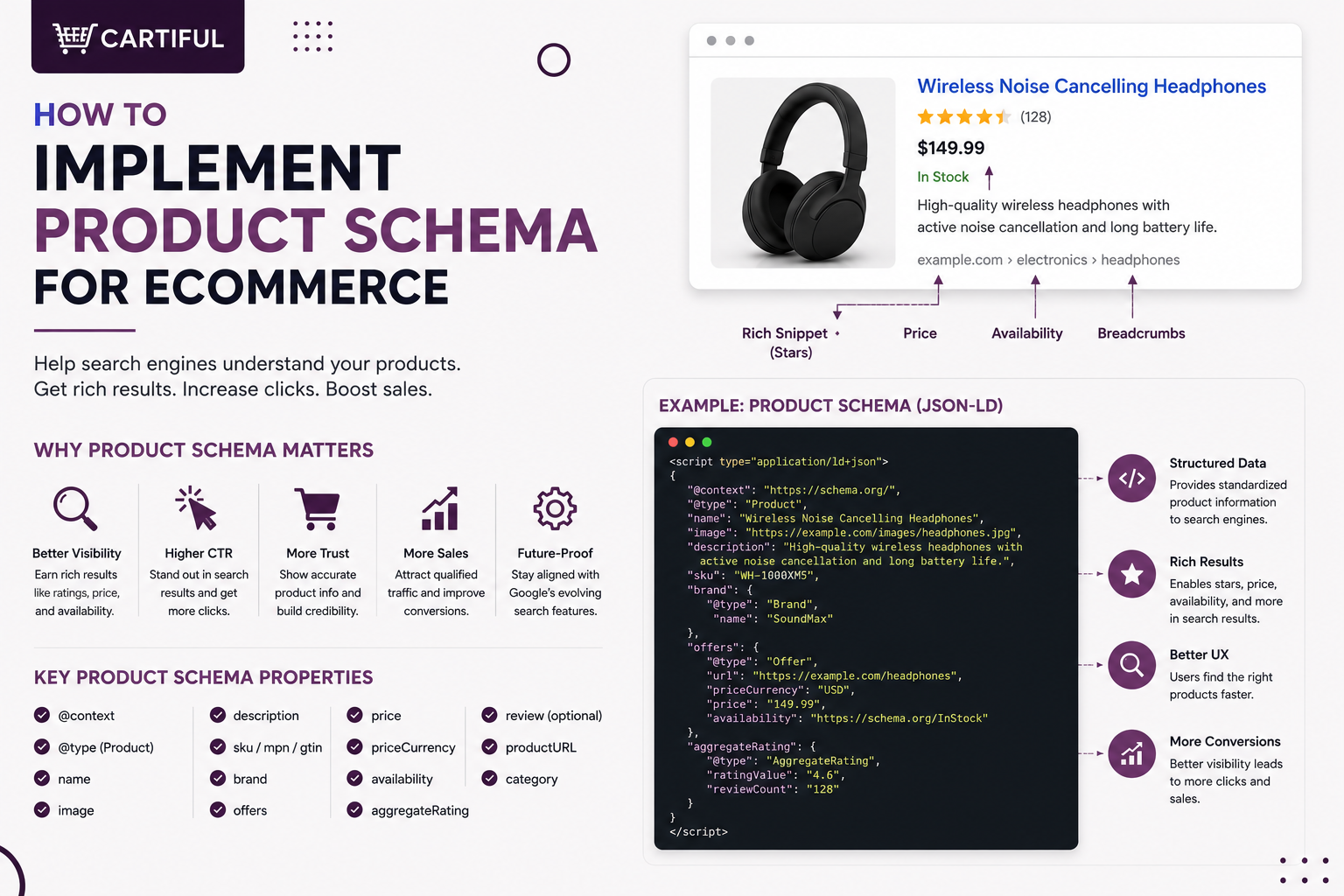
Product schema is not just a code snippet for review stars. It helps Google understand your product name, price, availability, variants, shipping, returns, and ratings before a shopper clicks.
For ecommerce stores, the challenge is keeping the schema aligned with the live product page, selected variant, and Merchant Center data. Conflicting product data can lead to disapprovals, limited visibility, or display issues.
This is revenue-related, not just technical. Google’s structured data introduction page includes case studies where Rotten Tomatoes measured a 25% higher click-through rate, Food Network reported a 35% increase in visits after enabling search features on 80% of pages, and Nestlé saw an 82% higher click-through rate on rich-result pages than standard results. Milestone’s SERP study also found that rich results drew clicks 58% of the time, compared with 41% for non-rich results.
Quick Answer
To implement product schema on ecommerce pages, start with Product and a nested Offer. Add price, currency, availability, product URL, image, brand, SKU, and identifiers where available.
Use review markup only when reviews are visible on the page.
Use ProductGroup for variants such as size, color, or material. Add shipping and return policy markup where relevant. Then test the page with Rich Results Test and monitor Product snippets, Merchant listings, and Merchant Center data alignment.
Product Schema Implementation Checklist
Before adding schema, confirm these product details:
- Product name
- Product image
- Product description
- Brand
- SKU, GTIN, MPN, ISBN, or another identifier
- Price and currency
- Availability
- Product URL
- Product condition
- Visible reviews and ratings
- Variant structure
- Shipping details
- Return policy
- Merchant Center feed values, if used
The goal is simple: your product page, schema markup, and feed data should describe the same product in the same way.
1. Start With the Right Target: Merchant Listings or Product Snippets
Before adding product schema, decide what the page is meant to do.
If shoppers can buy the product directly from the page, the schema should support Merchant listings. This is the usual setup for ecommerce product detail pages because the page includes purchase-related details such as price, availability, shipping, returns, and product options.
If the page only reviews, compares, or discusses a product without selling it, it is closer to a Product snippet use case.
2. Map the Product Data Before Writing Code
Many schema issues start before the code is written. The product template may pull price from one place, stock from another, reviews from an app, and feed data from Merchant Center. If these systems are not aligned, the schema can quickly become inaccurate.
Before implementation, map the source for each product field:
Product Field | Where to Check |
Name | Product title / H1 |
Image | Main product gallery |
Price | Visible PDP price |
Currency | Store or market version |
Availability | Stock system |
Reviews | On-page review app |
Brand | Product data or collection setup |
SKU / GTIN / MPN | Product database or feed |
Shipping | Store policy or product-specific rule |
Returns | Return policy page or product-specific rule |
Feed values | Merchant Center |
Merchant Center says structured data helps its systems understand product data on a site, but the crawler must be able to match that markup with the actual product data.
At Cartiful, this is usually where we start. Not with a schema plugin. With a source-of-truth check.
3. Add Product and Offer Markup First
For most ecommerce product pages, the core setup is Product plus a nested Offer. Product tells search engines what the item is. Offer tells them how it can be purchased.
A clean starting point looks like this:
{
“@context”: “https://schema.org”,
“@type”: “Product”,
“name”: “Women’s Waterproof Hiking Jacket”,
“image”: [
“https://www.example.com/images/jacket-front.jpg”
],
“description”: “Lightweight waterproof hiking jacket with taped seams and an adjustable hood.”,
“sku”: “JKT-2048-BLK-S”,
“brand”: {
“@type”: “Brand”,
“name”: “North Ridge”
},
“offers”: {
“@type”: “Offer”,
“url”: “https://www.example.com/womens-waterproof-hiking-jacket”,
“priceCurrency”: “USD”,
“price”: “129.00”,
“availability”: “https://schema.org/InStock”,
“itemCondition”: “https://schema.org/NewCondition”
}
}
This is stronger than adding a bare Product object because it includes the commerce details Google needs to understand the buyable offer. Google’s Merchant listing documentation focuses on Product structured data for merchant listing eligibility.
4. Keep Price, Currency, and Availability Accurate
Price and stock data change often. That makes them two of the easiest fields to get wrong.
Check these items before launch:
- The visible product price matches offers.price
- The visible currency matches priceCurrency
- Sale pricing is reflected correctly
- Out-of-stock products do not show InStock
- Preorder products use the right availability value
- Variant-specific prices update correctly
- Each market or currency version has the right URL and product data
Cartiful’s guide on multi-currency ecommerce SEO also stresses that visible price, schema price, and Merchant Center price should stay aligned for each market version.
5. Use JSON-LD Where Possible
Google supports structured data formats such as JSON-LD, Microdata, and RDFa, but Merchant Center Help recommends JSON-LD for product markup because it is easier to maintain separately from visible page code.
For ecommerce stores, JSON-LD is usually the safest choice because it is easier to update through a product template, Shopify theme, WooCommerce plugin, or custom product-data layer.
Use JSON-LD for:
- Product markup
- Offer markup
- Aggregate ratings
- Product variants
- Shipping details
- Return policy details
- Organization-level policy markup
6. Add Review and Rating Markup Only When Reviews Are Visible
Review schema should match what shoppers can actually see on the page. Do not mark up hidden reviews, imported ratings that are not visible, or ratings copied from another website.
A basic aggregate rating object looks like this:
{
“@type”: “AggregateRating”,
“ratingValue”: “4.6”,
“reviewCount”: “128”
}
Use it only when the product page clearly shows the same rating and review count. If your review app updates dynamically, make sure the schema updates with it.
Common review schema mistakes include:
- Marking up reviews that are hidden behind tabs Google may not process clearly
- Showing one review count on the page and another in schema
- Adding ratings to products with no visible reviews
- Using category-level ratings on individual product pages
- Copying ratings from marketplaces or third-party sources without showing them properly on the PDP
7. Handle Product Variants With ProductGroup
Variants are one of the most common schema problems in ecommerce. A store may sell one shoe in five colors and ten sizes, or one sofa in several fabrics and dimensions. If each variant is marked up poorly, Google may struggle to understand how the variants relate.
Google says product variant structured data can help it understand which products are variations of the same parent product.
A simplified ProductGroup example:
{
“@context”: “https://schema.org”,
“@type”: “ProductGroup”,
“name”: “Performance Running Shoe”,
“productGroupID”: “RUN-9900”,
“variesBy”: [
“https://schema.org/color”,
“https://schema.org/size”
],
“hasVariant”: [
{
“@type”: “Product”,
“name”: “Performance Running Shoe – Blue – Size 9”,
“sku”: “RUN-9900-BLU-9”,
“color”: “Blue”,
“size”: “9”,
“offers”: {
“@type”: “Offer”,
“priceCurrency”: “USD”,
“price”: “89.00”,
“availability”: “https://schema.org/InStock”
}
}
]
}
This is especially useful for apparel, footwear, furniture, accessories, beauty products, and electronics where size, color, material, storage, or model variations matter.
For Shopify and WooCommerce stores, variant schema should be checked carefully after theme changes, plugin updates, or product import changes.
8. Add Shipping and Return Policy Markup Carefully
Product schema is no longer only about name, image, price, and ratings. Google’s product structured data documentation also points to shipping and return policy information as part of richer merchant experiences.
For returns, MerchantReturnPolicy can specify a return policy link or details such as return conditions, methods, fees, refund options, and return windows.
A practical setup:
- Add standard shipping and return details at the Organization level.
- Add product-level overrides only when a specific item has different rules.
- Keep policy URLs visible and easy for shoppers to find.
- Do not add shipping promises in schema that are not shown or honored on the site.
This matters for stores selling across cities, countries, marketplaces, or product categories with different delivery timelines.
9. Keep Schema, Merchant Center, and the PDP Aligned
Schema does not work alone. For stores running Google Shopping, Performance Max, free listings, or Merchant Center feeds, product data must stay consistent across multiple systems.
Check alignment between:
- Product page title
- Schema product name
- Product feed title
- Visible price
- Schema price
- Merchant Center price
- Product availability
- Feed availability
- Product image URL
- Product landing page
- Product identifier values
Merchant Center’s product data specification calls out issues such as missing or incorrect GTIN values, weak images, incorrect variant attributes, and conflicting feed and website data.
This is where many ecommerce stores need more than a plugin. They need a product-data QA process.
10. Validate the Markup Before Rolling It Out
Do not push schema across hundreds or thousands of product pages without testing first.
A safe rollout process:
- Pick 5 to 10 product pages.
- Include simple products, variable products, sale items, out-of-stock items, and reviewed products.
- Add or update the JSON-LD.
- Test each URL in Rich Results Test.
- Inspect the live URL in Google Search Console.
- Compare schema with the visible page.
- Compare the page with Merchant Center data.
- Fix template-level issues.
- Roll out to the wider product catalog.
- Monitor Search Console and Merchant Center after launch.
Cartiful’s ecommerce technical SEO audit checklist also treats structured data and feed-to-site alignment as part of a proper ecommerce SEO audit, not a one-time code check.
11. Monitor After Template, Feed, or App Changes
Product schema can break after routine store updates. Review apps, pricing apps, currency tools, product import tools, and theme updates can all change what appears on a product page.
Recheck schema after:
- Theme updates
- Shopify app changes
- WooCommerce plugin updates
- Product feed changes
- Review app migrations
- Currency or market setup changes
- New variant logic
- Sale pricing changes
- Stock system changes
- Product template redesigns
A schema setup that was valid last month can be inaccurate after a simple product template change.
Common Product Schema Mistakes
The most common ecommerce schema issues are usually simple but costly:
- Adding Product without Offer
- Missing price or currency
- Showing the wrong stock status
- Marking up reviews that are not visible
- Using the same schema across all variants
- Sending conflicting data to Merchant Center
- Using placeholder images in markup
- Forgetting product identifiers
- Marking every product as new condition by default
- Adding return or shipping data that does not match site policy
- Trusting a schema generator without checking the live page
- Ignoring Search Console reports after launch
A schema block can be technically valid and still be wrong for the page. Accuracy matters more than volume.
Product Schema Audit Checklist for Ecommerce Stores
Use this checklist when reviewing product schema on Shopify, WooCommerce, custom ecommerce stores, and marketplace-style catalogs.
Product Data
- Product name matches the visible H1.
- Product image is a real product image.
- Product description matches the page.
- Brand is correct.
- SKU is present where available.
- GTIN, MPN, or ISBN is added where relevant.
- Product URL matches the canonical page.
Offer Data
- Price matches the visible page.
- Currency matches the market version.
- Availability matches stock status.
- Sale price logic is correct.
- Item condition is accurate.
- The offer URL points to the correct product page.
Reviews
- Ratings are visible on the page.
- Review count matches the visible review UI.
- Reviews belong to that specific product.
- Third-party reviews are not marked up as on-page reviews unless properly displayed and valid.
Variants
- ProductGroup is used where needed.
- Variant attributes are clear.
- Size, color, material, or model values match the selected variant.
- Each variant has accurate offer data.
- Variant URLs, canonicals, and schema do not conflict.
Shipping and Returns
- Business-wide policies are marked at the right level.
- Product-specific overrides are used only when needed.
- Shipping costs and timelines match visible page content.
- Return policy links are accessible to shoppers.
QA
- Test URLs in Rich Results Test.
- Inspect live pages in Search Console.
- Compare schema with the visible product page.
- Compare schema with Merchant Center feed values.
- Recheck after product template or app changes.
Frequently Asked Questions
1. What schema type should an ecommerce product page use?
A buyable ecommerce product page should usually use Product with a nested Offer. Product describes the item, while Offer describes the price, currency, availability, condition, and purchase URL.
2. Is Product schema enough without Offer?
Usually no. A buyable product page needs offer data because shoppers and search systems need commercial details such as price, currency, and stock status.
3. Should product schema be added in JSON-LD?
Yes, JSON-LD is usually the best format for ecommerce stores. Merchant Center Help recommends JSON-LD because it is easier to maintain separately from visible page code.
4. Can Shopify or WooCommerce plugins handle product schema?
Yes, many Shopify apps and WooCommerce SEO plugins can generate basic product schema. Still, you should manually check the live output because apps can miss variant data, reviews, sale pricing, or Merchant Center alignment.
5. Can I add review schema if reviews come from an app?
Yes, but only if the ratings and reviews are visible on the product page and match the exact product. Do not mark up hidden, copied, or unrelated review data.
6. How should product variants be marked up?
Use ProductGroup when products vary by attributes such as size, color, material, or model. This helps connect variants to the same parent product instead of treating them as unrelated items.
7. Should shipping and returns be added to every product page?
Not always. Standard store-wide policies can be handled at the Organization level, while product-specific shipping or return rules can be added at the Offer level when needed.
8. Does product schema improve rankings directly?
Product schema does not guarantee higher rankings. Its main value is helping search systems understand product data and making pages eligible for richer product displays when the markup is valid and the page qualifies.
9. Does product schema need to match Merchant Center?
Yes. The product page, schema, and Merchant Center feed should stay closely aligned. Conflicting data can lead to product display issues, limited eligibility, or disapprovals.
10. How often should product schema be checked?
Check schema after theme updates, app changes, feed edits, price logic changes, variant changes, and review app changes. Large ecommerce stores should include schema checks in regular technical audits.
Final Takeaways
Product schema for ecommerce works best when it matches the live product page. Keep Product, Offer, reviews, variants, price, stock, shipping, returns, and Merchant Center data accurate and aligned. The goal is not more markup. The goal is clean product data that helps search engines understand your catalog and supports better product visibility.
Cartiful helps ecommerce store owners improve product pages with better content, design, CRO, paid ads, and search visibility.