Skip to content
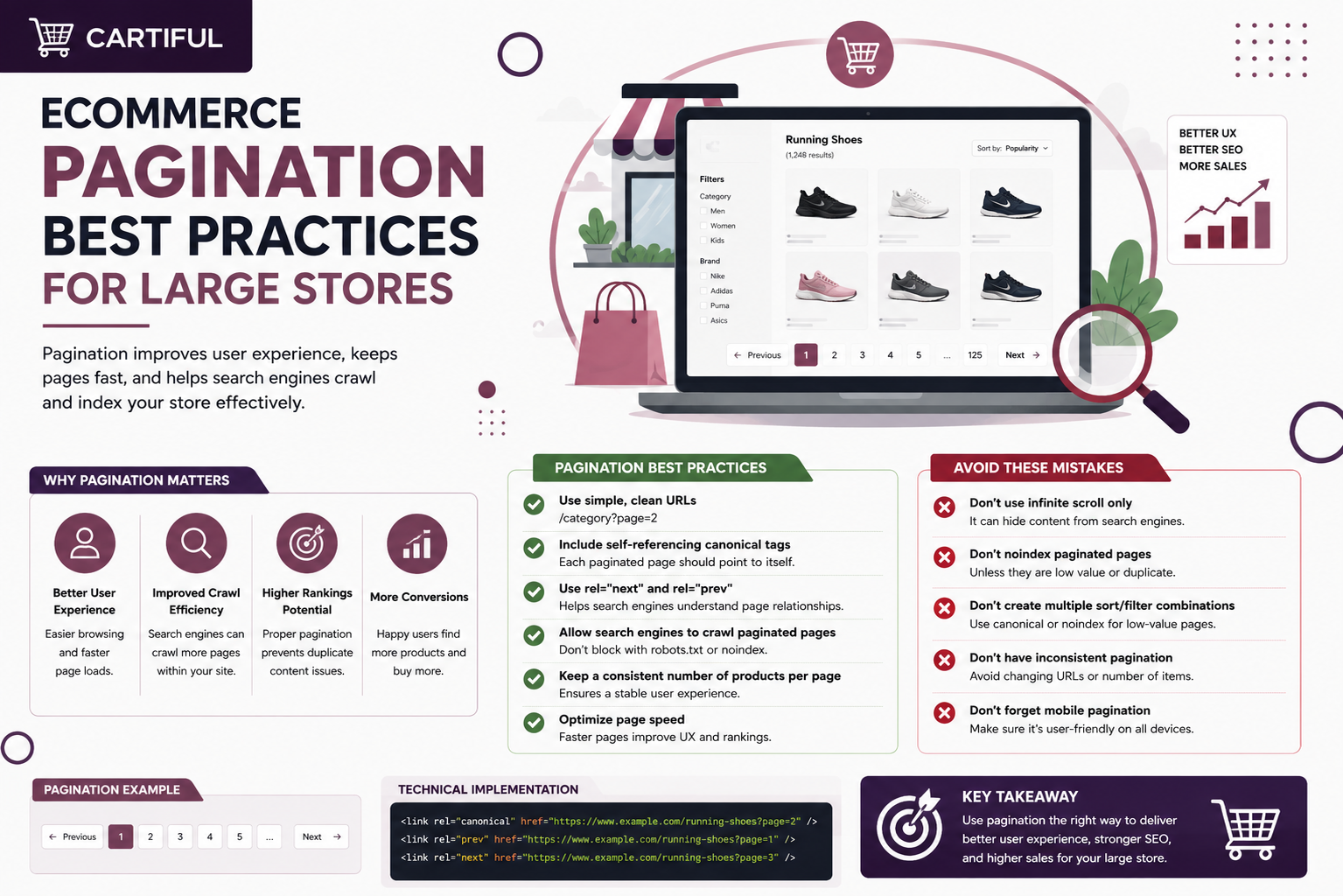
Pagination on large ecommerce sites is not just a duplicate-content issue. It is a product visibility and crawlability issue.
When a category has hundreds or thousands of products, search engines need a clear path to deeper listing pages and the products linked from them. Google’s ecommerce guidance says pagination, load more, and infinite scroll can all work, but Google usually finds pages through URLs in <a href> links and does not click buttons or trigger JavaScript actions that require user interaction.
That is why pagination matters on large catalogs. A store can have strong category demand but still hide much of its inventory behind weak crawl paths, JavaScript-only loading, or incorrect canonical tags. The problem worsens when pagination is combined with filters and sorting, creating thousands of low-value URL variations.
The Safest Pagination Setup for Ecommerce SEO
For most large ecommerce stores, the safest pagination setup looks like this:
- give every paginated page its own crawlable URL
- link paginated pages with real <a href> links
- use self-referencing canonicals on each page in the sequence
- do not canonicalize all pages to page 1
- do not use fragment identifiers like #page=2
- keep sort and filter variations out of the index unless they deserve separate search visibility
- use sitemaps or Merchant Center feeds as support, not as a replacement for crawlable category links
- treat load more and infinite scroll as UX layers, not as the only path to deeper products
Why Pagination Matters for Large Ecommerce Stores
Large stores often split category pages into smaller result sets so pages load faster, users are not overwhelmed, and servers do not have to return every product at once. Incremental loading can improve user experience, reduce network traffic, reduce backend load, and avoid errors caused by very long lists.
For ecommerce, pagination has two jobs:
- It helps shoppers browse categories.
- It helps search engines reach deeper products.
The second job is where many stores fail.
A category page is not just a shopping page. It is also an internal linking hub. If the first page links to only 24 products and the rest are locked behind weak pagination, Google may have a harder time finding and evaluating the deeper products.
Linking category pages is important because it helps search engines move from broad collections to deeper products, subcategories, and related pages without depending only on long pagination chains.
Pagination vs Load More vs Infinite Scroll
Most ecommerce stores use one of three patterns:
- Pagination
- Load more
- Infinite scroll
Each one can work, but they have different SEO and UX trade-offs.
1. Pagination
Pagination uses page numbers, next links, and previous links to split a product list across separate URLs.
Pagination is usually the safest option for large ecommerce stores because each page can have its own URL, links, and crawl path. It also gives users a better sense of where they are in the category.
The downside is that users may need to click through multiple pages, which can feel slower than scroll-based browsing.
2. Load More
Load more lets users click a button to show more products on the same page.
This can work well for users, especially on mobile, but it becomes risky when the button is the only way to reveal products. Google says its crawlers generally do not click buttons or trigger user-action JavaScript to update page content.
If a store uses load more, there should still be crawlable paginated URLs behind it.
3. Infinite Scroll
Infinite scroll loads more products as the user scrolls.
It can work for browsing-heavy categories such as fashion, accessories, or lifestyle products. But for large stores, it can also create problems. Infinite scroll can’t handle very large result sets well and causes scrolling fatigue.
Infinite scroll should not be the only path to deeper products. The safer setup is a hybrid model, where users get infinite scroll, while search engines still get crawlable paginated URLs.
How Google Handles Pagination
Google treats each page in a paginated sequence as a separate URL. That means every page should have its own crawlable URL and a self-referencing canonical tag. Do not canonicalize page 2, page 3, or later pages back to page 1. Google also no longer uses rel=”next” and rel=”prev” for pagination, although other search engines may still read them.
Avoid fragment-based pagination, such as #page=2, because Google may ignore the part after #. Paginated pages also do not need fully unique titles and meta descriptions. The technical setup matters more: clear URLs, crawlable links, and correct canonicals.
The Canonical Rule Large Stores Often Get Wrong
Google’s pagination guidance for ecommerce sites is clear: do not canonicalize every paginated URL to page 1. Each page in the sequence should have its own canonical URL.
That means:
- /mens-running-shoes?page=2 should canonicalize to /mens-running-shoes?page=2
- /mens-running-shoes?page=3 should canonicalize to /mens-running-shoes?page=3
This matters because page 2, page 3, and later pages usually link to products that do not appear on page 1. If every paginated URL points canonically to page 1, deeper product links may receive weaker discovery signals. For large catalogs, that can make important products harder for search engines to reach and evaluate.
For stores with many products, pagination should also work with a clear internal linking structure.
Sequential Links Make Pagination Crawlable
Google recommends linking each paginated page to the next page using crawlable links. Its SEO link best practices also explain that Google can crawl links more reliably when they use proper <a href> attributes.
A clean pagination setup can look like this:
<nav class=”pagination”>
<a href=”/mens-running-shoes?page=1″>1</a>
<a href=”/mens-running-shoes?page=2″>2</a>
<a href=”/mens-running-shoes?page=3″>3</a>
<a href=”/mens-running-shoes?page=2″>Next</a>
</nav>
Deep Pagination Is Not Always Bad, But It Can Weaken Product Discovery
Deep pagination is not automatically an SEO problem. GSQI’s pagination indexing case study found a site where 67% of indexed URLs were paginated pages, yet performance remained stable. The takeaway is simple: indexed pagination is not always a crisis. It depends on whether those pages help users and search engines reach useful content.
The bigger issue is relying on very long pagination chains as the main path to products. Ahrefs’ ecommerce category page SEO guide recommends using stronger category structures instead of forcing users and crawlers through endless product listing pages.
For large stores, pagination should work with a stronger ecommerce site architecture and internal linking strategy so important products are not buried too deep in the catalog.
Keep Filters, Sorting, and Pagination Under Control
Filters and sort options are useful for shoppers, but they can create SEO problems when every variation becomes a crawlable or indexable URL. Keep alternate sort orders and filtered versions out of the index when they are only different views of the same product list.
For example, these URLs usually should not be indexed unless they target real search demand:
- /mens-running-shoes?page=3&order=price
- /mens-running-shoes?color=black&page=4
- /mens-running-shoes?size=10&brand=nike&page=7
The main category pagination should usually remain crawlable, but low-value filter-and-sort combinations need to be controlled. Google explains that faceted URLs can create large numbers of near-duplicate URLs, causing overcrawling and slower discovery of useful pages.
What Large Stores Should Do Beyond “Set Up Pagination Correctly”
Correct pagination is the baseline, not the whole answer. In large catalogs, deeper products often need stronger supporting paths than page 11 of a category can provide. Ahrefs’ category-page guidance supports building more specific subcategories and directing internal visibility toward important products, rather than assuming a single huge category with endless pagination is enough.
In practice, that usually means:
- build more specific subcategories where search demand exists
- surface best sellers or core products higher in the category
- link to important products from brand pages, guides, and collection hubs
- use pagination for browsing, but not as the only discovery path
- consider “view all” pages only when performance is strong enough to support them.
Examples Of Good and Bad Setups
Good setup: standard paginated category
/laptops?page=1
/laptops?page=2
/laptops?page=3
Each page has its own URL, its own self-canonical, and real anchor links to the next page. That matches Google’s current best practices.
Good setup: hybrid load more
Users click “load more,” but the system still exposes crawlable page URLs like /dresses?page=2 and /dresses?page=3 behind the scenes. This keeps the smoother UI without hiding the inventory from Google.
Bad setup: canonicalize all pages to page 1
/sofas?page=2 and /sofas?page=3 both canonicalize to /sofas?page=1. Google explicitly says not to do this.
Bad setup: fragment-based pagination
/shoes#page=2
Avoid using fragments such as #page=2 for paginated category pages. Search engines may ignore the part after the #, meaning deeper product listing pages may not be treated as separate, crawlable URLs.
Bad setup: sort-based index sprawl
/jackets?page=2&order=price-asc
/jackets?page=2&order=top-rated
These URLs are usually just alternate views of the same product list. Unless a sorted or filtered page has real search value, it should usually stay out of the index.
For example, a page for “black leather jackets” may deserve its own indexable URL if shoppers search for it. But URLs created only by sorting products by price, rating, or newest arrivals usually do not need separate search visibility.
A Practical Decision Checklist
Use this when reviewing category templates on large stores.
Keep pagination as the main crawl path when:
- the category has too many products for one page
- deeper products still need to be discovered
- the store wants a predictable crawl path through the category
- the listing can expose real page URLs with anchor links.
Use load more or infinite scroll only when:
- there is a crawlable paginated fallback underneath
- deeper results are still reachable through URLs
- the JavaScript layer is not the only way content appears.
Self-canonicalize each paginated page when:
- the page is part of a normal listing sequence
- the page has its own URL
- the page links onward in the sequence.
Keep sort and filter variations out of the index when:
- they are just alternate views of the same result set
- they create unnecessary URL growth
- they do not serve a distinct search purpose.
Build stronger supporting paths when:
- important products sit too deep in the category
- category chains are extremely long
- product discovery depends too heavily on late pages in the sequence.
Frequently Asked Questions
1. Is pagination still good for SEO on large ecommerce stores?
Yes. Pagination is still useful for large ecommerce stores when it creates crawlable URLs and clear links to deeper product listing pages. It helps search engines find products beyond the first category page and gives shoppers a structured way to browse large catalogs.
2. Does Google still use rel=”next” and rel=”prev”?
No. Google no longer uses rel=”next” and rel=”prev” for pagination. These tags are not harmful, and other search engines may still read them, but they should not be treated as the main pagination fix. Crawlable URLs, real links, and correct canonicals matter more.
3. Should paginated pages canonicalize to page 1?
No. Paginated pages should not all canonicalize to page 1. Each page in the sequence should usually have a self-referencing canonical. For example, page 2 should canonicalize to page 2, and page 3 should canonicalize to page 3.
4. Is infinite scroll bad for large product listing pages?
Infinite scroll is not automatically bad, but it can cause SEO problems if it is the only way to reach deeper products. Large stores should use crawlable paginated URLs behind infinite scroll so search engines can still access products that appear later in the list.
5. Do pages 2, page 3, and page 4 need unique titles?
Usually no. Paginated pages do not need fully unique titles and meta descriptions like standalone landing pages. The priority is making sure each page has a crawlable URL, a self-referencing canonical, and links to the next pages in the sequence.
6. Should sorted paginated URLs be indexed?
Usually no. Sorted URLs such as price-low-to-high, newest, or top-rated are often alternate views of the same product list. They should usually stay out of the index unless the page serves a clear search purpose and has value beyond sorting.
7. Can sitemaps replace crawlable pagination links?
No. XML sitemaps can help search engines find URLs, but they should not replace crawlable pagination links. Large stores still need proper category links, product links, and paginated URLs so search engines can move through the catalog naturally.
8. Are deep paginated pages always bad for SEO?
No. Deep paginated pages are not always bad. The real issue is whether they help users and search engines reach useful products. If important items are buried too deep, the store may need better subcategories, featured product sections, and internal links.
9. What is the best pagination setup for headless ecommerce stores?
The best setup for headless ecommerce stores is unique URLs for each paginated page, real HTML links, self-referencing canonicals, and a crawlable fallback when the visible interface uses load more or infinite scroll. JavaScript should not be the only path to deeper products.
Final Takeaway
Pagination on large ecommerce stores should keep deeper products easy to reach without letting filters, sorting, and URL variations create crawl clutter. The safest setup is simple: use real links, give each paginated page its own URL, use self-referencing canonicals, and avoid indexing low-value filter or sort pages.
But pagination should not be the only way search engines find products. Strong category structure, useful subcategories, and internal links to key products help large stores make more of their catalog visible.